Apple's New Alarm Design in iOS 26 Might Make You Oversleep - MacRumorsOpen MenuShow RoundupsShow Forums menuVisit ForumsOpen Sidebar
Skip to Content

Apple's New Alarm Design in iOS 26 Might Make You Oversleep

In the iOS 26 beta, Apple has redesigned the alarm screen in the Clock app, giving it a cleaner look with a larger time display and significantly bigger buttons. When the alarm goes off, you'll now see two large, equal-sized buttons for Stop and Snooze placed side by side at the bottom of the screen.
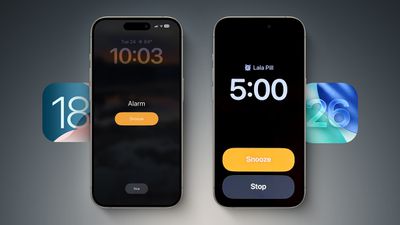
iOS 18 vs 26 Alarms

Alarm screen in iOS 18 (left) versus iOS 26 beta 2

While the redesign fits with Apple's broader visual refresh in iOS 26, it also seems to address a problem the company had already solved: reducing the chances of you hitting Stop instead of Snooze when you're half-awake and fumbling for your phone. Ironically, internal testing once showed that making both buttons the same size actually made that mistake more likely.

According to Jack Fields, a former Apple engineer and head writer at Kernel Extension, the new layout contradicts internal research he was involved in during his time at the company. That testing included a version of the Clock app that logged user interactions to a heat map, tracking exactly where people tapped the screen upon waking.

"It was recording where our sleepy hands were smacking around on the screen in order to see how accurate we were in turning off the alarms," says Fields. What they found was perhaps counterintuitive: when Stop and Snooze were made the same size and placed close together, users were 30% more likely to hit Stop by accident. In other words, it actually increased the chances of oversleeping.

That's why recent versions of iOS feature a prominent, centered Snooze button and a much smaller Stop button tucked further down the screen. "By making the Stop button such a small hit target, it ensures you're awake enough to actually stop it," Fields explains.

"This new design is... interesting," he adds. "It goes against any studies I was a part of, so I'm curious what data they have to support the change. It's terrifyingly large now."

It's worth remembering this is beta software, and Apple could tweak the layout before the final release. But for now, the update makes you wonder whether a more symmetrical, simplified UI is always better, or (at least in this case) is it more likely to make you tap the wrong thing, just faster?

In a related change you may have missed, Apple also now allows users to customize snooze length, choosing a length of time between 1 minute and 15 minutes. (Previously, tapping snooze always snoozed an alarm for nine minutes.) Now that's a change we can certainly get behind.


Related Roundups: iOS 26, iPadOS 26
Related Forum: iOS 26

Popular Stories

iOS 26

Apple Seeds Second iOS 26.5 and iPadOS 26.5 Release Candidates to Developers

Friday May 8, 2026 10:16 am PDT by
Apple today seeded new release candidate versions of upcoming iOS 26.5 and iPadOS 26.5 updates to developers for testing purposes, with the software coming five days after the first RC. It's not clear what's changed in the second RC, but Apple typically sends out another candidate if there are bugs that need to be addressed. Registered developers can download the betas from the Settings app ...
iOS 26

Apple Releases iOS 26.5 and iPadOS 26.5 With End-to-End Encrypted RCS, New Wallpaper, and Maps Updates

Monday May 11, 2026 10:06 am PDT by
Apple today released iOS 26.5 and iPadOS 26.5, the newest updates to the iOS 26 and iPadOS 26 operating systems. The software comes nearly two months after Apple released iOS 26.4 and iPadOS 26.4. The new software can be downloaded on eligible iPhones and iPads over-the-air by going to Settings > General > Software Update. Apple has also released iOS 15.8.8, iOS 16.7.16, iOS 18.7.9, and...
ios 26 5 rcs 1

iPhone-Android RCS Conversations Are End-to-End Encrypted in iOS 26.5

Monday May 11, 2026 10:25 am PDT by
End-to-end encryption (E2EE) for RCS messages between iPhone and Android devices is officially available, Apple confirmed today. Support is included in iOS 26.5, which is now available to everyone. End-to-end encrypted RCS messaging is available in a beta capacity, even though it is in the launch version of iOS 26.5. The feature is available with supported carriers and will roll out over...

Top Rated Comments

tweaknmod Avatar
13 months ago
Make “stop” a slide/switch, not a button.

Even with the old layout, I’ve hit “stop” accidentally. Requiring more deliberate input would likely solve the issue for most – with either layout.
Score: 62 Votes (Like | Disagree)
13 months ago
Apple seems to have forgotten a lot of things they went to great pains to learn in the past.
Score: 30 Votes (Like | Disagree)
13 months ago
Best option yet, just disable snooze in the alarm setting and get your sorry asses out of bed the first time.
Score: 22 Votes (Like | Disagree)
mrr Avatar
13 months ago
I never need to use the snooze button and I’m always searching for the stop button, so I like this new improvement.
Score: 16 Votes (Like | Disagree)
berrymetal Avatar
13 months ago
It already happened with me, I stopped the alarm by mistake while I was half asleep and then I overslept. Thanks Apple
Score: 13 Votes (Like | Disagree)
13 months ago
Teaches you really quick to just get out of bed.

You can thank Tim later.
Score: 12 Votes (Like | Disagree)