Enable AirPods Beta Firmware Update and Get These 4 New Features - MacRumorsOpen MenuShow RoundupsShow Forums menuVisit ForumsOpen Sidebar
Skip to Content

Enable AirPods Beta Firmware Update and Get These 4 New Features

Like previous iPhone software updates, iOS 26 adds several new features to Apple's AirPods. While iOS 26 will be officially released sometime in September 2025, there's nothing stopping you from installing the latest ‌iOS 26 beta –‌ and getting access to the new AirPods features today.

AirPods Pro 2 New Firmware Feature Cool

New AirPods Features

Apple's upcoming iOS 26, iPadOS 26, and macOS Tahoe updates add the following new features to AirPods, thanks to an AirPods firmware update (more on that below). Controls for the new features are also listed.

  • Pause Audio for Sleep: If you're listening to music, a podcast, or a book while you're in bed and you're wearing AirPods, the AirPods will pause your audio when you fall asleep. (Settings ➝ [Your Name]'s AirPods ➝ Pause Media When Falling Asleep.)
  • Camera Remote: AirPods can be used as a camera remote with the Camera app on ‌iPhone‌ or ‌iPad‌. Just press and hold on the AirPods stem to take a photo or start a video recording. (Settings ➝ [Your Name]'s AirPods ➝ Camera Remote.)
  • Keep Audio in Headphones: When you use AirPods, you can opt to keep audio in your headphones when other playback devices like cars and speakers connect to the ‌iPhone‌. (Settings ➝ General ➝ AirPlay & Continuity ➝ Keep Audio with Headphones.)
  • Improved Call Quality: The H2 chip in the ‌AirPods 4‌ and ‌AirPods Pro‌ 2 brings more natural vocal texture and clarity to voice recordings, ‌iPhone‌ calls, FaceTime calls, and all CallKit-enabled apps like Zoom. (No change in Settings necessary.)

How to Get the New AirPods Features

Step 1: Install iOS 26 / macOS Tahoe Beta

In order to gain access to the new AirPods features in beta, you'll first need an iPhone/iPad running iOS 26/iPadOS 26 beta or a Mac running macOS Tahoe beta. Apple has released beta versions for developers and the public. Follow the links to learn how to get the betas, then meet us back here.

Step 2: Install AirPods Beta Firmware

Once you have your device running the iOS 26/iPadOS 26/macOS Tahoe beta, you need to give Apple permission to install beta firmware on your AirPods.

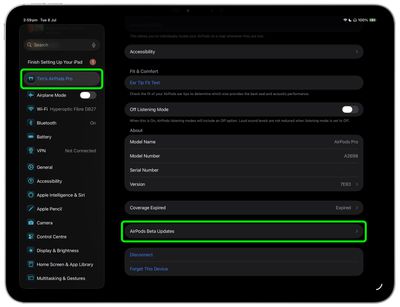
  1. Connect your AirPods to your iPhone, iPad, or Mac, then open Settings ➝ [Your Name]'s AirPods.
  2. Scroll to the bottom of the menu and select AirPods Beta Updates.
    settings

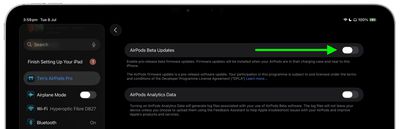
  3. Toggle the switch next to AirPods Beta Updates to the green ON position.
    settings

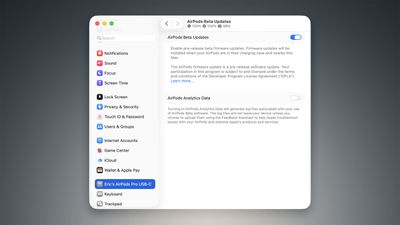
After you've completed these steps, the firmware update will be installed automatically when your AirPods are in their charging case and near to your iPhone/iPad/Mac. This could take anywhere from a few seconds to several minutes, so be patient.
AirPods Beta Updates Feature
Once the firmware update is complete, additional options to control the new AirPods features will appear within the Settings app, in the menu screens described above. Bear in mind that the new features are in beta and as a result cannot be guaranteed to work consistently.

Related Roundups: AirPods 4, AirPods Pro 3
Related Forum: AirPods

Popular Stories

airpods eq

Apple to Bring Custom EQ to AirPods

Monday June 8, 2026 10:29 am PDT by
Apple today announced that AirPods will gain a custom EQ (equalizer) feature, allowing users to further personalize how their AirPods sound. The new capability is part of Apple's next-generation software platform updates, which the company unveiled today. Custom EQ lets listeners adjust audio output to match their personal preferences, going beyond the fixed audio profiles AirPods have...
airpods pro 3 orange

iOS 27 Introduces Overhauled AirPods Settings Menu

Tuesday June 9, 2026 5:45 am PDT by
When AirPods owners connect to their iPhone running iOS 27, they'll see a completely revamped settings menu for their earbuds that does a better job at organizing all of the feature options that Apple has added over the last few years. In the first iOS 27 developer beta, released on Monday, the new settings menu can be accessed in the same way as the old one – i.e. by appearing only when...
AirPods Pro Beta Firmware 2

Apple Releases New AirPods Beta Firmware With iOS 27 Features

Tuesday June 9, 2026 11:31 am PDT by
Apple today released new beta firmware for the AirPods 4, AirPods Pro 2, and AirPods Pro 3. The firmware is limited to developers at the current time, and it has a build number of 9A5292e. In iOS 27, iPadOS 27, and macOS Golden Gate, Apple is adding a new AirPods interface and support for custom EQ. AirPods are also compatible with the new Siri AI. With iOS 26, iPadOS 26, and macOS Tahoe, ...

Top Rated Comments

Astuces iOS Avatar
13 months ago
I do not suggest to install this… it’s a beta software and again it’s for DEVS… Yup devs. So it could have bugs and unexpected things…
Score: 6 Votes (Like | Disagree)
axantas Avatar
13 months ago
Just to get these new features on the AirPods early, i definitely do not recommend to update a "productive" iPhone to the new Developer Beta. I am running it on a spare iPhone - it is ok so far, but you never know, what important functions/apps do not run as expected. I am actually reporting a weird behaviour of the AppStore on iPads to Apple. Found a workaround myself, but it is not the way to go.

So: be patient, enjoy the news and wait for Santa to drop trough the chimney.
...in September. ☺️

...or install it, knowing, what you do.
Score: 5 Votes (Like | Disagree)
13 months ago
Y’all couldn’t wait until the Public Beta is available to post this? The idea of encouraging people to download the DEVELOPER Beta is kinda disgusting and borderline malpractice for an Apple news and rumor site with your reach.

As someone who, in years past, would foolishly pay developers to get access to iOS Betas (before the Public Beta Program was a thing) … I knew the risks, but it was also an incredibly stupid thing to do just to get advanced access to new features for the hell of it. Fun. Exciting. But incredibly stupid.

Let developers use the Developer Beta the way it’s intended, and keep people like me off of it.
Score: 4 Votes (Like | Disagree)
midori matcha Avatar
13 months ago
My AirPods already stop playing music when I sleep, that's when it falls out of my ear.
Score: 3 Votes (Like | Disagree)
13 months ago
Dont ever update your airpods, apple tv or apple watch to OS beta versions. If there is an issue, you can never downgrade your os version by yourself. You have to go an apple store.
Score: 3 Votes (Like | Disagree)
Statusnone88 Avatar
13 months ago
Encouraging beta updates for AirPod features. Make it make sense.
Score: 3 Votes (Like | Disagree)