Apple Releases iPadOS 26.1 With Slide Over Multitasking - MacRumorsOpen MenuShow RoundupsShow Forums menuVisit ForumsOpen Sidebar
Skip to Content

Apple Releases iPadOS 26.1 With Slide Over Multitasking

Apple today released iPadOS 26.1, the first major update to the iPadOS 26 operating system released in September. iPadOS 26.1 comes six weeks after ‌iPadOS 26‌.

ipados 26 1 slide over
The new software can be downloaded on eligible iPads over-the-air by going to Settings > General > Software Update.

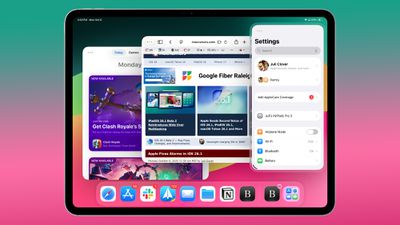
iPadOS 26.1 reintroduces Slide Over, a multitasking feature that was removed with the multitasking overhaul in ‌iPadOS 26‌.

Slide Over works alongside the window-based multitasking functionality in ‌iPadOS 26‌, so you can open up multiple app windows and still swipe over to quickly access a Slide Over app. Only one Slide Over app is supported at a time in iPadOS 26.1, and the feature is accessible by tapping on the green window resizing button and choosing Enter Slide Over.

iPadOS 26.1 also includes almost all of the new features that are in iOS 26.1, such as a toggle to reduce Liquid Glass transparency and Apple Intelligence support for new languages. Apple's release notes for the update are below.

Apple's release notes are below.

Slide Over
- Slide Over lets you keep a window on top of other windows, and easily hide off screen when not in use
- Resizable windows in Slide Over let you choose your preferred size and aspect ratio

Local capture
- Gain control is available for external USB microphones when recording with local capture
- Option to let you choose where local capture files are saved

This update includes the following features and enhancements:
- Liquid Glass setting gives you the option to choose between the default clear look or a new tinted look which increases opacity of the material in apps and notifications on the Lock Screen
- Apple Music MiniPlayer swipe gesture to go to the next or previous track
- Apple Music AutoMix support over AirPlay
- New Camera setting to turn on or off Lock Screen swipe to open Camera
- Improved FaceTime audio quality in low-bandwidth conditions
- Communication Safety and Web content filters to limit adult websites are enabled by default for existing child accounts for ages 13-17 (Age varies by country or region)
- Discover new content, spatial experiences, and quickly access information about your device using Apple Vision Pro app, now available on iPad

For information on the security content of Apple software updates, please visit:
https://support.apple.com/100100

Some features may not be available in all regions or on all iPad models. To learn more, please visit:
https://apple.com/ios/feature-availability/

Software updates, like this one, add new features and improvements that may affect performance and/or battery life. To learn more, please visit:
https://support.apple.com/125039

A list of features in iOS 26.1 can be found in our iOS 26.1 launch post, and more info on ‌iPadOS 26‌ is available in our roundup.

Related Roundups: iOS 26, iPadOS 26
Related Forum: iOS 26

Popular Stories

bug security vulnerability issue fix larry

Apple Fixes Possibly Exploited CoreGraphics Flaw on Older iPhones

Tuesday October 27, 2026 5:16 am PDT by
Among the flurry of iOS 27.2 releases on Monday, Apple also pushed a wave of software updates for its older operating systems, including a fix for a CoreGraphics vulnerability that Apple says may have been exploited in targeted attacks. The releases include iOS 26.7.2, iPadOS 26.7.2, iOS 18.7.11, iPadOS 18.7.11, macOS Tahoe 26.7.2, macOS Sequoia 15.8.2, and tvOS 26.6.1. iOS 18.7.11 and...
iOS 28 AI

Apple Taking New Approach to Developing iOS 28 and macOS 28

Sunday November 8, 2026 7:42 am PST by
Apple has made a change to its development process for iOS 28, macOS 28, and corresponding software updates, according to Bloomberg's Mark Gurman. In his Power On newsletter today, he said Apple separates development of each year's new operating systems into three major stages. Typically, he said each stage consists of four weeks of coding followed by a four-week "convergence" period where...
duo aquarium

More Fun iPhone Duo Apps: 30 New Picks to Try

Friday November 6, 2026 3:27 pm PST by
When the iPhone Duo launched, we shared a list of some of the fun apps developers created for the new form factor. Two weeks out, developers are continuing to come up with fresh ideas, so we thought we'd share some of our favorites. Games Marbles Unhinged ($2.99) - Marbles Unhinged is a marble maze designed for the Duo. When you fold it, the floor turns into a ramp. If you stand the top...


Top Rated Comments

ConsciousBone Avatar
13 months ago
Bring back Split View when? Yes I know you can do it with windowed mode but its a lot more faffing around compared to what Split View used to be
Score: 20 Votes (Like | Disagree)
13 months ago
It’s nothing like the old Split View, as long as you need to enter windowed mode. The iPad had a perfect multitasking system for a tablet, and it has been ruined with iPadOS 26.
Score: 18 Votes (Like | Disagree)
pdaholic Avatar
13 months ago

Chill is a good update just a bit late
I just miss the old split screen with all of my lesser used apps in slideover. It was multitasking heaven for me.
Score: 9 Votes (Like | Disagree)
13 months ago

Bring back Split View when? Yes I know you can do it with windowed mode but its a lot more faffing around compared to what Split View used to be
This is the single reason why I haven’t upgraded to os26. I use Split View daily, it’s super quick AND I can also four finger swipe between apps. In os26 you cannot do both but have to choose either.
Score: 8 Votes (Like | Disagree)
turbineseaplane Avatar
13 months ago

Why is everyone spreading false information constantly. Split View IS NOT GONE. It just requires a few extra taps to get there. Annoying? Yes. But it's still very much possible to have two apps side-by-side. Stop spreading false info!
Accomplishing having two Apps side by side, one way or another with a few more taps ≠ "Split View" the feature.

There's a difference there and the details of implementation and ease of use make up that difference.

It's sort of like PiP as a feature or ..."with just some more work you can resize a browser window and turn off the chrome and get the same effect".
Score: 6 Votes (Like | Disagree)
turbineseaplane Avatar
13 months ago
Can one turn off the pointless "glass" border around the whole thing?

Goodness gracious.
What are we doing here, Apple?

How about adding a border around the border also?
You know .. to help me "focus on my content".
Score: 6 Votes (Like | Disagree)
Latest Stories
Some HomePod Mini 2 Buyers Returning Units Over Mac Speaker Issues
4 minutes ago
MacBook Pro With PROLED XDR Display: Details You Might Have Missed
15 minutes ago
Satechi Offers MacRumors Readers 30% Off Select Accessories in Early Black Friday Sale
37 minutes ago
Leaker Envisions a Shorter iPhone With a New iOS Layout
1 hour ago
Apple to Give You More Control Over When Your Mac Passwords Lock
2 hours ago
Siri Is Getting a Better Memory
2 hours ago
iPhone 18e Could Feature Bigger Display and Battery
3 hours ago
Apple's Siri Boss May Leave - Here's Who Could Take Over
3 hours ago
Apple Launching Two More New Products This Friday
3 hours ago
Apple Store Subscription Sign-Up Controversy Exposed
12 hours ago
Siri AI Rumored to Become 'More Like an Agent' as Early as Next Year
22 hours ago
Apple Taking New Approach to Developing iOS 28 and macOS 28
1 day ago
Early Apple Black Friday Deals on Apple Watch, MacBook Air, and More
2 days ago
'Backglow' Lets You Customize New MacBook Pro's Glowing Apple Logo
2 days ago
Top Stories: Apple Product Launches, iOS 27.3 Beta, and More
2 days ago
More Fun iPhone Duo Apps: 30 New Picks to Try
3 days ago
Hands-On With Apple's New OLED Touchscreen MacBook Pro
3 days ago
Apple Store With All-New Design Opening Soon in Southern California
3 days ago
Control the Glowing Apple Logo on Your New MacBook Pro
3 days ago
Apple Shares New 'Apple Card: Apply and Use in Minutes' Ad
3 days ago
Apple Says More Than 100,000 Apps Optimized for iPhone Duo, Here's What's Still Missing
3 days ago
Early Black Friday Deals Kickoff With Steep Discounts on Apple Watch Ultras and More
3 days ago
The MacRumors Show: iOS 27.3 Looks Like a Huge Update
3 days ago
Best Buy's Black Friday Event Begins With Sitewide Savings on Apple, TVs, More
3 days ago
Apple Releasing Yet Another Two New Products Next Week
3 days ago
MacBook Air Drops to Lowest Price in Months With Amazon's $250 Discount
3 days ago
Apple Rumored to Drop the iPhone's Action Button Next Year
3 days ago
Apple's Extended Return Policy Now in Effect for 2026 Holiday Season
3 days ago
Apple Music Classical Updated With New Icon and Refreshed Design
3 days ago
OLED iPad Mini, M6 iMac, and New MacBook Pros Available From Today
3 days ago