

Five New iOS 27 Features You Might Have Missed - MacRumorsOpen MenuShow RoundupsShow Forums menuVisit ForumsOpen Sidebar
Skip to Content

Five New iOS 27 Features You Might Have Missed

iOS 27 is currently available as a developer beta, with a public beta set to follow in July. The update is expected to be released in September.
iOS 27 Next to iPhone
Below, we have recapped five new iOS 27 features that you might have missed.

Landscape Mode in More Apps
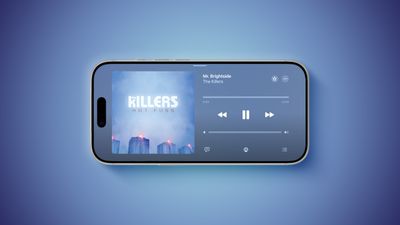
iOS 27 Adds Landscape Mode to Many Apple Apps Ahead of iPhone Ultra Feature
iOS 27 enables landscape mode in more of Apple's built-in iPhone apps, including Apple Music, Podcasts, Fitness, Health, Reminders, Home, Shortcuts, Apple Watch, Find My, Weather, Voice Memos, Apple TV Remote, and others.

In the Apple Music and Podcasts apps, landscape support is limited to the audio player for now.

Many of the apps feature a left-aligned sidebar in landscape mode. In the Messages app, which already supported landscape orientation on iOS 26 and earlier, you can now collapse the sidebar to show only names and profile pictures.

Landscape mode was already available on iOS 26 or earlier in Apple Maps, Calendar, Files, Notes, Mail, and some other Apple apps too, but iOS 27 expands support to many more apps. This change could be laying the groundwork for the "iPhone Ultra," as landscape-friendly apps would be well suited for the rumored foldable device.

iOS 27 also adds landscape support for Live Activities in the Dynamic Island.

To use landscape mode in a supported app, simply turn your iPhone sideways. Portrait Orientation Lock must be turned off in Control Center.

Landscape apps used to be more common on iOS many years ago. In fact, the Home Screen grid supported landscape orientation on the iPhone 6 Plus, iPhone 6s Plus, iPhone 7 Plus, and iPhone 8 Plus, but that functionality ended with the iPhone X.

Dual Capture for FaceTime
iOS 27 and FaceTime Feature
On the iPhone 17, iPhone 17 Pro, iPhone 17 Pro Max, and iPhone Air, a Dual Capture feature allows you to record video of yourself and what is in front of you at the same time. Starting with iOS 27, this feature is now supported in the FaceTime app on these devices, allowing you to show both your front and rear camera views on a video call.

New Drawing Tool in Messages
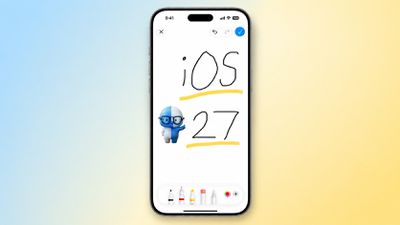
iOS 27 Messages Drawing
In the Messages app on iOS 27, there is a new "Drawing" option in the app drawer, which can be opened by tapping the plus sign in the bottom-left corner.

On older iOS versions, the Messages app once had a very basic drawing tool that was accessible by tapping a button on the keyboard in landscape orientation, but now Apple's complete set of Markup tools are available in the app.

Apple Cash Bill Splitting
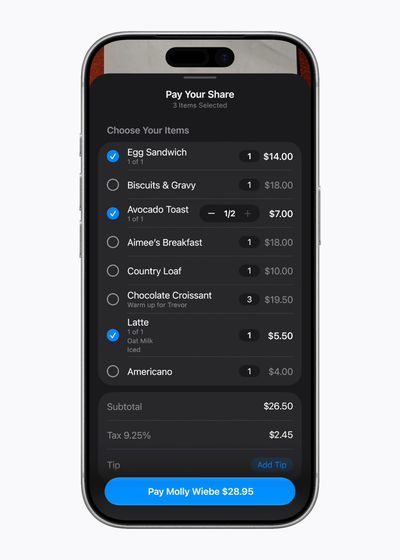
Apple Cash Bill Splitting iOS 27
In the U.S. only, iOS 27 allows you to split bills with a new feature powered by Apple Cash and Apple Intelligence. This capability is available in the Apple Wallet and Messages apps, or by using the new Siri mode in the Camera app.

"When users point their iPhone at a receipt using Siri mode, it can surface the relevant action to split a bill with Apple Cash and identify the items on the receipt," said Apple. "As users select their items, their total payment is calculated, including their share of tax and tip, so they can pay back exactly what they owe with Apple Cash."

Find My Location Sharing Enhancements
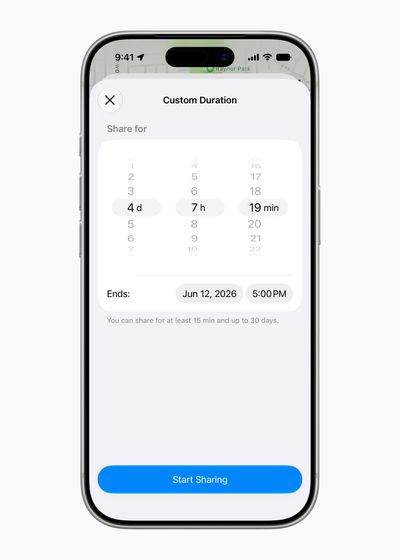
Find My Location Sharing Durations iOS 27
In the Find My app, you will have the ability to share your location with others for a custom duration, such as four days and six hours. Or, you can set a set an exact date and time for your location sharing to expire. In addition, you can now pause your location sharing with specific people until the end of the day, without them knowing.

On iOS 26 and earlier, there are only three preset timeframes available: indefinitely, until end of day, and one hour.


Related Roundups: iOS 27, iPadOS 27

Popular Stories

iOS 27 on iPhone 17 1

New iOS 27 Rumors Include Revamped AirPods Settings Menu and More

Sunday May 24, 2026 1:02 pm PDT by
Apple is set to unveil iOS 27 next month ahead of a September release. The update is expected to include a dedicated Siri app, expanded Apple Intelligence capabilities in apps like Wallet, Safari, and Shortcuts, an upgraded keyboard with improved autocorrect, the ability to use Apple Maps via satellite connection, and more. In his Power On newsletter today, Bloomberg's Mark Gurman revealed...
Low Angle iPhone Purple

Apple to Unveil iOS 27 With All-New Siri App Next Month

Tuesday May 26, 2026 12:42 pm PDT by
Apple reportedly plans to debut an all-new, dedicated Siri app with a so-called "Extensions" feature across iOS 27, iPadOS 27, and macOS 27. With the Siri app, iPhone, iPad, and Mac users will reportedly be able to interact with Apple's assistant in both text and voice modes. The app will also provide users with access to their past conversations with Siri. Overall, the Siri app would...
wwdc 2026

iOS 27 Siri Redesign Will Use Dark Color Scheme, Matching Apple's WWDC Art

Tuesday May 26, 2026 2:30 pm PDT by
Apple is redesigning Siri for iOS 27 to accommodate new artificial intelligence features and chatbot capabilities. Siri is getting a dedicated app, integration with the iPhone's Dynamic Island, and a new design scheme. The graphics that Apple is using to promote WWDC hint at its design plans for Siri, according to Bloomberg's Mark Gurman. In this week's Power On newsletter, Gurman said the...

Top Rated Comments

sully54 Avatar
22 hours ago at 09:51 am
This might be an unpopular opinion but now that we’re getting landscape oriented apps, it would be great if we could get a toggle to shift sidebars and other UI elements to be aligned to the right side for easier single handed use for right handed people.

I now understand how left handed people feel.
Score: 5 Votes (Like | Disagree)
22 hours ago at 09:56 am
While dual capture for FaceTime is a nice addition, would have liked to see dual photo capture in addition to last year's dual capture for video. Location sharing for custom time periods is beneficial.
Score: 2 Votes (Like | Disagree)
jdavid_rp Avatar
7 hours ago at 01:10 am

Speaking of landscape mode, what time was using a android phone and I noticed on video playback they have a button that you press and it switches it to landscape mode whether you rotate the phone or not where as on the iPhone you have to turn off rotation lock and then physically turn the phone. 🤔📱
Also i believe some have smart rotate, so you can leave it enable and will just work while playing videos. In iOS it exists as a jailbreak tweak, so maybe they sherlock it someday…
Score: 1 Votes (Like | Disagree)
18 hours ago at 01:52 pm

While dual capture for FaceTime is a nice addition, would have liked to see dual photo capture in addition to last year's dual capture for video. Location sharing for custom time periods is beneficial.
Add manage location sharing per contact depending on Focus.
Score: 1 Votes (Like | Disagree)













