iOS 27 Tweaks Apple Wallet's U.S. Passport Feature - MacRumorsOpen MenuShow RoundupsShow Forums menuVisit ForumsOpen Sidebar
Skip to Content

iOS 27 Tweaks Apple Wallet's U.S. Passport Feature
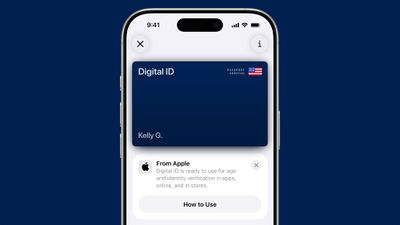
ios 26 digital id passport walletiOS 27 tweaks some of the information and menus shown alongside the Digital ID passport feature in the Apple Wallet app.

As a result of these changes and/or a related bug, some iPhone users have seen their Digital ID deactivated on recent iOS 27 beta versions. Apple says affected users must remove the card and re-add it to the Apple Wallet app in order to use it again.

Popular Stories

iOS 27 Next to iPhone

Here's When iOS 27 Rolls Out Today in Every Time Zone [Update: It's Out]

Sunday September 13, 2026 3:00 am PDT by
Update 10:04 a.m.: iOS 27 is rolling out now, though it may take a bit for all users to see it, so keep checking! Apple is about to release iOS 27, which will finally deliver more advanced Siri AI capabilities as well as a variety of other refinements, improvements, and new features to iPhones. It's Apple's biggest software update of the year, and Apple announced at Wednesday's iPhone event...
iPhone Handoff Feature

iOS 27 Introduces New 'iPhone Handoff' Feature

Wednesday September 2, 2026 12:35 pm PDT by
Apple has added a new "iPhone Handoff" feature to iOS 27 that will allow you to switch between two iPhones while using the same phone number on each device. This functionality was briefly mentioned during the WWDC 2026 keynote in June, on a slide that listed hundreds of new features coming in iOS 27 and corresponding software updates, but Apple never shared any further details at the time. ...
iOS 27 Icon iPhone

iOS 27 Available Now With These 8 New Features

Monday September 14, 2026 9:00 am PDT by
Update — 10 a.m. Pacific Time: Apple has released iOS 27. During its iPhone 18 Pro and iPhone Duo event last week, Apple announced that iOS 27 will be released widely on Monday, September 14. iOS 27 should be available around 10 a.m. Pacific Time / 1 p.m. Eastern Time today via the Settings app, under General → Software Update. Below, we have highlighted eight new features and...

Top Rated Comments

chrono1081 Avatar
3 weeks ago

Tell me how it works or I will never understand
You need FaceID for it to work and you need to be looking at the phone for it to activate.
Score: 7 Votes (Like | Disagree)
Zorn Avatar
3 weeks ago
This happened to me yesterday afternoon and I was looking all over to see whether or not it was just me. Glad to see this to explain it.
Score: 7 Votes (Like | Disagree)
3 weeks ago

Isn't this useless? Kid could just take mom’s iPhone !
Egads, you've found a critical flaw in our passport system! A kid could just take Mom's passport..!
Score: 5 Votes (Like | Disagree)
3 weeks ago

Given what TSA and ICE are doing at the border, I've actually started removing digital IDs from my iPhone and reverted to a numerical unlock instead of Face ID.
You can temporarily disable Face ID by long pressing the side and volume up buttons, or by pressing the side button five times quickly. Either way it brings up the off-switch screen, and Face/Touch ID won't work again until the phone is unlocked by passcode.

I understand the thought behind turning all this stuff off, but I think knowing you can quickly and temporarily disable it if you're in a situation where you need to is good enough. I say that from a place of privilege, of course, but I figured it might be of interest to people who don't know.
Score: 5 Votes (Like | Disagree)
chrono1081 Avatar
3 weeks ago

Isn't this useless? Kid could just take mom’s iPhone !
That's not how it works.
Score: 5 Votes (Like | Disagree)
DocMultimedia Avatar
3 weeks ago
Mine got deactivated last night (I’d updated to beta 7 yesterday). Will try to add it again later today. In any case, you should ALWAYS bring your physical one with you.
Score: 5 Votes (Like | Disagree)