Got a New iPhone 17? How to Use All the New Features - MacRumorsOpen MenuShow RoundupsShow Forums menuVisit ForumsOpen Sidebar
Skip to Content

Got a New iPhone 17? How to Use All the New Features

Apple's iPhone 17, iPhone Air, iPhone 17 Pro, and ‌iPhone 17 Pro‌ Max have been available to buy since September, and a fair few will have been gifted over the holidays. If you're the proud owner of one of Apple's latest models, then keep reading. Whether you're upgrading from an older iPhone or completely new to the devices, this article will help you get the most out your new iPhone.
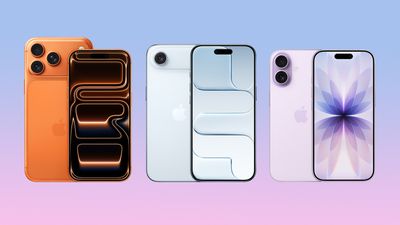
iphone 17 lineup
MacRumors has put together the following series of ‌iPhone 17‌ how-to articles explaining all the new features that can be found on Apple's newest models.

All iPhone 17 Models (Incl. iPhone Air)

iPhone 17 Pro and iPhone 17 Pro Max

iOS 26

Happy holidays!

Top Rated Comments

MakeAppleAwesomeAgain Avatar
14 weeks ago
I upgraded from a 12 to a 17, and it’s a wonderful phone (battery, screen, USB-C, Action Button). Plus, I don’t mind iOS 26. But the Camera Control button is terrible. I really tried, but it’s even annoying when I don’t try to use it and accidentally touch it, and it enables some crappy filter or weird setting. Really Apple-unworthy.
Score: 16 Votes (Like | Disagree)
Moukee Avatar
14 weeks ago

I upgraded from a 12 to a 17, and it’s a wonderful phone (battery, screen, USB-C, Action Button). Plus, I don’t mind iOS 26. But the Camera Control button is terrible. I really tried, but it’s even annoying when I don’t try to use it and accidentally touch it, and it enables some crappy filter or weird setting. Really Apple-unworthy.
Settings > Camera > Camera Control to disable features of the button. You can essentially just dumb it down to a physical button or even completely disable it.
Score: 9 Votes (Like | Disagree)
14 weeks ago

I upgraded from a 12 to a 17, and it’s a wonderful phone (battery, screen, USB-C, Action Button). Plus, I don’t mind iOS 26. But the Camera Control button is terrible. I really tried, but it’s even annoying when I don’t try to use it and accidentally touch it, and it enables some crappy filter or weird setting. Really Apple-unworthy.
You can adjust/disable various Camera Control functionality in the Settings app.
Score: 7 Votes (Like | Disagree)
14 weeks ago

I upgraded from a 12 to a 17, and it’s a wonderful phone (battery, screen, USB-C, Action Button). Plus, I don’t mind iOS 26. But the Camera Control button is terrible. I really tried, but it’s even annoying when I don’t try to use it and accidentally touch it, and it enables some crappy filter or weird setting. Really Apple-unworthy.
What a great upgrade, Merry Christmas!
Score: 6 Votes (Like | Disagree)
FILIPSN007 Avatar
14 weeks ago
What we REALLY need: "How to configure your iPhone to avoid all bugs and resprings"
Score: 5 Votes (Like | Disagree)
WarmWinterHat Avatar
14 weeks ago

I upgraded from a 12 to a 17, and it’s a wonderful phone (battery, screen, USB-C, Action Button). Plus, I don’t mind iOS 26. But the Camera Control button is terrible. I really tried, but it’s even annoying when I don’t try to use it and accidentally touch it, and it enables some crappy filter or weird setting. Really Apple-unworthy.
The camera control isn’t great. I disabled all the swipe and adjust features and now it’s just a shutter button. It works well for that.
Score: 4 Votes (Like | Disagree)