iPhone 17: Disable Center Stage Camera Auto-Zoom - MacRumorsOpen MenuShow RoundupsShow Forums menuVisit ForumsOpen Sidebar
Skip to Content

iPhone 17: Disable Center Stage Camera Auto-Zoom

by

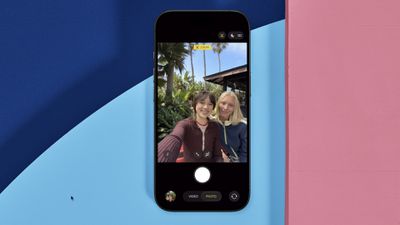
On the iPhone 17 series and iPhone Air, the new 18-megapixel Center Stage front camera features a square sensor that offers more flexibility in framing and composition. Center Stage will also auto-zoom to include everyone in a group selfie, but if you don't like it, you can turn it off.
iphone 17 center stage auto zoom
The Center Stage camera automatically adjusts its view depending on what's happening in front of it. If you're the only person in the shot, it keeps the frame tight for a more personal feel. As others join, the view zooms out to fit everyone in, with no need to adjust it yourself.

This dynamic feature reduces the chance of friends being cropped out in group photos. However, you may find that Center Stage is not zooming adequately for your particular needs, in which case you can disable the auto-zoom feature. The following steps show you how.

iPhone 17: How to Disable Center Stage Auto Zoom

  1. Open the Camera app on your iPhone.
  2. Tap the circular arrows icon bottom-right to switch to the selfie camera.
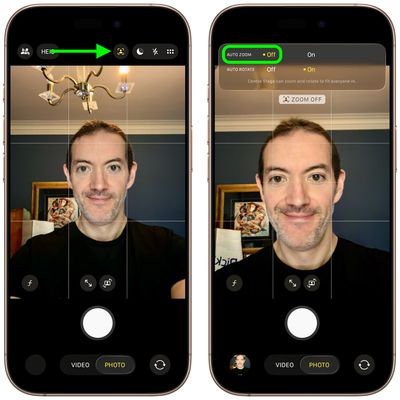
  3. Tap the yellow Center Stage button (the icon with a person's profile within a frame).
  4. Tap Off next to Auto Zoom.
  5. Line up your shot and hit the shutter button to take a photo or start recording video.
iphone 17 disable auto zoom

That's all there is to it. Note that Center Stage also works during FaceTime calls, though it attempts to keep just your own face centered, similar to how it functions on iPads and MacBooks.
Related Roundups: iPhone 17, iPhone 17 Pro, iPhone Air
Related Forum: iPhone

Popular Stories

iPhone 17 Review Thumb 3

Apple Slashes iPhone 17 Prices in China for Annual 618 Festival

Friday May 15, 2026 7:09 am PDT by
Apple has slashed prices on the iPhone 17 Pro series in China by 1,000 yuan (around $138) in anticipation of the annual 618 shopping festival, one of the country's largest mid-year online retail events. The cuts went live on Friday on JD.com and Tmall, with Apple's official store on the latter platform applying a direct 1,000-yuan discount on the iPhone 17 Pro series. On JD.com, taking into ...
video proc giveaway

MacRumors Giveaway: Win an iPhone 17 and a Lifetime Copy of VideoProc Converter AI

Friday May 22, 2026 10:02 am PDT by
For this week's giveaway, we've teamed up with Digiarty VideoProc to offer MacRumors readers a chance to win an iPhone 17 and a copy of the VideoProc Converter AI software to use with it. VideoProc Converter AI is software for editing and managing videos, images, audio, DVDs, and more. It includes a suite of AI features for easy photo and video editing, along with tools for converting,...
iOS 26

Apple Releases iOS 26.5.1 to Fix Charging Issue on iPhone Air and iPhone 17 Models

Monday June 1, 2026 10:23 am PDT by
Apple today released iOS 26.5.1, a minor update to iOS 26. The software is available three weeks after iOS 26.5 came out, and appears to only be available for the iPhone Air and all models in the iPhone 17 lineup. The new software can be downloaded on eligible iPhones over-the-air by going to Settings > General > Software Update. According to Apple's release notes, the update fixes a previ...