iOS 16 Health and Fitness Updates: Medication Tracking, Sleep Stages, iPhone Activity Tracking and More - MacRumorsOpen MenuShow RoundupsShow Forums menuVisit ForumsOpen Sidebar
Skip to Content

iOS 16 Health and Fitness Updates: Medication Tracking, Sleep Stages, iPhone Activity Tracking and More

Apple with iOS 16 has added a new medication management feature to the Health app, which is designed to allow users to keep track of their medications to make sure a dose isn't missed. The feature works alongside a new Medications app on the Apple Watch, and it's useful for everything from prescriptions to vitamins.
iOS 16 Health Guide Feature
This guide covers everything that you need to know about the medication tracking feature along with other new Health app features in iOS 16, which is available now for all eligible devices.

Medication Tracking

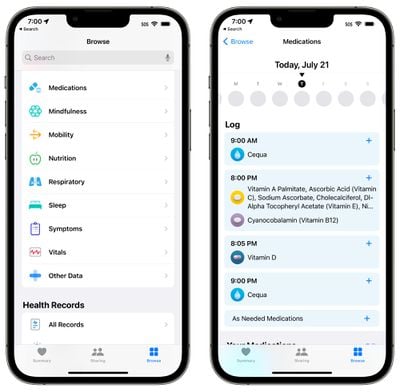
"Medications" is a new section available in the Health app, accessible by going to the Browse section and scrolling down to Medications, or typing it into the Health app search bar.
ios 16 medications section health
In the Medications app, you can enter in all of the prescription medications, over-the-counter medications, and vitamins that you take so you can get reminders to take medicine, check for interactions, and more.
ios 16 medication add
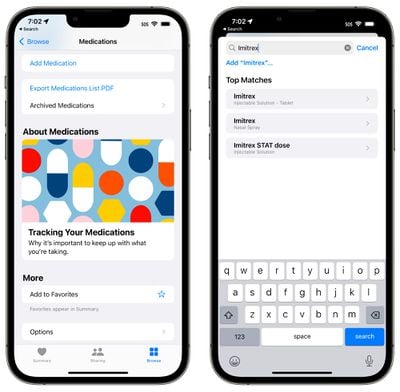
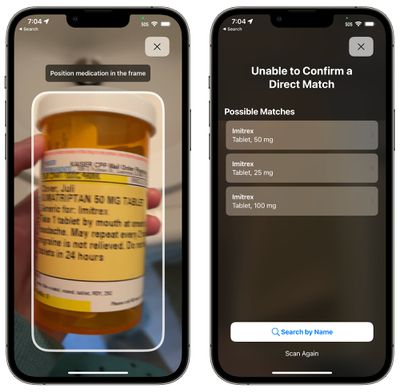
Adding a medication is as simple as tapping on the Add Medication button in the Health app. From there, you can type in the name of a medicine or vitamin, or use your iPhone's camera to scan the label of your pill bottle. Adding via scan is simple, but it doesn't always pick up all the information, so you may need to manually select dose and form (pill, spray, etc).
ios 16 medication label scan
From there, you can choose the frequency of when you take the medication. You can choose a specific day or interval of days, specific days of the week, or opt for as needed, and then you can set the time that you want to take the medication.
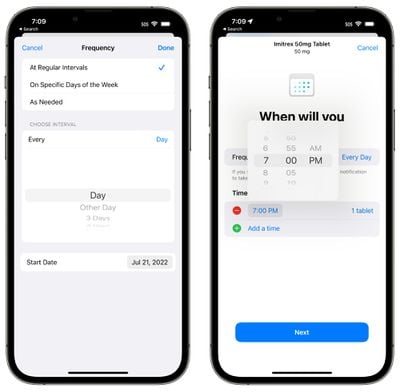
ios 16 health schedule medicine
Medications can be customized with a shape and a color to match the pill that you take in real life for quick and easy recognition.
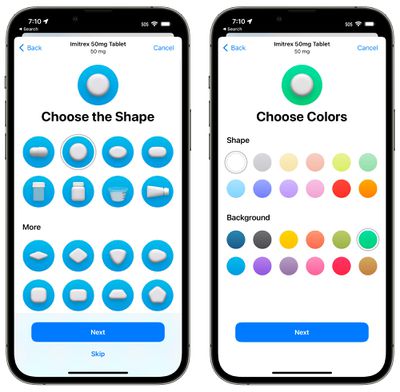
ios 16 health app customize medication
You can add all of your medications and vitamins into the Health app, with everything viewable in a list.

Medication Reminders

Once you've added your medication to the Health app and set a time and day to take it, the iPhone will send you a notification when it's time to take it. You can get notifications for all of the medications in the Health app that have been assigned a schedule.
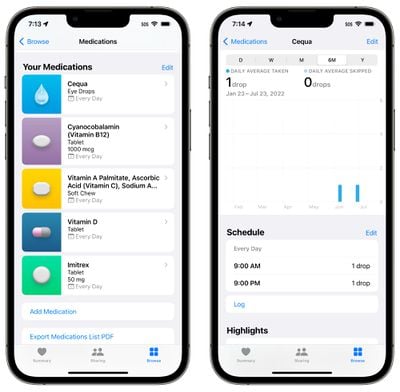
ios 16 medication list health
Medication notifications are classed as time sensitive notifications and will be delivered at your specified time unless you override the setting.
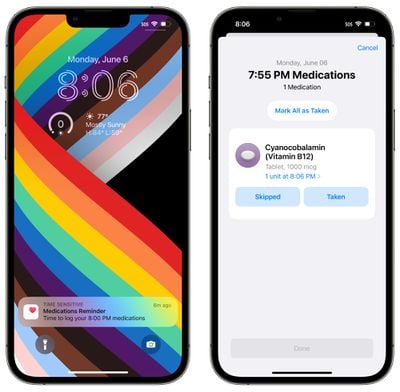
log medication
Notifications are automatic for all medications that have a set time and and/or set day for when you take them.

Medication Logging

When a reminder notification pops up, you can tap it to be taken to a popup where you can mark a medication as "Taken" or Skipped." You can also use the "Mark All as Taken" option if you have multiple medications scheduled for the same time. Medications can also be marked as logged from the medication list in the Health app.
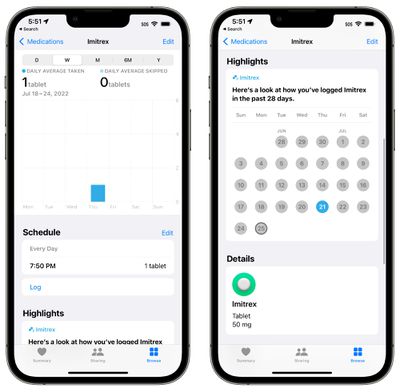
ios 16 health app medication logging
The Health app can track your medications over time, so you can check in on whether you're taking your medication regularly. You can see data organized by day, week, month, six months, and year.

Apple will also provide a Medications "Highlight" in your Health summary that will let you know how often you've taken a medication over the past 28 days.

Apple Watch Medication App

In watchOS 9, there is a dedicated Medications app that you can tap into for quicker logging. You can log each medication individually in the app or use the "Log All as Taken" to get to them all at once. If you skipped a dose, you can choose the "Skipped" option.
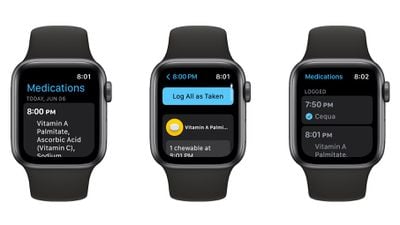
medications watchos 9
The Apple Watch app is just for marking medications as taken and all other medication management needs to be done in the Health app.

Medication Interactions

The Health app regularly checks to make sure that the medications that you are taking do not have interactions with one another, keeping you from taking a combination of medications that could be dangerous.
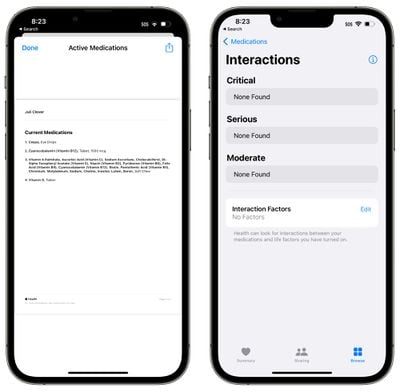
medication interactions ios 16

Medication Side Effects and Other Info

If you tap into any medication from your Health app list, you can then choose the "Side Effects" button to see the listed side effects for that medicine, if it's available.
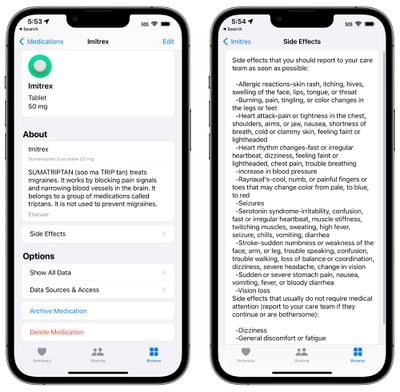
ios 16 medications side effects
Not all medications have side effects listed, and the information is provided by Elsevier, a Netherlands-based company that specializes in medical content, including the Annual ScienceDirect book series on drug side effects.

Export Medications

In the Medications section of the Health app, there's an option to "Export Medications List PDF," which as the name suggests, creates a simple PDF of the medications that you take. You can share this list with a doctor.

Sleep Features

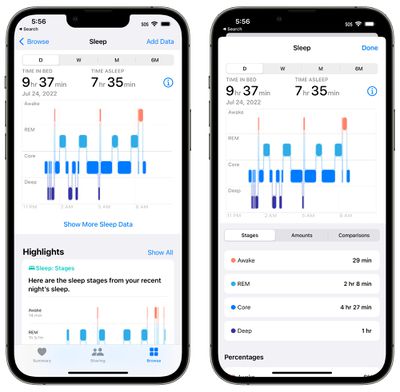
For those who wear the Apple Watch to bed for sleep tracking purposes, watchOS 9 and iOS 16 bring new functionality. Sleep recorded by the Apple Watch is broken down into Awake, REM, Core (light), and Deep sleep categories, so you can get an idea of how well you slept during the night.
ios 16 sleep info
The Apple Watch will track when you get in bed, how long it takes you to fall asleep, how often you wake up, and how much time you spend in REM, Core, and Deep sleep.

Apple defines the different sleep categories as follows:

  • Awake - You may find yourself awake during parts of a sleep session. It's normal for people to wake up on occasion. It's possible that you will fall right back to sleep and not remember waking up during the night.
  • REM - This stage of sleep may play a role in learning and memory. During this stage, your muscles are the most relaxed and your eyes move rapidly from side to side. This is also when most of your dreams occur.
  • Core - Sometimes referred to as light sleep, this stage is considered just as important as the others. This stage often represents most of your time asleep each night. Brain waves that may be important for cognition occur during this stage.
  • Deep - Also known as slow wave sleep because of the brain wave patterns, this is the stage where body tissues are repaired and essential hormones are released. This stage typically happens in longer periods during the first half of your sleep session.

The sleep data collected by the Apple Watch can be viewed in the "Sleep" section of the Health app. Sleep data can now be viewed by day rather than just by week so you can drill down into your sleep quality on a day-by-day basis.

Other than the new sleep categories, the Sleep functionality is the same. You still use the same Bedtime and Wake Up features, which tie into the Wind Down and Sleep Focus options.

Health Sharing Invitations

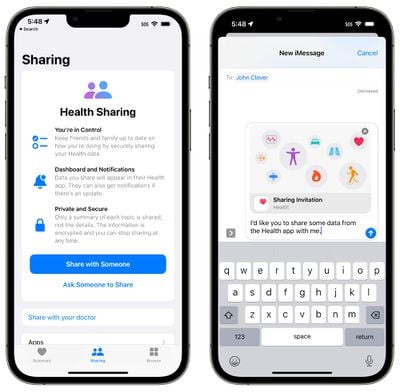
You can invite family members to share their data with you in iOS 16, making it easy to keep track of the health information of elderly family members or children. Once an invitation is received, the person can opt to select which data to share with you.
ios 16 health sharing

Fitness Activity Tracking

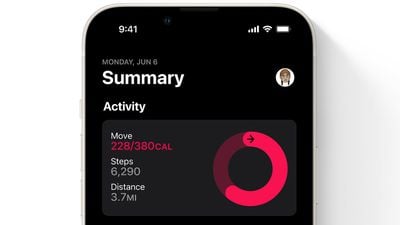
In iOS 15 and earlier, you needed an Apple Watch to take advantage of the Fitness app, but that's changed in iOS 16.
fitness app ios 16
You can use the Fitness app with the iPhone's motion sensors to track your activity level. The iPhone can estimate steps, and distance walked, and track third-party workouts to provide details on how many calories you've burned in a day.

Without an Apple Watch, you're limited to a daily Move goal, without the Exercise and Stand goals available.

Guide Feedback

Have questions about the new Health and Fitness features in iOS 16, know of a feature we left out, or want to offer feedback on this guide? Send us an email here.


Related Forum: iOS 16

Popular Stories

apple pro tell logo

Apple Launching Five New Products Today

Thursday November 5, 2026 12:59 am PST by
Apple is launching five new products on Friday, November 6, following pre-orders that opened last week, including its first touchscreen MacBook Pro models. The following new products will be available from today: iPad mini with OLED display and A20 Pro chip iMac with M6 chip 14-inch MacBook Pro with M6 chip 14-inch MacBook Pro with OLED touchscreen 16-inch MacBook Pro with OLED...
duo aquarium

More Fun iPhone Duo Apps: 30 New Picks to Try

Friday November 6, 2026 3:27 pm PST by
When the iPhone Duo launched, we shared a list of some of the fun apps developers created for the new form factor. Two weeks out, developers are continuing to come up with fresh ideas, so we thought we'd share some of our favorites. Games Marbles Unhinged ($2.99) - Marbles Unhinged is a marble maze designed for the Duo. When you fold it, the floor turns into a ramp. If you stand the top...
silver iphone 18 pro

Apple Rumored to Drop the iPhone's Action Button Next Year

Friday November 6, 2026 6:07 am PST by
Apple plans to merge the iPhone's Action button with the Camera Control starting next year, according to the leaker known as "Instant Digital." In a new post on Weibo, the leaker claimed that a single press of the combined button would open the camera, while a long press would trigger the function assigned to the Action button. They explicitly clarified that the dedicated Action button would ...

Top Rated Comments

56 months ago
Love the medication addition. Pharmacies should start adding QR codes to the bottle labels, which can include the name of the medication, frequency of use, any special instructions like take with/without food, take only in evening, etc... That way apps like Apple Health can scan and automatically import the full information about the medication rather than just the name.
Score: 12 Votes (Like | Disagree)
56 months ago
This is going to be incredibly useful. Wow.
Score: 8 Votes (Like | Disagree)
56 months ago

I was seriously looking forward to add my vitamins and supplements (as I track all my foods) but it’s basically useless for it. For one it can’t scan any of the barcodes for my supplements and manual search is trash for them as well, then there’s the boneheaded decision that vitamins added do not show up in the previous health app spot for vitamins (under nutrition) but only live in the medication category. For instance if I add vitamin D3 to medication and “take it” and then look at vitamin D under nutrition, nothing is there. What? Even worse is that it gives me an option for a D3 + K2 supplement but only logs the D3 dosage and not K2 which is a separate dosage. WTF Apple.



Well that's very disappointing. I was looking forward to doing the same thing.
Score: 4 Votes (Like | Disagree)
56 months ago
For the medication part of this:

I’ve been a lung transplant recipient since 2016. The amount of meds I take ridiculous. And by the looks of this, I’ll stick with reminders, it’s simple and does the job.

I’ll give Apple credit for adding such features, and maybe it would help patients just starting out with an overwhelming amount of medications and info to keep up with.
Score: 4 Votes (Like | Disagree)
thefourthpope Avatar
56 months ago
I’ve only barely toyed with it, as I’m fortunate to only occasionally take seasonal allergy meds, but the medications feature is going to be an amazing resource for lots of people.
Score: 4 Votes (Like | Disagree)
Fraserpatty Avatar
56 months ago

Seems like it will be helpful for older people to remind them and help them track medication. That's a plus.
Yes, and I am one of those older people who take a lot of medicines. But I take them at home, where my iPad is. I reiterate, this app should be on all devices.
Score: 3 Votes (Like | Disagree)
Latest Stories
Siri AI Rumored to Become 'More Like an Agent' as Early as Next Year
2 hours ago
Apple Taking New Approach to Developing iOS 28 and macOS 28
4 hours ago
Early Apple Black Friday Deals on Apple Watch, MacBook Air, and More
23 hours ago
'Backglow' Lets You Customize New MacBook Pro's Glowing Apple Logo
23 hours ago
Top Stories: Apple Product Launches, iOS 27.3 Beta, and More
1 day ago
More Fun iPhone Duo Apps: 30 New Picks to Try
2 days ago
Hands-On With Apple's New OLED Touchscreen MacBook Pro
2 days ago
Apple Store With All-New Design Opening Soon in Southern California
2 days ago
Control the Glowing Apple Logo on Your New MacBook Pro
2 days ago
Apple Shares New 'Apple Card: Apply and Use in Minutes' Ad
2 days ago
Apple Says More Than 100,000 Apps Optimized for iPhone Duo, Here's What's Still Missing
2 days ago
Early Black Friday Deals Kickoff With Steep Discounts on Apple Watch Ultras and More
2 days ago
The MacRumors Show: iOS 27.3 Looks Like a Huge Update
2 days ago
Best Buy's Black Friday Event Begins With Sitewide Savings on Apple, TVs, More
2 days ago
Apple Releasing Yet Another Two New Products Next Week
2 days ago
MacBook Air Drops to Lowest Price in Months With Amazon's $250 Discount
2 days ago
Apple Rumored to Drop the iPhone's Action Button Next Year
2 days ago
Apple's Extended Return Policy Now in Effect for 2026 Holiday Season
2 days ago
Apple Music Classical Updated With New Icon and Refreshed Design
2 days ago
OLED iPad Mini, M6 iMac, and New MacBook Pros Available From Today
2 days ago
Apple Surveys iPhone Duo Buyers About Crease and Camera
3 days ago
Apple's First Touchscreen Mac is Now Arriving to Customers
3 days ago
Claude Gets Personal Finance Feature With Bank Account Linking
3 days ago
Apple Arcade Adds Crossy Road Rush and NBA 2K27
3 days ago
Apple's New HomeView Smart Home Hub: Here's How Much RAM It Has
3 days ago
iPad Mini vs. iPad Air Buyer's Guide: Now Just $50 Apart
3 days ago
First iOS 27.3 and macOS Golden Gate 27.3 Public Betas Now Available
3 days ago
Apple Announces a New Mac Sales Record
3 days ago
Paid $200 for Logic Pro? Apple Says You Won't Get This New Feature
3 days ago
Instagram's Edits Video Editor is Now Available on Mac
3 days ago







































