Everything New in the iOS 16 Photos and Camera Apps - MacRumorsOpen MenuShow RoundupsShow Forums menuVisit ForumsOpen Sidebar
Skip to Content

Everything New in the iOS 16 Photos and Camera Apps

Almost all of Apple's main built-in iPhone apps were updated with new features in iOS 16, including both the Photos and Camera apps. ‌Photos‌ has quite a few new features including an option to get rid of duplicates and some locked folders for sensitive photos, plus the Camera app can translate text and there are functionality improvements for iPhone 13 users.

iOS 16 Photos and Camera Guide Feature
This guide aggregates everything that's new in iOS 16 in both the Camera and ‌Photos‌ apps. Many of these features will also be available in iPadOS 16 and macOS Ventura when they launch to the public in October.

Photos

Locked Hidden and Recently Deleted Albums

In the iOS 16 ‌Photos‌ app, both the "Hidden" and "Recently Deleted" albums under Utilities are locked with Face ID or Touch ID and cannot be opened without biometric authentication or a passcode.
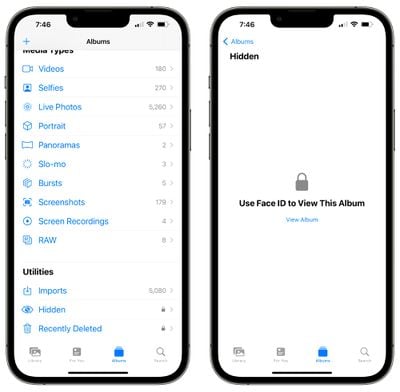
photos locked albums ios 16
This protects the photos that you've deleted or those that you've marked as hidden. Someone who has access to your unlocked phone will not be able to open these albums without further authentication.

There is no option not to lock these two albums as it is a system-level lock that cannot be overwritten. There continues to be an option to hide the Hidden album, however.

Duplicates Detection

In iOS 16, your iPhone will automatically detect any duplicate images that you have in your ‌Photos‌ app. Duplicate photos will show up in a "Duplicates" album under Utilities in ‌Photos‌, giving you the opportunity to merge them to save space and reduce clutter.
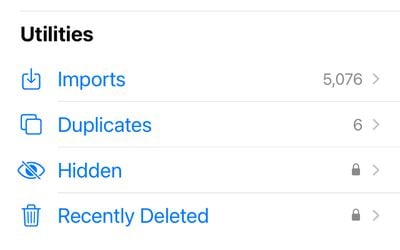
ios 16 duplicates
The Duplicates album only shows up if you have photo duplicates in your library, and the merging feature is intelligent. It will keep the highest detail and the most metadata, creating the best possible image.

If, for example, you have one copy of a photo that's high-resolution and a second copy that has more metadata, the ‌Photos‌ app will combine the best qualities of both photos into a single image.

After updating to iOS 16, your iPhone will continually scan for duplicates, so duplicate images may show up over time and may not be available right when the update is installed.

Copy and Paste Edits

If you have multiple photos that you want to edit in the same way, or if you've made changes to one photo that you want to replicate in another photo, you can use the new copy and paste edits tools in iOS 16.
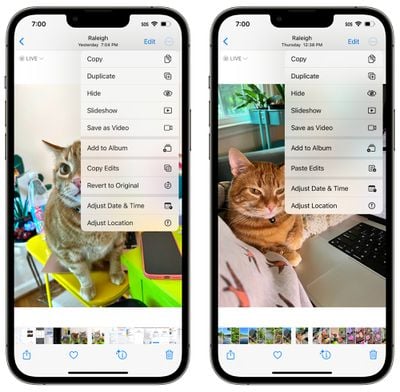
ios 16 photos copy paste edits
To use the option, make edits to an image and then tap on the three-dots icon in the upper right corner. From there, tap on Copy Edits to copy everything that was done to the image. Open up another photo, tap on the three dot icon again, and then choose the Paste Edits feature to get the exact same adjustments.

Undo and Redo Edits

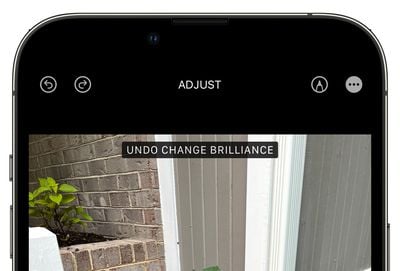
To streamline photo editing, iOS 16 adds simple undo and redo buttons, a feature missing in prior versions of iOS. With the undo and redo buttons, you can remove edits that you've made to photos one by one rather than having to cancel all of the edits by reverting an image entirely.
ios 16 photos undo redo
The undo and redo buttons are located in the upper left corner of the image editing interface and will show up once you've made an edit to a photo using the built-in editing tools in the ‌Photos‌ app. You can undo and/or redo every change individually, making it quicker to go back and correct a mistake.

In prior versions of iOS, you would need to manually change one of the edited parameters back to where you started, or revert changes entirely.

People Album Sorting

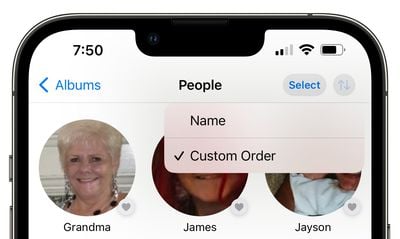
In a small but meaningful change, Apple added an option to sort the dedicated People album by name in iOS 16. You can open up the People album and tap on the two arrow keys to change the sorting from "Custom Order" to "Name." Opting for Name rearranges the people in the album into alphabetical order.
ios 16 people sort alphabetical

iCloud Shared Photo Library

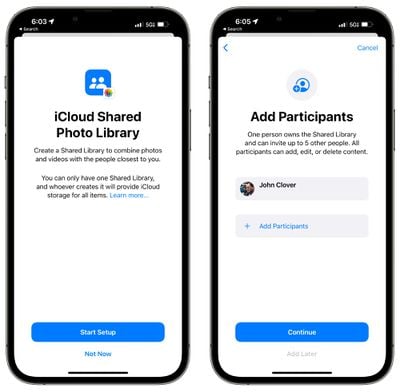
iOS 16 adds an iCloud Shared Photo Library that's basically identical to the standard iCloud Photo Library, but shareable with up to five other people.
icloud shared photo library setup
There are a lot of ins and outs to know about with ‌iCloud‌ Shared Photo Library, so we've created a dedicated guide on iCloud Shared Photo Library that tells you everything you need to know about setting up the feature and using it with family and friends.

Lift Subject From Background

Though not strictly a ‌Photos‌ app feature, lift subject from background is one of the most fun random additions to iOS 16 as it's a little bit like a mini version of Photoshop. You can use it to pull the subject out of any image or photo.


To use it in the ‌Photos‌ app, open up an image and then long press on the main subject of the photo until it lights up. From there, you can drag it out or choose the "copy" option to copy it to the clipboard. You can paste it into another photo or send it as a sticker in Messages.

Memory Updates

When a video is playing in a memory, tap to restart the video and play it from the beginning while the music continues to play. There are also new memory types for This Day in History and children playing.

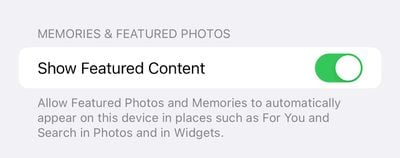
iOS 16 adds a toggle that allows you to prevent Featured ‌Photos‌ and Memories from showing up in For You, ‌Photos‌ Search, and Widgets.

ios 16 photos show featured content
The toggle can be found in the ‌Photos‌ section of the Settings app.

Camera

Foreground Blur in Portrait Photos

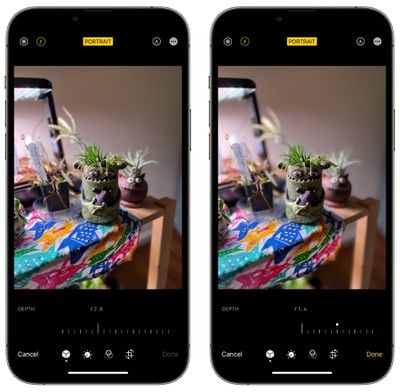
When using Portrait mode, you can blur objects in the foreground of an image to get a more realistic-looking depth-of-field effect. This feature is limited to the iPhone 13, 13 mini, 13 Pro, and 13 Pro Max.
portrait mode blur ios 16

Translate Camera

System-wide translation has expanded to the Camera app in iOS 16, allowing the iPhone's camera to be used for real-time translation of signs, menus, packaging, and more.

ios 16 translate camera
Just open up the Camera app and point it at the text that you want to translate. Tap on the text selection button to select the detected text, and then tap on the translate option to get an instant translation.

The view can be paused to get translations overlaid on text, letting you zoom in for a closer look. It's similar to the Translate camera feature that the Google Translate app has long offered, and it's convenient for when you just need a quick translation but don't want to snap a photo.

Improved Quality for Cinematic Mode

On the iPhone 13 models, the Cinematic mode video recording feature is more accurate in iOS 16. It has a better depth-of-field effect for profile angles and around the edges of hair and glasses.

Guide Feedback

Have questions about the ‌Photos‌ and Camera apps in iOS 16, know of a feature we left out, or want to offer feedback on this guide? Send us an email here.


Related Forum: iOS 16

Popular Stories

duo aquarium

More Fun iPhone Duo Apps: 30 New Picks to Try

Friday November 6, 2026 3:27 pm PST by
When the iPhone Duo launched, we shared a list of some of the fun apps developers created for the new form factor. Two weeks out, developers are continuing to come up with fresh ideas, so we thought we'd share some of our favorites. Games Marbles Unhinged ($2.99) - Marbles Unhinged is a marble maze designed for the Duo. When you fold it, the floor turns into a ramp. If you stand the top...
iOS 28 AI

Apple Taking New Approach to Developing iOS 28 and macOS 28

Sunday November 8, 2026 7:42 am PST by
Apple has made a change to its development process for iOS 28, macOS 28, and corresponding software updates, according to Bloomberg's Mark Gurman. In his Power On newsletter today, he said Apple separates development of each year's new operating systems into three major stages. Typically, he said each stage consists of four weeks of coding followed by a four-week "convergence" period where...
apple pro tell logo

Apple Launching Five New Products Today

Thursday November 5, 2026 12:59 am PST by
Apple is launching five new products on Friday, November 6, following pre-orders that opened last week, including its first touchscreen MacBook Pro models. The following new products will be available from today: iPad mini with OLED display and A20 Pro chip iMac with M6 chip 14-inch MacBook Pro with M6 chip 14-inch MacBook Pro with OLED touchscreen 16-inch MacBook Pro with OLED...

Top Rated Comments

TheYayAreaLiving 🎗️ Avatar
55 months ago
Apple has stepped up its game big time. Dang, this revamped photos app seems too rich and intelligent.


Score: 12 Votes (Like | Disagree)
George Dawes Avatar
55 months ago
Can't wait to use the duplicates feature

Can see me deleting literally hundreds of old photos , maybe thousands !!!
Score: 12 Votes (Like | Disagree)
55 months ago
Steppin’ it up.

Locked hidden was well overdue. That was the first thing I noticed.
Score: 12 Votes (Like | Disagree)
contacos Avatar
55 months ago
What happens if you have version A in Album A and version B in Album B and you decide to remove the duplicate B? Will it remove the photo from Album B or will it update version B with version A and leave it in both albums (as it should)?

Also, it is progress but I wish you could finally tell which photos in your „all photos“ feed have already been sorted into folders. My android phone shows a little icon on the corner and if I click on details, it even tells me what album the photo is part of. Often I forget to sort my photos right away and then I don’t remember where I left off or which photos I still need to sort 😵‍💫
Score: 10 Votes (Like | Disagree)
lazyrighteye Avatar
55 months ago
I’d like to see them add the ability to fade in from black and out to black when trimming videos directly in Photos app. Would make for a better video viewing experience.
Score: 8 Votes (Like | Disagree)
55 months ago
Locking the hidden and deleted pictures will a welcome addition for the dic pic aficionados.
Score: 7 Votes (Like | Disagree)
Latest Stories
Apple Store Subscription Sign-Up Controversy Exposed
8 hours ago
Siri AI Rumored to Become 'More Like an Agent' as Early as Next Year
18 hours ago
Apple Taking New Approach to Developing iOS 28 and macOS 28
20 hours ago
Early Apple Black Friday Deals on Apple Watch, MacBook Air, and More
2 days ago
'Backglow' Lets You Customize New MacBook Pro's Glowing Apple Logo
2 days ago
Top Stories: Apple Product Launches, iOS 27.3 Beta, and More
2 days ago
More Fun iPhone Duo Apps: 30 New Picks to Try
3 days ago
Hands-On With Apple's New OLED Touchscreen MacBook Pro
3 days ago
Apple Store With All-New Design Opening Soon in Southern California
3 days ago
Control the Glowing Apple Logo on Your New MacBook Pro
3 days ago
Apple Shares New 'Apple Card: Apply and Use in Minutes' Ad
3 days ago
Apple Says More Than 100,000 Apps Optimized for iPhone Duo, Here's What's Still Missing
3 days ago
Early Black Friday Deals Kickoff With Steep Discounts on Apple Watch Ultras and More
3 days ago
The MacRumors Show: iOS 27.3 Looks Like a Huge Update
3 days ago
Best Buy's Black Friday Event Begins With Sitewide Savings on Apple, TVs, More
3 days ago
Apple Releasing Yet Another Two New Products Next Week
3 days ago
MacBook Air Drops to Lowest Price in Months With Amazon's $250 Discount
3 days ago
Apple Rumored to Drop the iPhone's Action Button Next Year
3 days ago
Apple's Extended Return Policy Now in Effect for 2026 Holiday Season
3 days ago
Apple Music Classical Updated With New Icon and Refreshed Design
3 days ago
OLED iPad Mini, M6 iMac, and New MacBook Pros Available From Today
3 days ago
Apple Surveys iPhone Duo Buyers About Crease and Camera
3 days ago
Apple's First Touchscreen Mac is Now Arriving to Customers
4 days ago
Claude Gets Personal Finance Feature With Bank Account Linking
4 days ago
Apple Arcade Adds Crossy Road Rush and NBA 2K27
4 days ago
Apple's New HomeView Smart Home Hub: Here's How Much RAM It Has
4 days ago
iPad Mini vs. iPad Air Buyer's Guide: Now Just $50 Apart
4 days ago
First iOS 27.3 and macOS Golden Gate 27.3 Public Betas Now Available
4 days ago
Apple Announces a New Mac Sales Record
4 days ago
Paid $200 for Logic Pro? Apple Says You Won't Get This New Feature
4 days ago