iOS 17.1 Features: What's New in iOS 17.1 - MacRumorsOpen MenuShow RoundupsShow Forums menuVisit ForumsOpen Sidebar
Skip to Content

iOS 17.1 Features: What's New in iOS 17.1

Apple today released iOS 17.1, introducing a range of new features for iPhones that run the iOS 17 operating system. While Apple outlined some of the major new additions in its release notes, there are also several hidden features that were not mentioned.

In this guide, we've rounded up all of the feature additions and changes we found in iOS 17.1.

AirDrop Over Internet

AirDrop transfers can now be completed over a cellular connection or Wi-Fi if you walk out of the range of the person you're sharing with. That means you will not have to stay close to someone if you are transferring a large number of files.
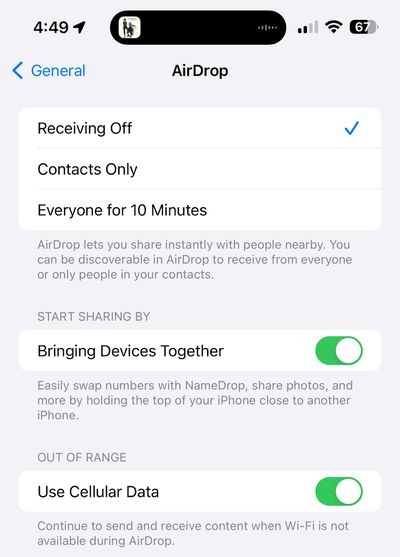
ios 17 1 airdrop
There is a new "Out of Range" toggle in the AirDrop section of the Settings menu that you can toggle to allow or disallow transfers over cellular.

Apple Music Favorites

You can favorite songs, albums, playlists, and artists in the iOS 17.1 Music app. Favorited music is added to the Library and improves recommendations. Favoriting replaces the prior "Love" system and favoriting can be done from the Lock Screen's Now Playing widget.
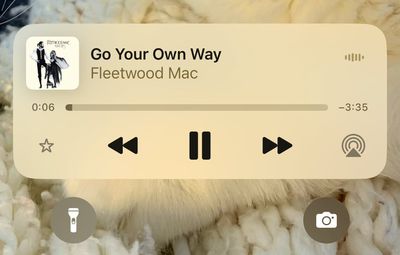
apple music favorite
A star next to a track in an album means that it's a favorite, while a dot is next to the most played track. With the favorites system, the Music app now suggests songs to add to playlists so you don't run out of content.
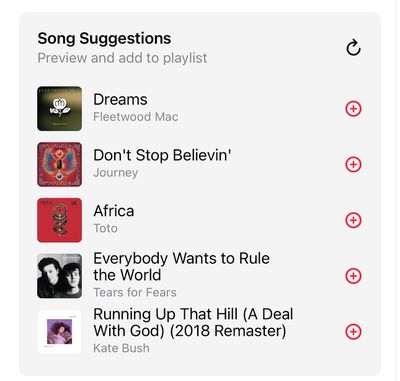
apple music song suggestions
Eventually, Apple plans to provide a Favorite Songs playlist and offer collaborative playlists, but these features do not appear to be implemented as of yet.

Apple Music Playlists

iOS 17.1 provides color-matched playlist artwork options that can be selected as a new customization option for your playlists. There are eight artwork styles that feature geometric shapes and gradients, with the colors featured pulled from the album artwork of the first song in the playlist.
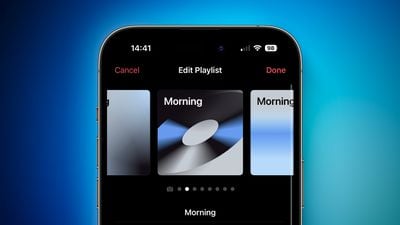
iOS 17 Playlist Artwork Feature 1

Double Tap on Apple Watch

Double Tap is enabled in the watchOS 10.1 update that is also in beta testing, and the settings for it can be managed using the Apple Watch app.
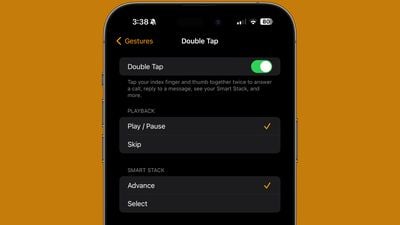
watchos 10 1 double tap

Double Tap allows Apple Watch Series 9 and Apple Watch Ultra 2 owners to tap their thumb and index fingers together to control the Apple Watch with one hand. The gesture can be used for opening up the Smart Stack, answering/ending calls, playing/pausing music, stopping alarms and timers, and more.

StandBy Display Options

Apple added a new "Display" section to the StandBy section of the Settings app, which houses some new customization options. The display can be set to turn off automatically, after 20 seconds, or never.
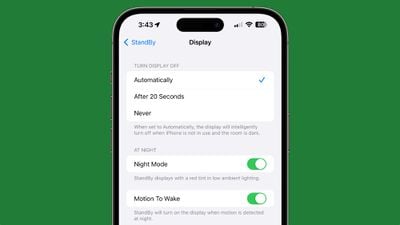
standby display settings ios 17 1
The existing Night Mode function that adds a red tint and dims the screen has been relocated to this section, as has the Motion to Wake toggle. The Display section also replaces the prior Always On toggle that limited the display to turning off intelligently.

Action Button Update

In iOS 17.1, Apple changed the functionality of the Action Button to prevent certain actions from being triggered while the iPhone is in a pocket or a bag. The Camera, Flashlight, Voice Memo, Focus, and Magnifier functions will no longer activate when the Action Button is pressed if the iPhone is tucked away in a pocket.
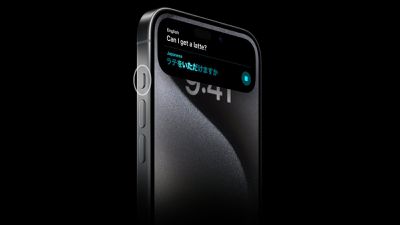
iPhone 15 Pro Action Button Translate
Actions that make sense to trigger in a pocket like the mute function and a shortcut can still be activated while the iPhone is inside of a pocket by long pressing on the Action Button, but other features are disabled.

UK Bank Balances in the Wallet App

UK users can add their UK bank accounts to the Wallet app in iOS 17.1, allowing them to see their account balances, payments, purchases, and deposits.
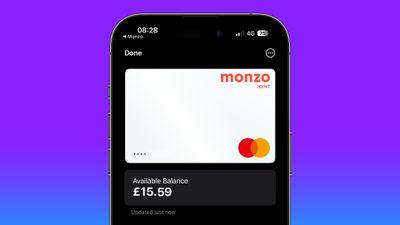
uk bank account apple wallet 2

Wallet App and Discover Cards

U.S. Discover users who add their credit cards to Apple Wallet can see their total card balance and transaction history right on the iPhone with iOS 17.1.

Books App

The "Reading Now" section in the Apple Books app has been renamed to "Read Now."

Dynamic Island Flashlight Indicator

When the flashlight is activated on an iPhone 14 Pro, iPhone 14 Pro Max, iPhone 15, or iPhone 15 Plus, there is now a flashlight icon in the Dynamic Island that lets you know that It is on. The flashlight icon for the ‌Dynamic Island‌ was previously limited to the iPhone 15 Pro and iPhone 15 Pro Max.
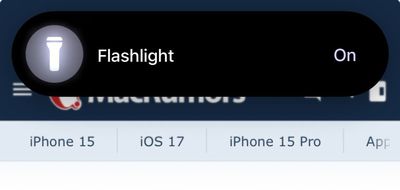
dynamic island flashlight

Controller Support

iOS 17.1 includes support for the Nintendo Switch N64 Controller.

Extend Wallpaper

When you are setting up a new wallpaper, Apple has added an "Extend" option that can be used if the image does not fit the display.

Photo Shuffle

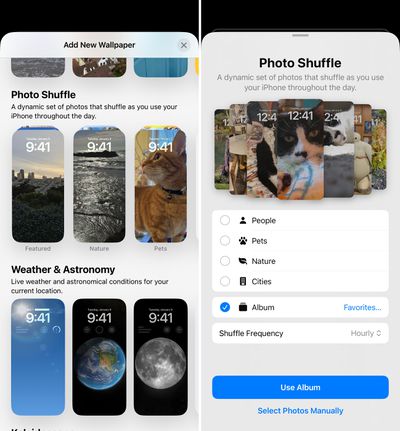
When you add a Photo Shuffle Lock Screen in iOS 17.1, you can select a specific album of photos that will be shown on the Lock Screen rather than having to rely on Apple's pre-selected options like People, Pets, or Nature.

When selecting any of the main Photo Shuffle images, you're brought into a customization screen where you can choose your Favorites album or opt for any other album you have created, giving you complete control over the images that show up on the Lock Screen. There was previously a tool for manually selecting photos, but being able to choose an entire album is quicker.
ios 17 1 photo shuffle
Photo Shuffle frequency remains the same at on tap, on lock, hourly, or daily.

Reachability

On iPhones with a ‌Dynamic Island‌, you'll now see a black background when you use the Reachability feature. In prior versions of iOS 17, a blurred version of the device's wallpaper was shown. The change to a black background prevents the ‌Dynamic Island‌ from being displayed twice when Reachability is used.
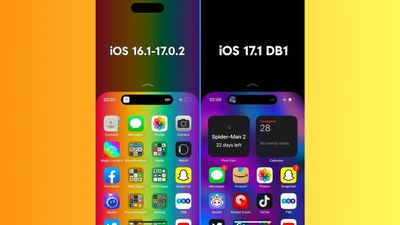
ios 17 1 reachability

Home Key Support for Matter Locks

If you have a Matter-equipped lock that you've added to HomeKit, it can now be added to the Wallet app if it supports the Home Key feature.
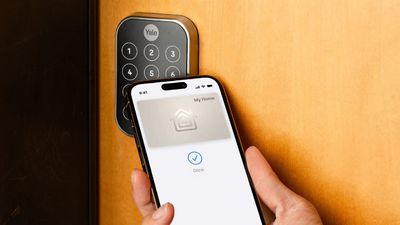
yale home key lock

Screen Time Syncing

According to Apple, Screen Time settings now better sync across devices. The change addresses complaints from parents who found that Screen Time settings would reset or not sync across devices, giving children more access to their devices than intended.
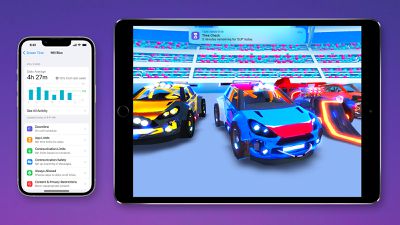
Screen Time iOS 16

Journal App

There is no sign of the promised Journal app in iOS 17.1, but there are mentions of Journaling Suggestions in the code, which indicates that it could be coming before too long.

New for the iPad

The iPadOS 17 update adds support for the USB-C Apple Pencil.
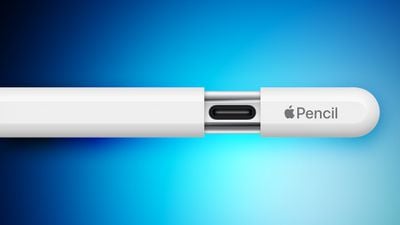
Apple Pencil USB C sliding cap feature

Crash Detection Optimizations

Apple in iOS 17.1 has further optimized the Crash Detection feature in the iPhone 14 and iPhone 15 models. Apple has tweaked Crash Detection several times to prevent it from activating accidentally at ski resorts and amusement parks.
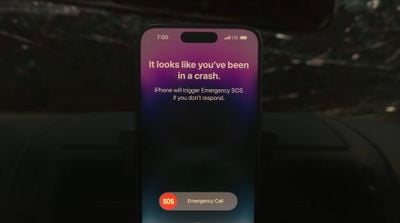
iPhone 14 Car Crash Detection

80% Charging Limit Fix

With the iPhone 15 models, Apple added a toggle that prevents the devices from charging past 80 percent in order to keep the battery healthy for a longer period of time. In iOS 17, the iPhone could ignore this setting and charge past 80 percent, but that no longer happens following the second beta update.
ios 17 1 80 percent charge

Messages Bug Fix

iOS 17.1 addresses an issue with the search function in the Messages app in iOS 17. Some iPhone 15 users have been able to search for older messages after transferring their data over from an older iPhone. The Messages search feature only works for recent messages, but the update fixes the issue.

Display Image Persistance Fix

iOS 17.1 fixes an issue that "may cause display image persistence," a problem that has been noticed on multiple iPhone models, most notably the iPhone 15. Several iPhone 15 Pro owners complained that they had seen severe "screen burn-in" following the iPhone's launch, but it turned out to be a software-based image retention issue.

More Bug Fixes

  • Resolves an issue where the names of incoming callers may not appear when you are on another call
  • Addresses an issue where custom and purchased ringtones may not appear as options for your text tone
  • Fixes an issue that may cause the keyboard to be less responsive

Read More

For more on what's included in iOS 17, we have a dedicated iOS 17 roundup.

Related Forums: iOS 17, iPadOS 17

Popular Stories

apple pro tell logo

Apple Launching Five New Products Today

Thursday November 5, 2026 12:59 am PST by
Apple is launching five new products on Friday, November 6, following pre-orders that opened last week, including its first touchscreen MacBook Pro models. The following new products will be available from today: iPad mini with OLED display and A20 Pro chip iMac with M6 chip 14-inch MacBook Pro with M6 chip 14-inch MacBook Pro with OLED touchscreen 16-inch MacBook Pro with OLED...
duo aquarium

More Fun iPhone Duo Apps: 30 New Picks to Try

Friday November 6, 2026 3:27 pm PST by
When the iPhone Duo launched, we shared a list of some of the fun apps developers created for the new form factor. Two weeks out, developers are continuing to come up with fresh ideas, so we thought we'd share some of our favorites. Games Marbles Unhinged ($2.99) - Marbles Unhinged is a marble maze designed for the Duo. When you fold it, the floor turns into a ramp. If you stand the top...


silver iphone 18 pro

Apple Rumored to Drop the iPhone's Action Button Next Year

Friday November 6, 2026 6:07 am PST by
Apple plans to merge the iPhone's Action button with the Camera Control starting next year, according to the leaker known as "Instant Digital." In a new post on Weibo, the leaker claimed that a single press of the combined button would open the camera, while a long press would trigger the function assigned to the Action button. They explicitly clarified that the dedicated Action button would ...

Top Rated Comments

40 months ago

Somewhat off topic, but on a semi-related note, I was planning on buying an iPhone 15 Pro, but something finally snapped in me, and I spat the dummy at Apple, and am about to jump ship from iPhone after nothing but iPhones since the iPhone 4, and am about to buy a Google Pixel 8. I can't honestly say whether or not I will prefer it, or hate it, but I am going to find out.

As a software engineer who most definitely makes full use of the wonderful power features of macOS, for example, the underlying unix system and terminal, I am really looking forward to the power and freedom of Android. I'm also intrigued by the many AI features of the Pixel which leave iPhones for dead.

And no, I have zero desire to leave macOS and my MBP. Nothing comes close.

But iPhones, I've had a fence sitting love/hate relationship with them for a long time.

The somewhat hilarious thing is that the one final nail that broke the camel's coffin, was the slow, and 20+ year old, USB 2.0 standard being foisted onto the base iPhone 15. Hilarious because I was going to get the iPhone 15 Pro, with the faster USB 3. However, it slapped me super hard in the face just how much Apple deliberately hold back their phones, just the right amount to push as many people as possible into forking out for the more expensive models. The absolute audacity to put the 23 year old USB 2.0 standard, instead of the 13 year old USB 3.0 standard, even though the wholesale price difference Apple themselves would pay to put USB 3 instead of USB 2 in the iPhone 15 would be somewhere in the ballpark of $0.01 per phone. It's pure madness, and pure greed. I am sick of it, and am jumping ship to give the Pixel a go.

Wish me luck! I'll be sporadically updating these forums with my extremely honest and blunt experiences with it, the good and the bad.
Since you didn’t tell us why your experience would be substantially improved with USB 3.0, this all reads like you’re simply tilting at windmills.

edit: spelling
Score: 11 Votes (Like | Disagree)
sideshowuniqueuser Avatar
40 months ago
Somewhat off topic, but on a semi-related note, I was planning on buying an iPhone 15 Pro, but something finally snapped in me, and I spat the dummy at Apple, and am about to jump ship from iPhone after nothing but iPhones since the iPhone 4, and am about to buy a Google Pixel 8. I can't honestly say whether or not I will prefer it, or hate it, but I am going to find out.

As a software engineer who most definitely makes full use of the wonderful power features of macOS, for example, the underlying unix system and terminal, I am really looking forward to the power and freedom of Android. I'm also intrigued by the many AI features of the Pixel which leave iPhones for dead.

And no, I have zero desire to leave macOS and my MBP. Nothing comes close.

But iPhones, I've had a fence sitting love/hate relationship with them for a long time.

The somewhat hilarious thing is that the one final nail that broke the camel's coffin, was the slow, and 20+ year old, USB 2.0 standard being foisted onto the base iPhone 15. Hilarious because I was going to get the iPhone 15 Pro, with the faster USB 3. However, it slapped me super hard in the face just how much Apple deliberately hold back their phones, just the right amount to push as many people as possible into forking out for the more expensive models. The absolute audacity to put the 23 year old USB 2.0 standard, instead of the 13 year old USB 3.0 standard, even though the wholesale price difference Apple themselves would pay to put USB 3 instead of USB 2 in the iPhone 15 would be somewhere in the ballpark of $0.01 per phone. It's pure madness, and pure greed. I am sick of it, and am jumping ship to give the Pixel a go.

Wish me luck! I'll be sporadically updating these forums with my extremely honest and blunt experiences with it, the good and the bad.
Score: 9 Votes (Like | Disagree)
40 months ago
I hate Apple these days. You would think they could easily could apply the 80% charging option to older iPhone models as well.
Score: 8 Votes (Like | Disagree)
40 months ago

Wait. Could you not favorite songs before?
Before you would Love ❤️ the song. Now you Favorite ⭐ the song. It's just a change in terminology and icon.
Score: 8 Votes (Like | Disagree)
sideshowuniqueuser Avatar
40 months ago
"Apple added a new "Display" section to the StandBy section of the Settings app, which houses some new customization options. The display can be set to turn off automatically, after 20 seconds, or never."

As a software engineer, I am constantly frustrated at the lack of control afforded to the user by iOS. It is trivially easy to change the "after 20 seconds" option to an "after [user entered value] seconds" option, where the [user entered value] might default to 20, but the user can merely enter any number from 0 to virtually infinity, including with decimal point. Trivially easy. So unbelievably, trivially, easy. Why Apply, why? Why are you such humungous control freaks?
Score: 6 Votes (Like | Disagree)
BGPL Avatar
40 months ago
The action button fix is a welcome change. Lots of pictures in my photo roll of the inside of my pocket and the inside of my vehicle. God knows what else.

The two finger function being limited to the newest watch models is typical Apple chickensh*t.
Score: 5 Votes (Like | Disagree)
Latest Stories
Siri AI Rumored to Become 'More Like an Agent' as Early as Next Year
5 hours ago
Apple Taking New Approach to Developing iOS 28 and macOS 28
7 hours ago
Early Apple Black Friday Deals on Apple Watch, MacBook Air, and More
1 day ago
'Backglow' Lets You Customize New MacBook Pro's Glowing Apple Logo
1 day ago
Top Stories: Apple Product Launches, iOS 27.3 Beta, and More
1 day ago
More Fun iPhone Duo Apps: 30 New Picks to Try
2 days ago
Hands-On With Apple's New OLED Touchscreen MacBook Pro
2 days ago
Apple Store With All-New Design Opening Soon in Southern California
2 days ago
Control the Glowing Apple Logo on Your New MacBook Pro
2 days ago
Apple Shares New 'Apple Card: Apply and Use in Minutes' Ad
2 days ago
Apple Says More Than 100,000 Apps Optimized for iPhone Duo, Here's What's Still Missing
2 days ago
Early Black Friday Deals Kickoff With Steep Discounts on Apple Watch Ultras and More
2 days ago
The MacRumors Show: iOS 27.3 Looks Like a Huge Update
2 days ago
Best Buy's Black Friday Event Begins With Sitewide Savings on Apple, TVs, More
2 days ago
Apple Releasing Yet Another Two New Products Next Week
2 days ago
MacBook Air Drops to Lowest Price in Months With Amazon's $250 Discount
2 days ago
Apple Rumored to Drop the iPhone's Action Button Next Year
2 days ago
Apple's Extended Return Policy Now in Effect for 2026 Holiday Season
2 days ago
Apple Music Classical Updated With New Icon and Refreshed Design
2 days ago
OLED iPad Mini, M6 iMac, and New MacBook Pros Available From Today
3 days ago
Apple Surveys iPhone Duo Buyers About Crease and Camera
3 days ago
Apple's First Touchscreen Mac is Now Arriving to Customers
3 days ago
Claude Gets Personal Finance Feature With Bank Account Linking
3 days ago
Apple Arcade Adds Crossy Road Rush and NBA 2K27
3 days ago
Apple's New HomeView Smart Home Hub: Here's How Much RAM It Has
3 days ago
iPad Mini vs. iPad Air Buyer's Guide: Now Just $50 Apart
3 days ago
First iOS 27.3 and macOS Golden Gate 27.3 Public Betas Now Available
3 days ago
Apple Announces a New Mac Sales Record
3 days ago
Paid $200 for Logic Pro? Apple Says You Won't Get This New Feature
3 days ago
Instagram's Edits Video Editor is Now Available on Mac
3 days ago









































