Mac Studio Buyer's Guide: M5 Max vs. M5 Ultra - MacRumorsOpen MenuShow RoundupsShow Forums menuVisit ForumsOpen Sidebar
Skip to Content

Mac Studio Buyer's Guide: M5 Max vs. M5 Ultra

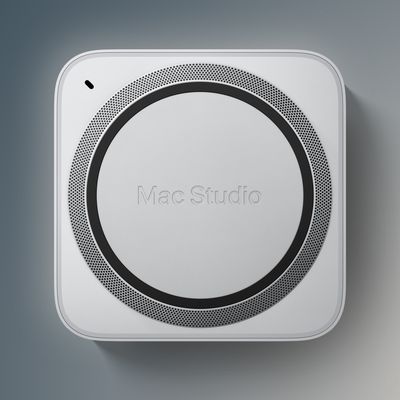
Apple last week announced two new Mac Studio models, with one built around the M5 Max chip and one around the all-new M5 Ultra chip, replacing the M4 Max and M3 Ultra models that had been on sale since March 2025.

m5 max vs m5 ultra mac studio
The gap between the two is unusually wide this time. ‌Mac Studio‌ with M5 Max starts at $2,499, holding the price Apple set when it raised Mac prices in June, while ‌Mac Studio‌ with M5 Ultra starts at $5,499, a further $200 increase on the post-June M3 Ultra price and $1,500 above what the M3 Ultra cost at launch.

That makes the premium $3,000 before any configure-to-order options, and memory and storage upgrades are more expensive than usual because of the memory chip shortage. Our guide helps to answer the question of how to decide which of these two ‌Mac Studio‌ models is best for you. The shared features include:

  • An identical enclosure measuring 3.7 inches tall and 7.7 inches wide
  • Neural Accelerators built into every GPU core, and hardware-accelerated ray tracing
  • Hardware-accelerated H.264, HEVC, ProRes, and ProRes RAW, plus AV1 decode
  • A next-generation SSD architecture that Apple says is up to twice as fast as before
  • Thunderbolt 5 with up to 120Gb/s of bandwidth, and clustering of multiple systems using RDMA (remote direct memory access)
  • 10Gb Ethernet, HDMI, and an SDXC card slot (UHS-II)
  • Wi-Fi 7 and Bluetooth 6 via the N1 chip, both new to the ‌Mac Studio‌
  • Genlock over USB-C for synchronization with professional camera capture
  • A 3.5mm headphone jack with support for high-impedance headphones
  • macOS 27, Apple Intelligence, and Siri AI

Here is everything that differs between the two models:

‌Mac Studio‌ (M5 Max) ‌Mac Studio‌ (M5 Ultra)
Starts at $2,499 Starts at $5,499
M5 Max chip M5 Ultra chip
18-core CPU with 6 super cores and 12 performance cores Up to 36-core CPU with 12 super cores and 24 performance cores, from 30 cores
Up to 40-core GPU, from 32 cores Up to 80-core GPU, from 64 cores
16-core Neural Engine 32-core Neural Engine
Up to 614GB/s memory bandwidth 1.2TB/s memory bandwidth
36GB, 48GB, 64GB, or 128GB of unified memory 96GB, 256GB, or 512GB of unified memory
512GB, 1TB, 2TB, 4TB, or 8TB of storage 1TB, 2TB, 4TB, 8TB, or 16TB of storage
Up to 3.9x faster AI performance than M4 Max Up to 4.3x the peak AI compute performance of M3 Ultra
Up to 50% faster graphics than M4 Max Up to 1.8x faster graphics than M3 Ultra
One video decode engine and two video encode engines Two video decode engines and four video encode engines
Two ProRes encode and decode engines Four ProRes encode and decode engines
Four Thunderbolt 5 ports, two USB-C ports, and two USB-A ports Six Thunderbolt 5 ports and two USB-A ports
Support for up to five 4K displays, four 6K displays, or two 8K displays Support for up to eight 4K displays, eight 6K displays, or four 8K displays
6.0 pounds (2.7 kg) 8.0 pounds (3.6 kg)

For the overwhelming majority of buyers, including most professionals, the M5 Max is the more appropriate choice. An 18-core CPU, up to 40 GPU cores with Neural Accelerators, up to 128GB of unified memory, and up to 614GB/s of bandwidth cover workflows such as multi-stream 4K and 6K editing, large Logic sessions with real-time plugins, compiling substantial codebases, and most 3D and motion work.

Apple's own figures support this, with up to 3x faster Magic Mask performance in Blackmagic Design DaVinci Resolve Studio and 1.4x faster scene rendering in Maxon Redshift compared to M4 Max, and graphics that are up to 50% faster than the previous generation. Since memory cannot be added later, the sensible approach is to spend more on unified memory at the point of purchase rather than on the higher chip tier.

You should only choose the M5 Ultra if you anticipate running into a performance ceiling the M5 Max cannot clear. The most obvious use-case is local AI inference, where the whole model needs to be resident in memory. 256GB and 512GB configurations paired with 1.2TB/s of bandwidth allow models with hundreds of billions of parameters to run on the machine itself, which keeps sensitive material on-device and eliminates the recurring cost of paying for cloud inference.

The other workflows that can take advantage of the M5 Ultra include studios finishing 8K material from several cameras at once, where the doubled Media Engine and its four encode engines earn their keep, research and simulation work that needs an enormous memory pool, and anyone who specifically needs six Thunderbolt 5 ports or more than five displays.

There is a notable catch in how the two memory ladders overlap. The M5 Ultra begins at 96GB, which is less than the 128GB you can configure on the M5 Max, so paying the premium at the entry configuration buys you more cores and more bandwidth, but less memory. The Ultra only separates itself at 256GB and above, and Apple limits the 512GB option to the 80-core GPU model, which means the configurations that justify the machine sit far above its starting price.

This is where the price proximity argument becomes noticeable. Configuring an M5 Max with memory and storage narrows the gap considerably, and at that point the Ultra becomes worth pricing alongside it, because it roughly doubles GPU cores, Neural Engine cores, memory bandwidth, and Media Engine capacity in one step. If your workload sits comfortably inside 128GB, though, that money is better spent on storage and displays than on the chip.

Both models support clustering over Thunderbolt 5 and RDMA, and Apple says four ‌Mac Studio‌ systems working together deliver up to 3x faster AI inference than a single machine, so scaling inference does not necessarily mean buying the most expensive configuration outright.

If the M5 Max still looks like more performance than you need, the new Mac mini with the M5 Pro chip starts at $1,699 with up to a 20-core GPU and 307GB/s of memory bandwidth, which is enough for a great deal of professional work.

Both new ‌Mac Studio‌ models are available to pre-order now, with availability beginning on September 22. The 512GB configuration arrives in late October, and its pricing is expected to start well above $10,000.

Related Roundup: Mac Studio
Buyer's Guide: Mac Studio (Buy Now)
Related Forum: Mac Studio

Popular Stories

Mac mini vs Studio Feature Sans Text 1

Apple Caught Off Guard by AI Demand for Mac Mini and Mac Studio

Sunday August 30, 2026 8:52 am PDT by
Apple's unusually timed announcement of new Mac mini and Mac Studio models this week was driven by unexpectedly strong enterprise appetite for AI hardware, according to The Information. Apple normally releases new Mac models in the autumn, closer to October or November, making this week's announcement unusually early, falling just before the anticipated arrival of new iPhone models. The...
Mac Studio Feature

Apple Seemingly Made a Mistake When Announcing the New Mac Studio

Monday August 31, 2026 11:19 am PDT by
Apple's press release for the new Mac Studio with M5 Max and M5 Ultra chips last week initially stated that the computer had "next-generation SSD architecture built on PCIe Gen 6." However, as spotted by the French blog MacGeneration, Apple removed the PCIe 6.0 mention from the announcement shortly after it was published. The press release still mentions that the new Mac Studio has a...
M5 Ultra Hero

M5 Ultra Chip's Impressive Performance Boost Revealed in First Benchmark Result

Tuesday September 15, 2026 11:00 am PDT by
The first unverified benchmark result for Apple's new M5 Ultra chip surfaced in the Geekbench 7 database today, offering a look at the chip's impressive performance gains. The new Mac Studio will be Apple's first device to be equipped with the M5 Ultra. Here is how the highest-end M5 Ultra chip with a 36-core CPU scored: Single-core CPU score: 3,774 Multi-core CPU score: 52,516Apple...

Top Rated Comments

quadra650 Avatar
2 weeks ago
I know this isn't an original criticism of the Ultra/Max use, but I'm repeating it regardless...


Max should come after Ultra. It's "maximum" afterall.
Score: 14 Votes (Like | Disagree)
2 weeks ago
Don’t you just love when they mix percentage and multiplier notation on the graphics performance comparisons. 🙄
Score: 13 Votes (Like | Disagree)
uczcret Avatar
2 weeks ago

Besides the price, I find it interesting that the Ultra is 2 pounds heavier....🤗
That’s because it has a different cooling system from the Max.
Score: 12 Votes (Like | Disagree)
2 weeks ago
I use AI subscription (Claude code Pro, 20$ a month, 99% of time using Opus 5 with low effort mode to fit within limits) for programming apps, learning and research. I'm also playing with local AI by running models like Qwen 3.8 27B and recently Qwen 3.8 Next. I run them on M5 Max 128GB MacBook Pro 14 inch. My honest opinion after 2 months since I have the laptop and started testing different things is: local models are far far behind Opus 5 low effort in real day to day app development in agentic work. They are only good if you use them as a chat. This is mainly due to the hardware limitations and also partially due to the models a bit less capable than Opus 5.

As I'm building mobile apps with Opus, which is great for that I asked local models (Qwen 3.6 27B, Qwen 3.6 35B MOE, Qwen 3.8 27B and Qwen 3.8 Next) to implement the same app from scratch with the same prompt that I gave to the Opus as well.

Opus implemented fully functional app within 30 minutes, it worked and looked nice.

All those models I mentioned (except the Qwen 3.8 Next, for which 128 GB of memory is not enough because it needs a space for KV cache, so it failed at some point and I gave up) managed to generate an app and run it in simulator, however:
- it took many hours
- fan noise was huge
- app was not looking that good
- app was crashing
- app was not working as expceted

Probably if you spend additional time asking Owen to fix those issues for you, testing the app, it would be able to fix it. But after so many hours waiting and hearing noise I didn't wanted to continue. I don't want to work like that when I can have Opus 5 for 20$ a month.

For sure local models will improve and I see huge jump from Qwen 3.6 to Qwen 3.8. Also I see huge jump in speed thanks to the MTPLX where I can have 50 tokens/s in Qwen 3.8 Next.

On the other hand local AI is great for just chatting, asking questions, learning. it can explain things, you read it and ask another one. the context is small and it often managed to generate answer without running a fan at high speed.
Score: 7 Votes (Like | Disagree)
2 weeks ago
This is no longer hardware for ordinary users, or even most enthusiasts. Apple is clearly targeting wealthy companies, studios, AI labs, and professionals who can write off a $10,000+ workstation as a business expense. For everyone else, these prices have moved into a completely different market. The rest of us will be left with the MacBook Neo — and at this rate, you have to wonder how long even that will remain affordable.
Score: 7 Votes (Like | Disagree)
2 weeks ago

Now is just not the time to be buying high-end workstations unless absolutely necessary. The 64GB of RAM I purchased right before the datacenter mania now retails at 4x the price. I would gladly sell it if I had 16GB of spare DDR5 of any quality laying around
The time isn't going to be right until the 2030s, if ever again.

There's too much to be gained from high unified memory and it's only going to improve with M7, new DGX, and beyond. That window where high performant large capacity personal computers were affordable is gone for a long, long time.

Even a 'bubble burst' will not correct all of this, over a billion people use GenAI and OpenAI just topped $1B in revenue from their ads service; this technology is not going away until something entirely replaces it, which may never happen. Sadly.

We are basically back into the 80s now where high performing computers cost the equivalent of a small older used vehicle. $10-20k is going to be the norm for a lot of professionals, and probably we'll see that creep up to $30k or even $50k for the very serious researchers (e.g. clustering 2 Studios for example).

The good thing is if you don't need a lot of memory or storage for your work, CPUs are really fast and efficient now. I feel for the DAW users who score film because those machines are now probably quadruple the price they were, and on the Mac side you can't go back to Intel since support is discontinued unless you pin the older OS, and then you still have crazy expensive storage and memory to worry about.
Score: 6 Votes (Like | Disagree)