iOS 14: How to Use Picture in Picture Mode on iPhone - MacRumorsOpen MenuShow RoundupsShow Forums menuVisit ForumsOpen Sidebar
Skip to Content

iOS 14: How to Use Picture in Picture Mode on iPhone

With iOS 13, Apple added a Picture in Picture Mode to the iPad, and with iOS 14, that Picture in Picture functionality is available for the iPhone too, letting users do things like watch videos and take FaceTime calls while doing other things on their device.

This guide covers everything that you need to know about using Picture in Picture on the iPhone.

Using Picture in Picture With Apps

Picture in Picture works with apps that play video content, but when it comes to third-party apps, app developers have to implement support for the feature.
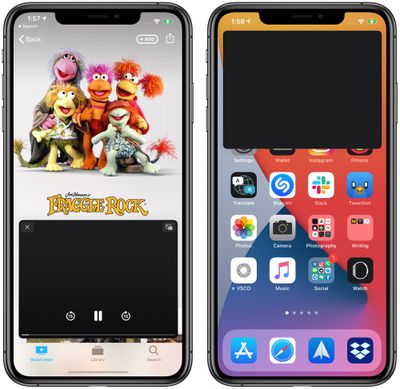
pictureinpictureappletv

Picture in Picture in the Apple TV app. Content is black because Apple does not allow screenshots of movies and TV shows.

In a compatible app, which includes Apple's apps such as ‌Apple TV‌, you can tap on the Picture in Picture icon available at the top of the app to activate Picture in Picture mode, double tap on the video with two fingers, or swipe upward from the bottom of the iPhone's display to activate Picture in Picture mode.

Exiting out of Picture in Picture Mode and returning to full screen mode with the app reopened can be done by tapping on the same icon in the upper right corner of the Picture in Picture window or double tapping with two fingers. Closing the Picture in Picture window and existing out of the app can be done by tapping on the X in the left corner.
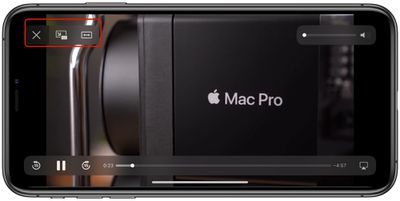
pictureinpicturecontrols
Picture in Picture mode controls for apps that play television and movie content include play/pause and an option to tap to skip 15 seconds forward and 15 seconds back.

Apple's apps that work with Picture in Picture include anything with a video feed, such as ‌Apple TV‌+ or video footage from HomeKit-enabled cameras in the Home app.

YouTube Picture in Picture

YouTube, unfortunately, has not implemented Picture in Picture support yet, so the YouTube app doesn't work with the feature. There are some doubts that YouTube will ever support this feature, but YouTube has been testing it on the ‌iPad‌. Fortunately, there is a workaround for now, using YouTube on the web.

Using Picture in Picture on the Web

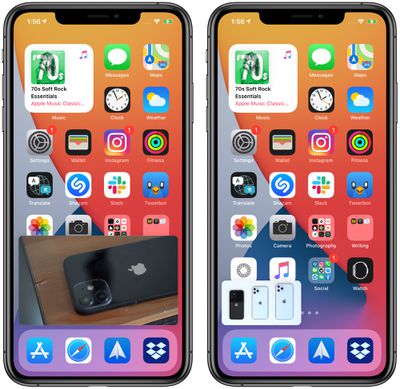
Picture in Picture with the Safari app works with almost any video and website developers don't need to implement support. On a site with a video, tap to play the video and then tap the Picture in Picture icon or do a two finger double tap on the video. You can also swipe upwards from the bottom of the iPhone to activate Picture in Picture.
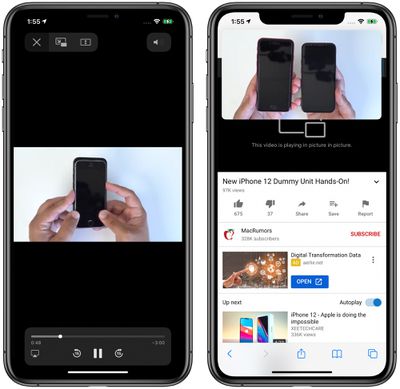
pictureinpicturesafari2
There are some video types that don't work, such as the videos that some sites embed in webpages, so there may need to be some tweaks to some websites before those kinds of videos can be used in Picture in Picture mode. It is compatible with videos from sites like YouTube and Vimeo, however, so websites that use these embeds will have content compatible with Picture in Picture.
pictureinpicturesafari
Note that to use Picture in Picture mode with Safari, if you want to continue browsing another website while a video plays, you need to open a new Safari tab.

Using Picture in Picture with FaceTime

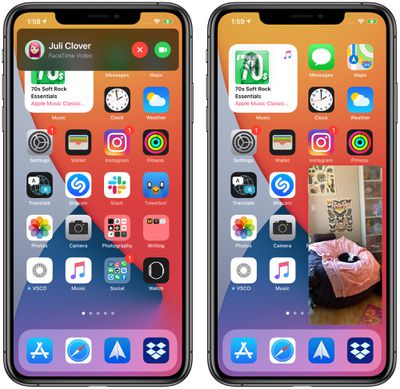
Picture in Picture works with ‌FaceTime‌ in iOS 14, and that's perhaps the most useful way to take advantage of it. In iOS 13, if you need to do something on your phone, you have to swipe out of the ‌FaceTime‌ window, which pauses your video for the person you're speaking with.
pictureinpicturefacetime
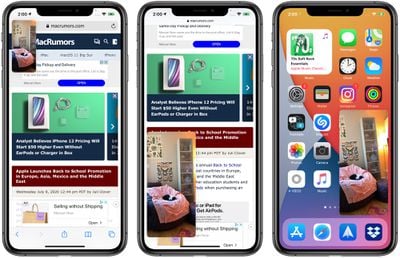
In iOS 14, if you swipe out of a ‌FaceTime‌ call it automatically minimizes into a Picture in Picture window that continues to be visible even while you access other apps so you and the other person you're talking to can continue your conversation without the iPhone being otherwise unusable.

You can double tap on the ‌FaceTime‌ window to change its size from large to medium or small and then back again, and if you just single tap the Picture in Picture window expands back to the full size of the iPhone's display. You can also move the Picture in Picture window to the optimal spot on the screen.
pictureinpicturefacetime2

Customizing Picture in Picture Window Size and Position

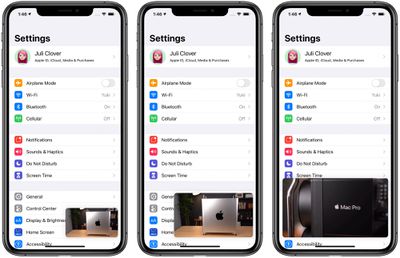
You can double tap on any Picture in Picture window or use pinch gestures to change the Picture in Picture window size. There are three sizes to choose from: small, medium, and large.
pictureinpicturesizes
The small window is about the size of two app icons, the medium is as wide as about three app icons and as tall as one and a half, while the largest window is the size of eight app icons.

All of the windows are shown in a landscape orientation on the iPhone's Home Screen with the exception of ‌FaceTime‌, which is shown in portrait mode.

Picture in Picture windows can be used with almost any app or while on the ‌Home Screen‌. The small and medium windows can be moved to any corner of the iPhone's display, while the large Picture in Picture window can be placed at the top or the bottom of the screen.

Moving the Picture in Picture Window Off Screen

You can pull a Picture in Picture window of any size over to the side of the iPhone with drag and drop gestures, moving it off of the screen.
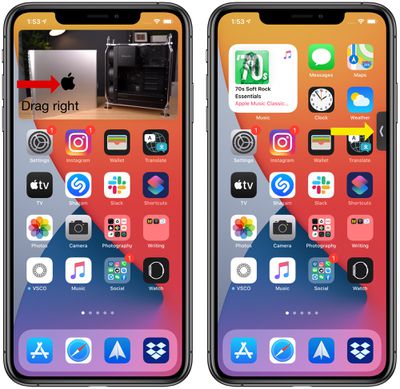
pictureinpicturecollapse
With the Picture in Picture window off screen, you will continue to hear the audio from the video or ‌FaceTime‌ call, but it won't be visible on the iPhone's display.

Guide Feedback

Have questions about the Picture in Picture mode on the iPhone, know of a feature we left out, or want to offer feedback on this guide? Send us an email here.


Related Forum: iOS 14

Popular Stories

duo aquarium

More Fun iPhone Duo Apps: 30 New Picks to Try

Friday November 6, 2026 3:27 pm PST by
When the iPhone Duo launched, we shared a list of some of the fun apps developers created for the new form factor. Two weeks out, developers are continuing to come up with fresh ideas, so we thought we'd share some of our favorites. Games Marbles Unhinged ($2.99) - Marbles Unhinged is a marble maze designed for the Duo. When you fold it, the floor turns into a ramp. If you stand the top...
apple pro tell logo

Apple Launching Five New Products Today

Thursday November 5, 2026 12:59 am PST by
Apple is launching five new products on Friday, November 6, following pre-orders that opened last week, including its first touchscreen MacBook Pro models. The following new products will be available from today: iPad mini with OLED display and A20 Pro chip iMac with M6 chip 14-inch MacBook Pro with M6 chip 14-inch MacBook Pro with OLED touchscreen 16-inch MacBook Pro with OLED...
silver iphone 18 pro

Apple Rumored to Drop the iPhone's Action Button Next Year

Friday November 6, 2026 6:07 am PST by
Apple plans to merge the iPhone's Action button with the Camera Control starting next year, according to the leaker known as "Instant Digital." In a new post on Weibo, the leaker claimed that a single press of the combined button would open the camera, while a long press would trigger the function assigned to the Action button. They explicitly clarified that the dedicated Action button would ...

Top Rated Comments

BulkSlash Avatar
83 months ago
Not to be that guy, but picture-in-picture has been available on the iPad since iOS 9 not iOS 13. I‘m pleased we’re finally getting it on iPhone.

I’ve now deleted the YouTube app and am just using the website because you can do picture-in-picture with that. It even seems to support auto-playing the next video so you don’t have to keep switching back to Safari to start the next video, which is really good.

Score: 10 Votes (Like | Disagree)
Rogifan Avatar
83 months ago
Apple needs to mandate that video apps support PIP. It’s ridiculous that Google doesn’t have to support an OS feature because they want to charge you for it.
Score: 9 Votes (Like | Disagree)
Apple_Robert Avatar
83 months ago

Hope they introduce the corresponding feature for people on the other end -- Auto Disconnect if more than one thing is showing on the other person's phone!

Just what we need. Calling someone up and they're watching a video, playing a game, and saying "Uh-huh", "uh-huh" every now and then!

No, thank you! It'll be as bad as people who put you on hold to take the other call!
All of the responders to your post are busy assisting other forum members. Your post is very important to us. Please remain on MacRumors constantly refreshing the page and someone will be with you shortly. We appreciate your patience and thank you for choosing MacRumors.
Score: 6 Votes (Like | Disagree)
arn Avatar
83 months ago

Actually Video overlay, can two videos be played at once?
In some situations yes. YouTube safari and YouTube app didn’t work. But YouTube video and Instagram video with both audio works!

[Click to view video attachment]
Score: 6 Votes (Like | Disagree)
Apple_Robert Avatar
83 months ago
This works the same on iPadOS. I have used the feature more than I thought I would on my iPad Pro. My SE is too small for such a feature to be practical.
Score: 5 Votes (Like | Disagree)
jclo Avatar
83 months ago

This works the same on iPadOS. I have used the feature more than I thought I would on my iPad Pro. My SE is too small for such a feature to be practical.
Yeah, makes more sense on the iPad's larger display, but it's especially handy for FaceTime on all devices.
Score: 4 Votes (Like | Disagree)
Latest Stories
Siri AI Rumored to Become 'More Like an Agent' as Early as Next Year
8 hours ago
Apple Taking New Approach to Developing iOS 28 and macOS 28
10 hours ago
Early Apple Black Friday Deals on Apple Watch, MacBook Air, and More
1 day ago
'Backglow' Lets You Customize New MacBook Pro's Glowing Apple Logo
1 day ago
Top Stories: Apple Product Launches, iOS 27.3 Beta, and More
1 day ago
More Fun iPhone Duo Apps: 30 New Picks to Try
2 days ago
Hands-On With Apple's New OLED Touchscreen MacBook Pro
2 days ago
Apple Store With All-New Design Opening Soon in Southern California
2 days ago
Control the Glowing Apple Logo on Your New MacBook Pro
2 days ago
Apple Shares New 'Apple Card: Apply and Use in Minutes' Ad
2 days ago
Apple Says More Than 100,000 Apps Optimized for iPhone Duo, Here's What's Still Missing
2 days ago
Early Black Friday Deals Kickoff With Steep Discounts on Apple Watch Ultras and More
2 days ago
The MacRumors Show: iOS 27.3 Looks Like a Huge Update
2 days ago
Best Buy's Black Friday Event Begins With Sitewide Savings on Apple, TVs, More
2 days ago
Apple Releasing Yet Another Two New Products Next Week
2 days ago
MacBook Air Drops to Lowest Price in Months With Amazon's $250 Discount
2 days ago
Apple Rumored to Drop the iPhone's Action Button Next Year
2 days ago
Apple's Extended Return Policy Now in Effect for 2026 Holiday Season
2 days ago
Apple Music Classical Updated With New Icon and Refreshed Design
3 days ago
OLED iPad Mini, M6 iMac, and New MacBook Pros Available From Today
3 days ago
Apple Surveys iPhone Duo Buyers About Crease and Camera
3 days ago
Apple's First Touchscreen Mac is Now Arriving to Customers
3 days ago
Claude Gets Personal Finance Feature With Bank Account Linking
3 days ago
Apple Arcade Adds Crossy Road Rush and NBA 2K27
3 days ago
Apple's New HomeView Smart Home Hub: Here's How Much RAM It Has
3 days ago
iPad Mini vs. iPad Air Buyer's Guide: Now Just $50 Apart
3 days ago
First iOS 27.3 and macOS Golden Gate 27.3 Public Betas Now Available
3 days ago
Apple Announces a New Mac Sales Record
3 days ago
Paid $200 for Logic Pro? Apple Says You Won't Get This New Feature
3 days ago
Instagram's Edits Video Editor is Now Available on Mac
3 days ago








































