

Apple's new Mac mini and MacBook Pro models powered by M4 Pro and M4 Max chips introduce Thunderbolt 5 connectivity to the Mac lineup for the first time, bringing the first major bandwidth increase since Thunderbolt 3 debuted in 2015. While this next-generation standard promises significant improvements, understanding its specific benefits can help you decide whether it's really essential for your needs.
Let's take a closer look at Thunderbolt 5 – what it does, whether it's necessary, and which accessories leverage the latest standard.
Thunderbolt 5: What It Does
Thunderbolt 5 doubles the standard data transfer speed to 80 Gbps in both directions, with a special "Bandwidth Boost" mode reaching up to 120 Gbps for video-intensive tasks. This asymmetrical mode allocates 120 Gbps to display data while maintaining 40 Gbps for other data transfers, effectively tripling the bandwidth compared to Thunderbolt 4. The standard also increases maximum power delivery to 240W, up from Thunderbolt 4's 100W limit, enabling faster charging for power-hungry devices like the 16-inch MacBook Pro.
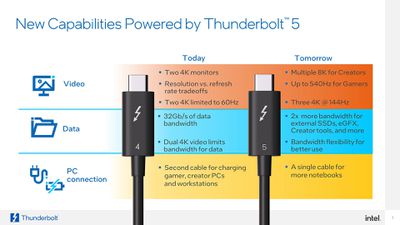
The increased bandwidth supports more demanding display configurations for M4 Pro and M4 Max-powered Macs. Thunderbolt 5 also incorporates DisplayPort 2.1, enabling features like 4K displays at 240Hz refresh rates, for smoother motion during gaming and video playback. Like previous versions, the standard maintains backward compatibility with older Thunderbolt standards and USB devices, including the latest USB4 2.0 specification.
Latest Macs With Thunderbolt 5
Apple's latest Mac models featuring Thunderbolt 5 offer enhanced external display support, varying by specific chip configuration. Both the Mac mini with M4 Pro chip and MacBook Pro with M4 Pro or M4 Max chip provide three Thunderbolt 5 ports. Here's a detailed breakdown of what's capable in terms of display configurations:
MacBook Pro Models
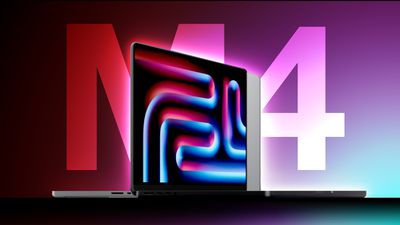
- MacBook Pro with M4 Pro Chip:
- Supports up to two external displays:
- Two displays with up to 6K resolution at 60Hz over Thunderbolt.
- One display with up to 6K resolution at 60Hz over Thunderbolt and one display with up to 4K resolution at 144Hz over HDMI.
- Alternatively, supports one external display:
- One display with up to 8K resolution at 60Hz over HDMI.
- One display with up to 4K resolution at 240Hz over HDMI.
- MacBook Pro with M4 Max Chip:
- Supports up to four external displays:
- Three displays with up to 6K resolution at 60Hz over Thunderbolt and one display with up to 4K resolution at 144Hz over HDMI.
- Alternatively, supports up to three external displays:
- Two displays with up to 6K resolution at 60Hz over Thunderbolt and one display with up to 8K resolution at 60Hz or one display with up to 4K resolution at 240Hz over HDMI.
Mac mini Models
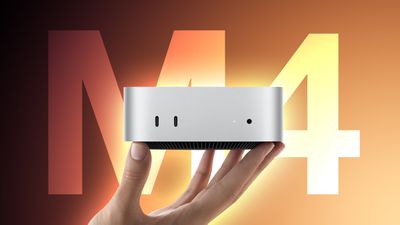
- Mac mini with M4 Pro Chip:
- Supports up to three external displays:
- Three displays with up to 6K resolution at 60Hz over Thunderbolt.
- Alternatively, supports one external display:
- One display with up to 8K resolution at 60Hz or one display with up to 4K resolution at 240Hz over HDMI.
Note that the Mac mini with the standard M4 chip features Thunderbolt 4 ports and supports up to three external displays, with specific configurations as detailed in Apple's technical specifications.
Do I Need Thunderbolt 5?
For most users performing everyday tasks like web browsing, document editing, or even photo editing, Thunderbolt 4's 40 Gbps bandwidth remains more than adequate. Even 4K video editing and working with large file sizes works smoothly with Thunderbolt 4 connections, as many professionals will attest. The new Mac mini and base 14-inch MacBook Pro with M4 chip includes Thunderbolt 4 ports that should serve most of these users.
It's worth considering Thunderbolt 5 if you work with 8K video, require multiple high-resolution displays, or regularly transfer extremely large files. The technology will be particularly beneficial if you work with virtual reality, 3D rendering, or high-end video production where every bit of bandwidth matters. However, remember that taking full advantage of Thunderbolt 5 requires compatible peripherals, which are just beginning to enter the market and typically command premium prices.
For most users, the presence of Thunderbolt 5 shouldn't be the deciding factor when choosing between M4 and M4 Pro/Max Macs. The standard M4 models with Thunderbolt 4 will continue to serve the majority of users well, making Thunderbolt 5 a "nice-to-have" rather than a necessity for typical Mac buyers. The technology's true benefits will likely become more apparent as compatible peripherals become more available and affordable over time.
- 14-Inch vs. 16-Inch MacBook Pro Buyer's Guide 2024
- M4 vs. M4 Pro vs. M4 Max Chip Buyer's Guide: Which Should You Choose?
- M1 vs. M2 vs. M3 vs. M4 MacBook Pro Buyer's Guide: 30+ Differences Compared
Thunderbolt 5 Accessories
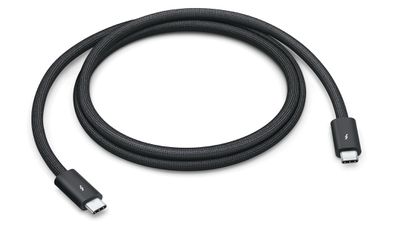
The first wave of Thunderbolt 5 peripherals is beginning to arrive. Apple's Thunderbolt 5 Pro Cable ($69) features a braided black design, supports the full 120 Gbps bandwidth and 240W power delivery, while maintaining backward compatibility with Thunderbolt 3/4 and USB standards.
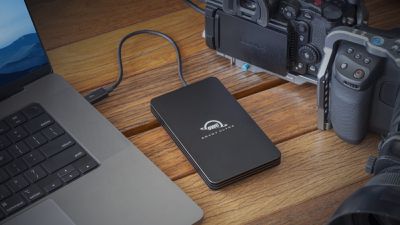
For storage, OWC's Envoy Ultra external SSD achieves speeds over 6GB per second – double that of previous Thunderbolt drives – and comes in 2TB ($399.99) and 4TB ($599.99) configurations with a built-in Thunderbolt cable.
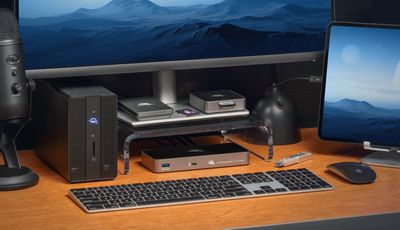
Lastly, OWC's Thunderbolt 5 Hub ($189.99) expands a single port into three Thunderbolt 5 ports and one USB-A port, supporting up to 140W power delivery – enough to charge a 16-inch MacBook Pro. The hub enables three separate device daisy chains and can drive up to three 8K displays at 60Hz with Display Stream Compression. Its aluminum enclosure uses passive cooling for silent operation, making it suitable for noise-sensitive environments like recording studios.















