How to Prevent Unsolicited AirDrops to Your Apple Device - MacRumorsOpen MenuShow RoundupsShow Forums menuVisit ForumsOpen Sidebar
Skip to Content

How to Prevent Unsolicited AirDrops to Your Apple Device

by

ios12 airdrop topic iconSince its introduction with iOS 7, AirDrop has become the favored means for iPhone and iPad users to instantly share photos, videos, documents, and more to nearby Apple devices over Wi-Fi and Bluetooth. Using it to transmit content from apps like Photos and Safari couldn't be simpler, thanks to its top-level location in the iOS Share Sheet, accessed via the ubiquitous Share icon.

AirDrop is popular with all sorts of users, from teenagers who use it to flirt or share innocent memes in public places like concerts and festivals, to professionals who AirDrop project materials to each other across the office. Unfortunately, however, the way AirDrop currently works also leaves it wide open to abuse.

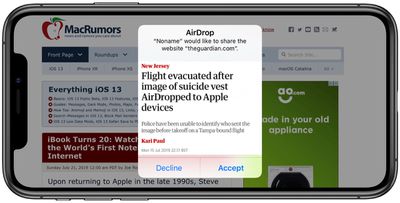
Technically, iOS doesn't allow just anyone to share a photo or document to your device unless you actively choose to accept it. The problem with AirDrop though is that it displays a preview of the proposed shared content on your device's screen, whether or not you actually want to see it.

Riders on New York City's subways often report being subjected to unsolicited nude images sent over AirDrop in this way. In fact the problem is so bad that NYC lawmakers introduced a bill last year that would make it illegal "for a person to send an unsolicited sexually explicit video or image to another person with intent to harass, annoy or alarm such other person."
how to protect yourself from airdrop harassment 1
But finding and prosecuting an AirDrop offender would be extremely difficult. The problem is that when someone attempts to send something to you over AirDrop, iOS identifies them by their device's name. However, the name of a device can be changed by its user at a moment's notice, which would make it almost impossible for the average user to know where the AirDropped content came from.

Protecting Yourself From AirDrop Harassment

To protect yourself from receiving unsolicited content in a public place, you could disable AirDrops to your device by turning off Wi-Fi and Bluetooth, but this limits you unnecessarily when you consider that Apple lets you control who can see your device and send you content using AirDrop.

There are two active settings for AirDrop: You can set it to accept shares from anyone, or only from people whose email address or mobile number appears in your contacts. Alternately, you can turn off the feature completely. You can use these settings to ensure that you don't become the unwitting victim of an unsolicited AirDrop share. Keep reading to learn how.

How to Restrict AirDrop in iOS

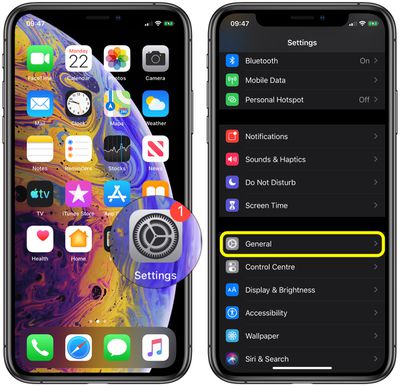
  1. Launch the Settings app on your iPhone or ‌iPad‌.
  2. Scroll down and tap General.
    how to protect yourself from AirDrop harassment 2

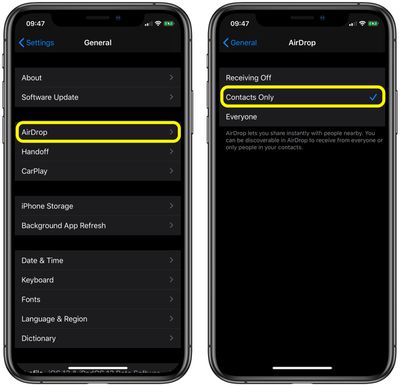
  3. Tap AirDrop.
    airdrop

  4. Tap Contacts Only or Receiving Off.

How to Restrict AirDrop via Control Center

You can also set your AirDrop options in Control Center. Here's how:

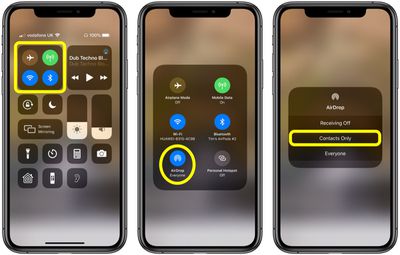
  1. Open Control Center on your device in the following way: On an ‌iPad‌ with a Home button, double-tap the Home button; on iPhone 8 or earlier, swipe up from the bottom of the screen; and on a 2018 iPad Pro or iPhone X/XR/XS/XS Max, swipe down from the upper right of the screen.
    how to protect yourself from airdrop harassment

  2. Press firmly or touch and hold the network settings card in the upper-left corner.
  3. Tap AirDrop.
  4. Tap Contacts Only or Receiving Off.

How to Restrict AirDrop in macOS

If you've been the victim of AirDrop harassment on a Mac at work (in an open plan office, for instance) here's how to restrict who can share content with you in macOS.

  1. Open a Finder window on your Mac.
  2. Select AirDrop from the Finder sidebar (if AirDrop isn't listed, use the keyboard combination Command-Shift-R to open it.
    how to protect yourself from airdrop harassment 3

  3. Click the setting prefaced with Allow me to be discovered by: and select Contacts Only or Receiving Off from the drop-down menu.
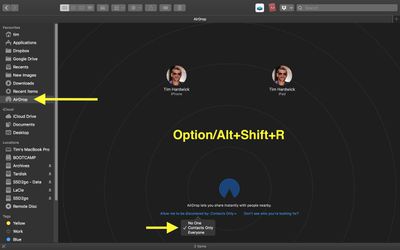
If you're a regular user of AirDrop in macOS and regularly open it in Finder, consider adding an AirDrop shortcut to your Dock for one-click access to it from any screen.


Tag: AirDrop

Top Rated Comments

Loge Avatar
95 months ago
But the obvious solution, "disable Airdrop preview" does not exist!
Score: 10 Votes (Like | Disagree)
95 months ago
TLDR set airdrop to contacts only

Job done!
Score: 6 Votes (Like | Disagree)
H3LL5P4WN Avatar
95 months ago
With this story, MacRumors is killing my favorite way to prove to strangers that Bigfoot is watching over them.
Score: 6 Votes (Like | Disagree)
kycophpd Avatar
95 months ago
With this story, MacRumors is killing my favorite way to hook up on a subway.
Score: 6 Votes (Like | Disagree)
MisterSavage Avatar
95 months ago
I’m actually surprised at the number of people that purposely leave airdrop set to everyone... it would also use more battery even if it’s a small amount
The kids like it!

https://www.businessinsider.com/teens-using-apple-airdrop-instead-of-snapchat-and-instagram-2015-1

Isn't Airdrop just bluetooth sharing like it was on the Nokia phones days?

Plus, why use Airdrop when the internet is so fast today you can send the images over any IMs or email
No. It uses a combination of bluetooth and its own local Wifi network. It doesn't require any cellular or existing Wifi networks and you can send huge files like video. Was incredibly useful when traveling overseas where connectivity was spotty and I wanted to share files with others. I can also send/receive a large amount of pictures at their full size and resolution using AirDrop.
Score: 2 Votes (Like | Disagree)
wesk702 Avatar
95 months ago
TLDR set airdrop to contacts only

Job done!
I don’t know why, but I have it set to everyone cause whenever I select “contacts only” it never consistently sees my devices.
Score: 2 Votes (Like | Disagree)

Popular Stories

duo aquarium

More Fun iPhone Duo Apps: 30 New Picks to Try

Friday November 6, 2026 3:27 pm PST by
When the iPhone Duo launched, we shared a list of some of the fun apps developers created for the new form factor. Two weeks out, developers are continuing to come up with fresh ideas, so we thought we'd share some of our favorites. Games Marbles Unhinged ($2.99) - Marbles Unhinged is a marble maze designed for the Duo. When you fold it, the floor turns into a ramp. If you stand the top...
apple pro tell logo

Apple Launching Five New Products Today

Thursday November 5, 2026 12:59 am PST by
Apple is launching five new products on Friday, November 6, following pre-orders that opened last week, including its first touchscreen MacBook Pro models. The following new products will be available from today: iPad mini with OLED display and A20 Pro chip iMac with M6 chip 14-inch MacBook Pro with M6 chip 14-inch MacBook Pro with OLED touchscreen 16-inch MacBook Pro with OLED...
silver iphone 18 pro

Apple Rumored to Drop the iPhone's Action Button Next Year

Friday November 6, 2026 6:07 am PST by
Apple plans to merge the iPhone's Action button with the Camera Control starting next year, according to the leaker known as "Instant Digital." In a new post on Weibo, the leaker claimed that a single press of the combined button would open the camera, while a long press would trigger the function assigned to the Action button. They explicitly clarified that the dedicated Action button would ...


Latest Stories
Siri AI Rumored to Become 'More Like an Agent' as Early as Next Year
9 hours ago
Apple Taking New Approach to Developing iOS 28 and macOS 28
11 hours ago
Early Apple Black Friday Deals on Apple Watch, MacBook Air, and More
1 day ago
'Backglow' Lets You Customize New MacBook Pro's Glowing Apple Logo
1 day ago
Top Stories: Apple Product Launches, iOS 27.3 Beta, and More
2 days ago
More Fun iPhone Duo Apps: 30 New Picks to Try
2 days ago
Hands-On With Apple's New OLED Touchscreen MacBook Pro
2 days ago
Apple Store With All-New Design Opening Soon in Southern California
2 days ago
Control the Glowing Apple Logo on Your New MacBook Pro
2 days ago
Apple Shares New 'Apple Card: Apply and Use in Minutes' Ad
2 days ago
Apple Says More Than 100,000 Apps Optimized for iPhone Duo, Here's What's Still Missing
2 days ago
Early Black Friday Deals Kickoff With Steep Discounts on Apple Watch Ultras and More
2 days ago
The MacRumors Show: iOS 27.3 Looks Like a Huge Update
2 days ago
Best Buy's Black Friday Event Begins With Sitewide Savings on Apple, TVs, More
2 days ago
Apple Releasing Yet Another Two New Products Next Week
2 days ago
MacBook Air Drops to Lowest Price in Months With Amazon's $250 Discount
3 days ago
Apple Rumored to Drop the iPhone's Action Button Next Year
3 days ago
Apple's Extended Return Policy Now in Effect for 2026 Holiday Season
3 days ago
Apple Music Classical Updated With New Icon and Refreshed Design
3 days ago
OLED iPad Mini, M6 iMac, and New MacBook Pros Available From Today
3 days ago
Apple Surveys iPhone Duo Buyers About Crease and Camera
3 days ago
Apple's First Touchscreen Mac is Now Arriving to Customers
3 days ago
Claude Gets Personal Finance Feature With Bank Account Linking
3 days ago
Apple Arcade Adds Crossy Road Rush and NBA 2K27
3 days ago
Apple's New HomeView Smart Home Hub: Here's How Much RAM It Has
3 days ago
iPad Mini vs. iPad Air Buyer's Guide: Now Just $50 Apart
3 days ago
First iOS 27.3 and macOS Golden Gate 27.3 Public Betas Now Available
3 days ago
Apple Announces a New Mac Sales Record
3 days ago
Paid $200 for Logic Pro? Apple Says You Won't Get This New Feature
3 days ago
Instagram's Edits Video Editor is Now Available on Mac
3 days ago