

Apple's AirTags have a built-in safety feature that's designed to prevent them from being used to track you, so no one can plant an AirTag in your items and then monitor your location without your awareness.
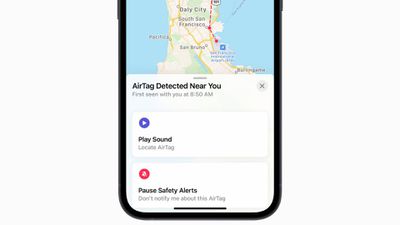
If there is an AirTag that does not belong to you near you for an extended period of time, your Apple device will alert you with the following notification: "AirTag Found Moving With You."
That may mean that you've borrowed an item with an AirTag, you're near a lost item with an AirTag, or someone has placed an AirTag in your belongings. This how to covers what you should do if you see this message.
- When the "AirTag Found Moving With You" message pops up, tap on the message.
- Tap Continue.
- If you don't know where the AirTag is located, tap on "Play Sound" to locate it.
- If the AirTag is attached to an item that you've borrowed from someone, tap on the option to disable "AirTag Detected" notifications for one day. If the item is from a friend or a member of your Family Sharing group, you can disable Item Safety Alerts entirely.
- You can tap on "Learn About This AirTag" to check its serial number to see if it's been marked as lost, and if so, find instructions for getting in contact with the owner.
- If the AirTag is not in Lost Mode and you don't know where it came from, you should tap on "Disable AirTag" and follow the steps to prevent it from continuing to track your location.
- These instructions will walk you through removing the AirTag's battery to disable it.
- Apple recommends that if you feel unsafe, you should contact your local law enforcement for help, as local law enforcement can work with Apple.
When you see an "AirTag Found Moving With You" message, it means that the owner of the AirTag may be able to see the location of the AirTag on their Apple devices, and by proxy, your location. It's important to address any alerts you receive right away for this reason.
In general, you will receive an alert about an unknown AirTag when you move from one location to another, such as traveling home or to another place that you frequent, as long as the AirTag remains in your possession.
Apple says that if you receive this alert and can't find the AirTag, it might not be with you anymore, but there are privacy features that might mask an AirTag if you attempt to play a sound using an old notification.
All AirTags have a Bluetooth identifier associated with them, but this identifier is designed to change regularly. If you had an AirTag with you overnight, for example, by the time you notice the notification in the morning, the identifier might have changed and you won't be able to make it play a sound for location purposes.
In this situation, Apple recommends looking through all of your belongings to make sure the AirTag isn't there, or waiting to see if another alert appears as you move from location to location during the day.
You should also be aware that after three days away from its owner, an AirTag will begin regularly emitting a sound, which is another anti-tracking function. If you have an AirTag with you, you may continually hear the noise from the AirTag, preventing it from remaining hidden.
Note that following Apple's instructions to remove the battery from an AirTag to disable it is the only way to get an AirTag to stop tracking you short of getting rid of the AirTag. Putting the battery back in and resetting the AirTag will allow the owner of the AirTag to continue to track it.



















