

Apple TV 4K: Play Game Console or Cable Box Audio on HomePod - MacRumorsOpen MenuShow RoundupsShow Forums menuVisit ForumsOpen Sidebar
Skip to Content

Apple TV 4K: Play Game Console or Cable Box Audio on HomePod

by

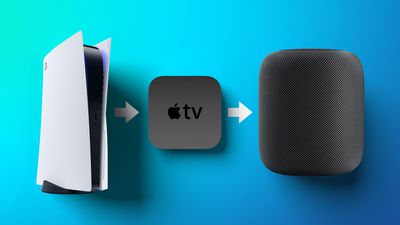
The Apple TV 4K (second- and third-generation) is capable of relaying audio from a compatible TV to a HomePod – even when you're not using your Apple TV. This allows you to stream audio from a TV-connected game console or other set-top box straight to Apple's smart speakers. Keep reading to learn more and how to set it up.
PS5 AppleTV and HomePod Feature
The second- and third-generation Apple TV 4K supports two additional connection standards, called ARC and eARC. ARC (Audio Return Channel) is a feature of HDMI 1.4 that enables audio from a device to be sent to a compatible TV and relayed through its HDMI port to a separate audio receiver, speaker, or sound bar. Meanwhile, eARC (enhanced ARC) adds support for the passthrough of higher bandwidth audio like Dolby Atmos, as well as 5.1 and 7.1 surround sound.

On Apple TV 4K, ARC and eARC support effectively allows a HomePod or HomePod mini (or stereo-paired Homepods in a Home Theater Audio setup) to play audio from other TV-connected devices like a cable box, PS5, or Xbox Series X. The following steps show you how to get it set up.

Set Up ARC or eARC on Apple TV 4K

Make sure that your TV supports ARC or eARC. You can check if it does by seeing if there's an ARC label next to the HDMI port that your Apple TV is connected to. Alternatively, check your TV manual or try contacting the TV manufacturer.

  1. On your Apple TV, launch the Settings app.
  2. Select Video and Audio ➝ Audio Output.

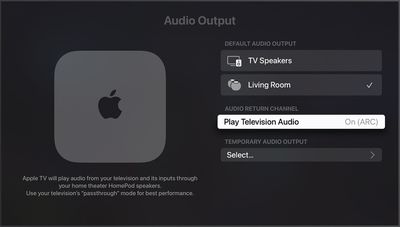
  3. Under "Default Audio Output," make sure the HomePod(s) in the same room as your TV are selected.
  4. Under "Audio Return Channel," select Play Television Audio. You'll know ARC or eARC is enabled when it says On (ARC) or On (eARC).
settings

If ARC or eARC doesn't work for you after following the above steps: assuming your TV supports the standard, check whether you need to turn on ARC, eARC, or HDMI-CEC in your TV's settings.


Related Roundup: Apple TV
Buyer's Guide: Apple TV (Don't Buy)

Popular Stories

tvOS 27 Feature

Apple Seeds tvOS 27 Beta 2 to Developers

Monday June 22, 2026 10:06 am PDT by
Apple today seeded the second beta of tvOS 27 to developers for testing purposes, with the update coming two weeks after Apple released the first beta following the WWDC keynote. The beta can be downloaded and installed through the Settings app on the Apple TV. A free developer account is required. tvOS 27 has few new features compared to the other 27 software updates, but it does add a...
General visionOS watchOS and tvOS Betas Feature Redux

Apple Releases Third watchOS 26.6, tvOS 26.6 and visionOS 26.6 Betas

Monday June 29, 2026 10:08 am PDT by
Apple today provided developers with the third betas of upcoming watchOS 26.6, tvOS 26.6, and visionOS 26.6 betas for testing purposes. The software comes two weeks after Apple seeded the second betas. The software updates are available through the Settings app on each device, and because these are developer betas, a free developer account is required. There's no word on what's in the...
Apple TV 2025 Thumb 2 Sans Text

iOS 27 Lets You Update Your Apple TV Using Your iPhone

Tuesday June 23, 2026 9:09 am PDT by
If the idea of digging out your Siri Remote to install a tvOS update on your Apple TV sounds like too much effort, Apple's upcoming iOS 27 software will have a new feature you'll surely welcome. Based on the latest iOS 27 beta 2, you can push Apple TV software updates straight from your iPhone, and you don't even need to turn the Apple TV on first. Apple's set-top box now appears in the...













