How to Get the Most Accurate Heart Rate Reading on Apple Watch - MacRumorsOpen MenuShow RoundupsShow Forums menuVisit ForumsOpen Sidebar
Skip to Content

How to Get the Most Accurate Heart Rate Reading on Apple Watch

by

Apple Watch features a heart rate monitor to help guide you through your workout sessions, tracking your heart rate while you exercise to better determine the amount of calories you burn during your activities.

The monitor also automatically tries to measure your heart rate every 10 minutes, but doesn’t record the data if your arm is moving. That is why your Health app doesn't reflect a reading at every 10 minutes on the dot, but shows varying intervals of readings.
Apple Watch Heart Rate Monitor 1
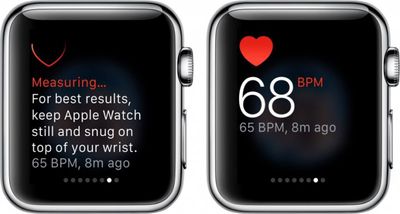
If you want to get a quick, accurate measurement of your heart rate manually you can do so in Glances.

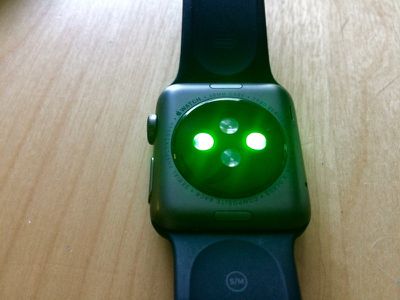
The heart rate sensor is on the backside of the Apple Watch case and is made up of two different sets of special lights that monitor the blood flow through your wrist. Because the sensors absorb light through your skin, there are a few factors that affect the accuracy of a heart rate reading.
Apple Watch Heart Rate Sensor 2
By following a few tips, as well as calibrating Apple Watch for workouts, you will get a better heart rate reading, thus improving the device's ability to more determine how many calories you burn.

A Proper Fit

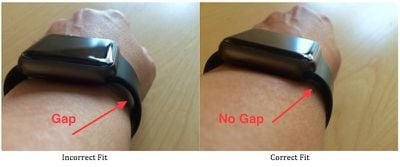
As simple as it sounds, a good fit is key to getting an accurate heart rate reading. Some people don't like the way it feels to have their watch snug on their wrist, but for the purposes of a proper reading, you'll need to keep it tight. When you hold your wrist out, there should be no gap between Apple Watch and your skin.
Apple Watch Correct Fit
If the feeling is just too uncomfortable for you to wear the device snug to your wrist, it might be a good idea to adjust the band differently for different activities. If you are working out, tighten it up one notch until you are done.

Avoid Cold Weather Workouts

The heart rate sensor is affected by how much blood flows through your skin. In cold weather, we tend to produce less blood flow near the surface of the skin as the blood is rerouted to warm more important parts of our bodies (it is why our fingers and noses get so cold). Some people enjoy jogging in the snow, but keep in mind that this may have an affect on an accurate heart rate reading from your Apple Watch.

Avoid Irregular Motion

Apple Watch gets a better reading when you've calibrated it by walking or running for 20 minutes. It tracks the rhythm of your movement and adjusts its data accordingly.

However, irregular movement, like playing tennis or boxing, will confuse the sensor and reduce its accuracy. So, for such workouts that have you swinging your arms wildly, be aware that your heart rate reading may not be as accurate as you would like.

Troubleshooting

If, for some reason, the heart rate monitor on your Apple Watch stops working, you may need to restart or reset the device.
Apple Watch Erase All Settings

  1. Press and hold the Side button until the power off slider bar appears and slide it to turn off Apple Watch.
  2. Press and hold the Side button again until the Apple Watch logo appears.

If that does not work, try resetting your Apple Watch.

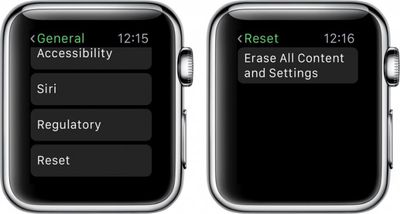
  1. On Apple Watch, open the Settings app and tap General.
  2. Tap Reset. Then tap "Erase All Content and Settings."
  3. Re-pair Apple Watch with your iPhone.

Although it is not an exact science, the heart rate monitor on Apple Watch is a useful way of tracking your activities and getting a better estimate on how many calories you burn. Following the tips above will improve accuracy of the light-absorbing sensors.


Related Roundup: Apple Watch 12
Buyer's Guide: Apple Watch (Buy Now)
Related Forum: Apple Watch

Top Rated Comments

Iconoclysm Avatar
149 months ago
That gap/no gap method is incorrect as this differs greatly depending on the shape of your wrist. If the watch is snug, it's snug, if it can't move around...it can't move around. For some people, that will mean there is a gap in the band. The watch itself is raised up, if you have a slimmer wrist, it is absolutely impossible to remove that gap.
Score: 6 Votes (Like | Disagree)
0098386 Avatar
149 months ago
Step 1) don't have a sleeve tattoo.
Score: 4 Votes (Like | Disagree)
nick42983 Avatar
146 months ago
The heart rate monitor is pretty much useless when I'm lifting weights (especially HIIT).

When I'm on the treadmill at a steady pace, the Apple Watch most often is spot on with what the machine says my heart rate is.

However, when I'm lifting weights w/ a lot of movement, I can feel my heart rate is at least over 150bpm, but the Apple Watch freaks out and says I have "37bpm" or "87bpm" or can't read. It's very frustrating.

Does hair on the wrist effect it at all?
I've had the same problems with weightlifing. Sometimes I'll simply exit out of the workout app and go to the HR monitor in glances until it gets the right reading and then go back to the workout app and it will update with the proper measurement. When it's accurate it's great, but I feel that 30%+ of my gym calories burned aren't being measured.
Score: 1 Votes (Like | Disagree)
149 months ago
The heart rate monitor is pretty much useless when I'm lifting weights (especially HIIT).

When I'm on the treadmill at a steady pace, the Apple Watch most often is spot on with what the machine says my heart rate is.

However, when I'm lifting weights w/ a lot of movement, I can feel my heart rate is at least over 150bpm, but the Apple Watch freaks out and says I have "37bpm" or "87bpm" or can't read. It's very frustrating.

Does hair on the wrist effect it at all?
Score: 1 Votes (Like | Disagree)

Popular Stories

apple watch series 3 design

Apple Offers Steps to Fix Daylight Saving Time Bug on Apple Watch

Sunday November 1, 2026 3:34 am PST by
Apple has published a support document describing what to do if your Apple Watch continues to show time that's off by one hour after daylight savings time changes. "This incorrect time appears only on the Always On display when your wrist is down," says Apple. "When you activate the display by tapping it or raising your wrist, the time changes to the correct hour." To fix the issue, Apple says ...
siri recap live rewind

watchOS 27.3 Brings Live Rewind and Siri Recap to Apple Watch

Tuesday November 3, 2026 10:35 am PST by
With the first beta of watchOS 27.3, Apple is introducing new Audio Intelligence features it previewed for the Apple Watch Series 12 and Ultra 4 earlier this year. Powered by the S11 chip, Audio Intelligence includes Live Rewind, Siri Recap, Sound Recognition, and Shazam Music Recognition. Sound Recognition and Shazam are already on the watch, but Live Rewind and Siri Recap are now available ...
apple watch series 3 design

Apple Watch Users in Europe Report Daylight Saving Glitch

Monday October 26, 2026 5:26 am PDT by
Some Apple Watch users running watchOS 27 are reporting a daylight saving glitch after clocks went back in the UK and Europe on Sunday. In a MacRumors forums thread, five users – several in the UK and central Europe – say their watch shows the correct time when activated, but the Always-On display keeps showing summer time, leaving it an hour fast. The problem has also been reported in...
Latest Stories
Siri AI Rumored to Become 'More Like an Agent' as Early as Next Year
5 hours ago
Apple Taking New Approach to Developing iOS 28 and macOS 28
7 hours ago
Early Apple Black Friday Deals on Apple Watch, MacBook Air, and More
1 day ago
'Backglow' Lets You Customize New MacBook Pro's Glowing Apple Logo
1 day ago
Top Stories: Apple Product Launches, iOS 27.3 Beta, and More
1 day ago
More Fun iPhone Duo Apps: 30 New Picks to Try
2 days ago
Hands-On With Apple's New OLED Touchscreen MacBook Pro
2 days ago
Apple Store With All-New Design Opening Soon in Southern California
2 days ago
Control the Glowing Apple Logo on Your New MacBook Pro
2 days ago
Apple Shares New 'Apple Card: Apply and Use in Minutes' Ad
2 days ago
Apple Says More Than 100,000 Apps Optimized for iPhone Duo, Here's What's Still Missing
2 days ago
Early Black Friday Deals Kickoff With Steep Discounts on Apple Watch Ultras and More
2 days ago
The MacRumors Show: iOS 27.3 Looks Like a Huge Update
2 days ago
Best Buy's Black Friday Event Begins With Sitewide Savings on Apple, TVs, More
2 days ago
Apple Releasing Yet Another Two New Products Next Week
2 days ago
MacBook Air Drops to Lowest Price in Months With Amazon's $250 Discount
2 days ago
Apple Rumored to Drop the iPhone's Action Button Next Year
2 days ago
Apple's Extended Return Policy Now in Effect for 2026 Holiday Season
2 days ago
Apple Music Classical Updated With New Icon and Refreshed Design
2 days ago
OLED iPad Mini, M6 iMac, and New MacBook Pros Available From Today
3 days ago
Apple Surveys iPhone Duo Buyers About Crease and Camera
3 days ago
Apple's First Touchscreen Mac is Now Arriving to Customers
3 days ago
Claude Gets Personal Finance Feature With Bank Account Linking
3 days ago
Apple Arcade Adds Crossy Road Rush and NBA 2K27
3 days ago
Apple's New HomeView Smart Home Hub: Here's How Much RAM It Has
3 days ago
iPad Mini vs. iPad Air Buyer's Guide: Now Just $50 Apart
3 days ago
First iOS 27.3 and macOS Golden Gate 27.3 Public Betas Now Available
3 days ago
Apple Announces a New Mac Sales Record
3 days ago
Paid $200 for Logic Pro? Apple Says You Won't Get This New Feature
3 days ago
Instagram's Edits Video Editor is Now Available on Mac
3 days ago







































