How to Prevent Apps From Showing Up in Search and Siri Suggestions in iOS - MacRumorsOpen MenuShow RoundupsShow Forums menuVisit ForumsOpen Sidebar
Skip to Content

How to Prevent Apps From Showing Up in Search and Siri Suggestions in iOS

by

In iOS 12 and earlier versions of iOS, Siri analyzes your app use, browsing history, emails, messages, contacts, and information from third-party apps to provide customized suggestions for searches, Look Up, News, Photos, and more.

‌Siri‌ syncs this information across all of your devices to provide a more personalized experience, and this information is also anonymously sent back to Apple to "make your searches more relevant."

All of this information is encrypted, but you may not want to use the feature because of privacy issues or you may not want certain apps showing up on your device. For that reason, Apple has expanded privacy controls so you can customize Search and ‌Siri‌ Suggestions to your liking.

How to Disable Siri Suggestions for Individual Apps

If you want to use ‌Siri‌ Suggestions but don't want certain apps to show up as suggested content, you can disable them on an app by app basis. This feature was introduced in iOS 11 and it keeps sensitive apps from showing up in suggestions, searches, and more across your operating system.
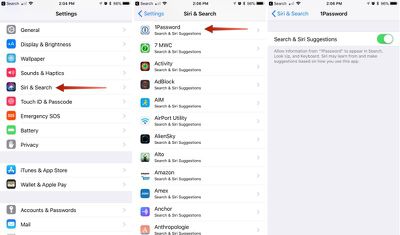
sirisuggestionsbyapp

  1. Open the Settings app.
  2. Scroll down to ‌Siri‌ & Search and tap it.
  3. Scroll down to see a list of all of the apps that work with the feature.
  4. Select each app you don't want to show up in search and ‌Siri‌ suggestions.
  5. Tap the ‌Siri‌ & Suggestions button to toggle it off.

When you disable apps, information from those apps will not show up in Search, Look Up, and Keyboard as you use your iOS device. So, for example, if I disable the Files app, content stored in my Files app will no longer come up in a search or anywhere else.

In the screenshot below, I have Files enabled for ‌Siri‌ and Search Suggestions on the left, and on the right, I've disabled the feature. As you can see, content from the Files app no longer shows up.
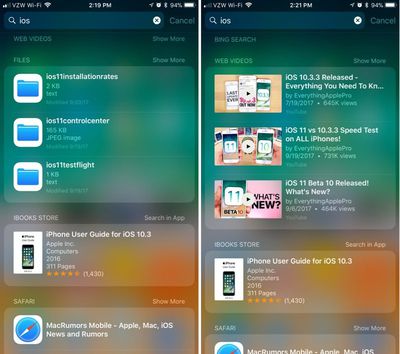
sirisuggestionsfilesdisabled
You can toggle off any of your installed apps to prevent their data from being displayed when you search, use the keyboard, and ask ‌Siri‌ questions.

‌Siri‌ will ignore disabled files but will continue to learn your preferences from enabled apps and show content from those apps, which is probably how most people will prefer to use this feature. For a full lockdown, though, disable your apps and turn off ‌Siri‌ Suggestions entirely.

How to Turn Off Siri Suggestions Entirely

If you don't want to use ‌Siri‌ suggestions at all, there are three simple toggles for turning it off.
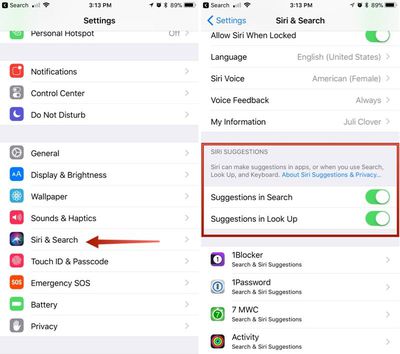
disablesirisuggestions

  1. Open the Settings app.
  2. Scroll down to ‌Siri‌ & Search and tap it.
  3. Scroll down to ‌Siri‌ Suggestions.
  4. Toggle off Suggestions in Search.
  5. Toggle off Suggestions in Look Up.
  6. Toggle off Suggestions on Lock Screen.

With these two settings toggled off ‌Siri‌ will not provide personalized suggestions when you search for things, and your data will not be anonymously sent to Apple to power the ‌Siri‌ features. Note that ‌Siri‌ will still bring up apps installed on your devices in search and other areas -- this just disables the feature that lets ‌Siri‌ learn your preferences and send data to Apple.

To keep apps from showing up entirely, you'll need to use the individual app settings, as outlined above.

Preventing Siri Suggestions From Sending Your Location to Apple

In some cases, ‌Siri‌ Suggestions sends the location of your device to Apple alongside your search queries so Apple can provide more relevant recommendations. You can keep your location from being sent to Apple by disabling a specific Location setting.
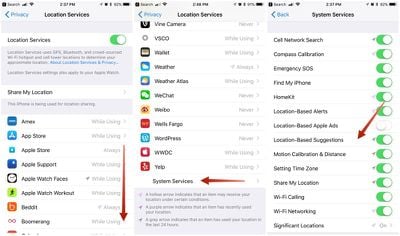
locationservicessiri

  1. Open the Settings app.
  2. Choose Privacy.
  3. Tap Location Services.
  4. Scroll down to System Services and tap it.
  5. Scroll down to Location-Based Suggestions and toggle it off.

‌Siri‌ Suggestions is a useful feature so most people won't want to toggle it off completely (and it is completely private -- Apple encrypts and anonymizes all data) but being able to prevent individual apps like Safari, Mail, and others from showing up lets you customize your results for a more streamlined experience and it prevents anything you don't want to see from popping up unexpectedly.
Related Forum: iOS 12

Top Rated Comments

Time Less Avatar
119 months ago
We need a toggle to disable all apps or toggles next to the names. 3 steps for each app is tedious.

Score: 5 Votes (Like | Disagree)
119 months ago
I’ve just figured out that you can’t even find an app with Spotlight anymore. WTF. Some show up, some don’t, and I have to type the entire app name before it shows up. Bad Apple. BAD!
Score: 4 Votes (Like | Disagree)
Compote Avatar
119 months ago
Siri always knows when I want to use Grindr... HA! Not anymore!
Score: 3 Votes (Like | Disagree)
119 months ago
I’ve just figured out that you can’t even find an app with Spotlight anymore. WTF. Some show up, some don’t, and I have to type the entire app name before it shows up. Bad Apple. BAD!
The app won’t show up at the top if ‘Search & Siri Suggestions’ is disabled for this particular app.

I always had it disabled for most because I found the in-app search result suggestions to be cluttering.

I want a quick and easy way to spotlight search an app by typing 2-4 characters.

The only way to do this now is to enable ‘Search & Siri Suggestions’ for this app. It will then show up almost at the top. Right below the text search suggestions.

Unfortunately this also enables all the other in-app search clutter again.

I’ve submitted feedback to the Apple iPhone feedback system. I suggest everybody who finds this annoying to do the same.
Score: 2 Votes (Like | Disagree)
119 months ago
Can someone explain the difference between search and “look up”
Score: 2 Votes (Like | Disagree)
mcdj Avatar
119 months ago
I’m more interested in a way to disable the word suggestions at the top of the results. It used to be apps at the top of search results and I used it as a launcher by typing a couple of letters of the app name. Now the app results are partially obstructed by the keyboard and less intuitive to reach.
Score: 2 Votes (Like | Disagree)

Popular Stories

Apple TV 4K 4th Generation Top View5

New Apple TV 4K Announced With A19 Chip, Updated Siri Remote, More

Tuesday October 13, 2026 6:08 am PDT by
Apple today announced the fourth-generation Apple TV 4K, with key features including an A19 chip, Siri AI support, an updated Siri Remote that has Find My support with Precision Finding, built in far-field microphones, support for surround sound with four HomePods in front and rear pairs, and more. The A19 chip in the new Apple TV 4K delivers up to 50% faster CPU performance and up to twice...
homepod mini 2 feature6

Apple Announces $149 HomePod Mini 2 With Siri AI, 'Sound Glow', and Four-Speaker Surround Sound

Tuesday October 13, 2026 6:11 am PDT by
Apple today announced a new HomePod mini equipped with Siri AI, new colors, and improved audio experiences. The new HomePod mini has an S10 chip that supports advanced computational audio, and Apple says it optimizes dynamic range, loudness, and acoustic performance in real-time. A Sound Glow feature turns the HomePod mini's top into a "visual canvas" that glows and animates in sync with...
New Apple TV 4K and Siri Remote Have These 14 New Features Feature

New Apple TV 4K and Siri Remote Have These 14 New Features

Tuesday October 13, 2026 10:26 am PDT by
The new Apple TV 4K and updated Siri Remote unveiled today have quite a few new features, as outlined in our all-in-one summary below. Here are 11 changes coming with the new Apple TV: A19 chip, for up to 50% faster CPU performance and up to twice as fast graphics performance compared to the previous model with the A15 chip. 8GB of RAM is very likely, up from 4GB of RAM in the previous ...
Latest Stories
Siri AI Rumored to Become 'More Like an Agent' as Early as Next Year
8 hours ago
Apple Taking New Approach to Developing iOS 28 and macOS 28
10 hours ago
Early Apple Black Friday Deals on Apple Watch, MacBook Air, and More
1 day ago
'Backglow' Lets You Customize New MacBook Pro's Glowing Apple Logo
1 day ago
Top Stories: Apple Product Launches, iOS 27.3 Beta, and More
2 days ago
More Fun iPhone Duo Apps: 30 New Picks to Try
2 days ago
Hands-On With Apple's New OLED Touchscreen MacBook Pro
2 days ago
Apple Store With All-New Design Opening Soon in Southern California
2 days ago
Control the Glowing Apple Logo on Your New MacBook Pro
2 days ago
Apple Shares New 'Apple Card: Apply and Use in Minutes' Ad
2 days ago
Apple Says More Than 100,000 Apps Optimized for iPhone Duo, Here's What's Still Missing
2 days ago
Early Black Friday Deals Kickoff With Steep Discounts on Apple Watch Ultras and More
2 days ago
The MacRumors Show: iOS 27.3 Looks Like a Huge Update
2 days ago
Best Buy's Black Friday Event Begins With Sitewide Savings on Apple, TVs, More
2 days ago
Apple Releasing Yet Another Two New Products Next Week
2 days ago
MacBook Air Drops to Lowest Price in Months With Amazon's $250 Discount
2 days ago
Apple Rumored to Drop the iPhone's Action Button Next Year
3 days ago
Apple's Extended Return Policy Now in Effect for 2026 Holiday Season
3 days ago
Apple Music Classical Updated With New Icon and Refreshed Design
3 days ago
OLED iPad Mini, M6 iMac, and New MacBook Pros Available From Today
3 days ago
Apple Surveys iPhone Duo Buyers About Crease and Camera
3 days ago
Apple's First Touchscreen Mac is Now Arriving to Customers
3 days ago
Claude Gets Personal Finance Feature With Bank Account Linking
3 days ago
Apple Arcade Adds Crossy Road Rush and NBA 2K27
3 days ago
Apple's New HomeView Smart Home Hub: Here's How Much RAM It Has
3 days ago
iPad Mini vs. iPad Air Buyer's Guide: Now Just $50 Apart
3 days ago
First iOS 27.3 and macOS Golden Gate 27.3 Public Betas Now Available
3 days ago
Apple Announces a New Mac Sales Record
3 days ago
Paid $200 for Logic Pro? Apple Says You Won't Get This New Feature
3 days ago
Instagram's Edits Video Editor is Now Available on Mac
3 days ago