How to Turn on Automatic Downloads for Songs in Apple Music - MacRumorsOpen MenuShow RoundupsShow Forums menuVisit ForumsOpen Sidebar
Skip to Content

How to Turn on Automatic Downloads for Songs in Apple Music

by

Normally when you add songs or albums from the Apple Music catalog to your library and then play them back, the tracks are streamed to your device or computer.
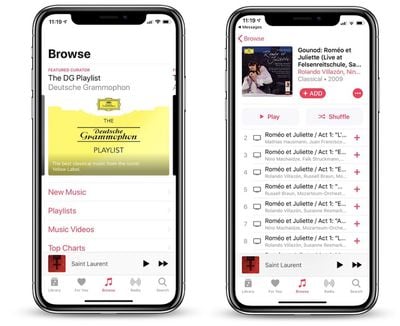
DG apple music
This avoids using up local storage, but it also has a major drawback –- the content becomes unavailable if you don't have an active internet or cellular connection.

Fortunately, you can avoid this situation altogether by enabling Automatic Downloads. With this option turned on, ‌Apple Music‌ content automatically downloads to your device or computer when you add it to your Library.

Enabling Automatic Downloads on iPhone and iPad

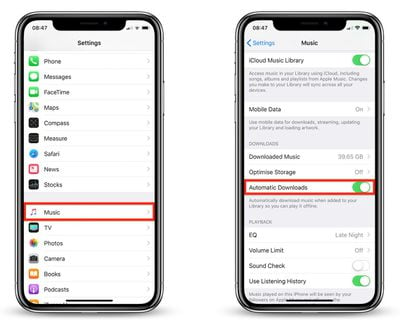
  1. Launch the Settings app on your iOS device.
  2. Tap Music in the apps list.
    automatic downloads in apple music ios

  3. Turn on the toggle switch next to Automatic Downloads.
Enabling Automatic Downloads on Your Computer

  1. Launch iTunes.
  2. On Mac, choose iTunes -> Preferences from the menu bar. On Windows, choose Edit -> Preferences from the iTunes window menu bar.
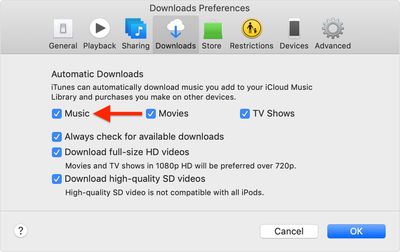
    macos mojave itunes preferences apple music automatic downloads

  3. Click the Downloads tab, and under Automatic Downloads, check the box next to Music.
  4. Click OK.

Note that you can download and access the same content on up to 10 devices for as long as your ‌Apple Music‌ subscription is active.

Popular Stories

iOS 26 Music Glass Feature

Apple Music Gains AutoMix Upgrades and More in iOS 27

Tuesday June 9, 2026 5:49 am PDT by
Apple yesterday detailed several updates coming to Apple Music in iOS 27, including redesigned artist and album pages, an upgraded AutoMix feature, and a suite of performance improvements. The most immediately visible change is a refreshed artist page, which now features a prominent shuffle play button, a new artist name display, and various other layout adjustments. Apple also says album...
Apple Says iOS 27 Adds These 12 New Features to Your iPhone Feature

Apple Says iOS 27 Adds These 12 New Features to Your iPhone

Tuesday June 9, 2026 9:47 am PDT by
iOS 27's key new feature is a more intelligent and personal version of Siri, but the changes go well beyond that. In a press release, Apple outlined additional enhancements coming across Apple Maps, Find My, Apple Wallet, Apple Music, and more. Apple Maps has gained an enhanced Flyover experience powered by AI, enabling you to view aerial imagery in "stunning detail" for select cities. In ...
Apple TV 2025 Thumb 2 Sans Text

tvOS 27: Apple Music Gains Hi-Res Lossless Audio on Apple TV 4K

Wednesday June 10, 2026 1:44 am PDT by
Apple Music is bringing Hi-Res Lossless Audio to tvOS 27, in addition to standard Lossless Audio. Apple says subscribers with compatible external speaker outputs will be able to enjoy their favorite songs in the highest audio quality and experience studio-quality sound directly through their Apple TV 4K. As of tvOS 26, Apple TV 4K supports Apple Music Lossless audio up to 24-bit/48 kHz,...