How to Cancel an Over-the-Air iOS Update in Progress - MacRumorsOpen MenuShow RoundupsShow Forums menuVisit ForumsOpen Sidebar
Skip to Content

How to Cancel an Over-the-Air iOS Update in Progress

by

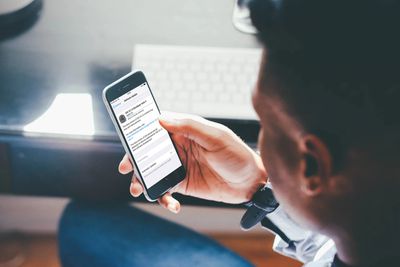
When an over-the-air iOS update starts downloading on your iPhone or iPad, you can monitor its progress in the Settings app via General -> Software Update.
how to cancel a downloading ios update
The lack of a cancel option on this screen seems to imply that there's no way to prevent a software update from downloading once it's started, but don't be fooled. You can stop the update process in its tracks at any time and even delete the downloaded data from your device to free up space. Here's how.

First, you'll want to pause the download by temporarily disconnecting your iPhone or ‌iPad‌ from your Wi-Fi network. The easiest way to do this is by enabling Airplane mode: swipe down from the upper right of your device's screen (on iPhone 8 or earlier, swipe up from the bottom of the screen) and tap the Airplane button in the top left of the Control Center grid.

Now that's done, follow these steps.

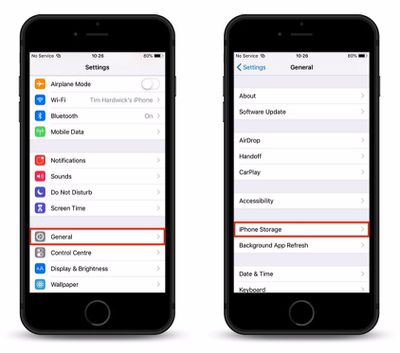
  1. Launch the Settings app on your iPhone or ‌iPad‌.
  2. Tap General.
  3. Tap iPhone Storage.
    how to cancel a downloading ios update 1

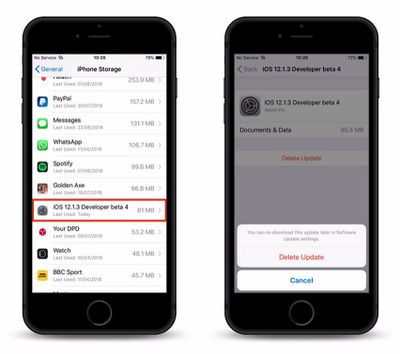
  4. Locate and tap the iOS software update in the app list.
  5. Tap Delete Update and confirm the action by tapping it again in the pop-up pane.
    how to cancel a downloading ios update 2

How to Turn off Automatic Updates

As some of our readers have pointed out, there's currently no option in Settings to prevent iOS software updates from re-downloading the next time your device is connected to Wi-Fi. What you can do though is prevent an update from automatically installing once it has downloaded: To so, simply launch the Settings app, tap Software Update, and toggle off the switch next to Automatic Updates.


Top Rated Comments

96 months ago
About the last part, I believe that’s not how it works. Disabling the option in the iTunes & App Store settings only works for applications updates not iOS system updates.

To prevent iOS from automatically downloading system updates, you need to go to General, Software Update and then disable Automatic Software Update here. This option is only available on iOS 12 though so if you are on a lower version your only option is to install a tvOS profile (or watchOS) to prevent the device from searching for updates.
Score: 6 Votes (Like | Disagree)
Grendelmon Avatar
96 months ago

How to Turn off Automatic Updates

If the OTA software update started downloading automatically without your consent and you'd like to prevent this behavior in future, you need to disable the default automatic downloads setting on your device. To do so, simply launch the Settings app, tap Software Update, and toggle off the switch next to Automatic Updates.

Article Link: How to Cancel an Over-the-Air iOS Update in Progress ('https://www.macrumors.com/how-to/cancel-a-downloading-ios-update/')
You cannot disable iOS update downloads. The Automatic Updates only applies to iTunes and App Store purchases.

Apple dictates when and how they try to push an iOS update to your device. I have complained to them many times regarding this matter. This is EXACTLY why they love to brag about their adoption rate.
Score: 5 Votes (Like | Disagree)
JosephAW Avatar
96 months ago
On older iOS version you can't clear the badge number on the settings icon.:mad:

And another nuisance is it downloads iOS updates when I'm using my cellular hotspot device wasting data and costing me money. No way to disable wifi internet for apps like you can do with cellular settings.
Score: 3 Votes (Like | Disagree)
96 months ago
I love these how-to articles sprinkled into MR’s feed. Also like how it inspires conversation around said topic and related questions.
Score: 2 Votes (Like | Disagree)
96 months ago
Definitely wanna turn off auto updates for everything these days.

I lose functionality more often than I gain it, in apps, as well as OSes.

I'm not sure why this is happening, but it is.
Score: 2 Votes (Like | Disagree)
96 months ago
Automatic updates is different than automatic downloads. iOS 12 now has the feature (if you want to call it that) of actually updating the OS automatically without any user intervention. Older versions can't do this.
Score: 2 Votes (Like | Disagree)

Popular Stories

Aston Martin CarPlay Ultra Screen

Apple Says CarPlay Ultra is Coming to These Vehicle Brands

Thursday May 21, 2026 11:53 am PDT by
Last year, Apple launched CarPlay Ultra, the long-awaited next-generation version of its CarPlay software system for vehicles. Nearly a year later, CarPlay Ultra is still limited to Aston Martin's latest luxury vehicles, but that should change fairly soon. In May 2025, Apple said many other vehicle brands planned to offer CarPlay Ultra, including Hyundai, Kia, and Genesis. CarPlay Ultra...
iphone 18 pro blue%402x

iPhone 18 Pro: Dark Cherry, Light Blue, and Dark Gray Chassis Leaked [Update]

Thursday June 4, 2026 5:18 am PDT by
Update: Since publication, new information has come to light suggesting the images have been AI-manipulated and are not in fact iPhone 18 Pro chassis parts. The original article follows. The color options Apple is reportedly planning for the upcoming iPhone 18 Pro and ‌iPhone 18 Pro‌ Max have appeared online today in the form of images of chassis parts of unknown authenticity....
iOS 27 All the New App Features

iOS 27: All the Rumored App Features

Wednesday June 3, 2026 3:48 pm PDT by
Siri is getting a major overhaul in iOS 27, but Apple also has some big updates planned for apps like Camera, Photos, and Wallet. There are multiple new AI features in the works, plus some non-AI upgrades. Camera Apple is moving Visual Intelligence from the Camera Control button to the Camera app in iOS 27, according to Bloomberg. There will be a Siri mode that will be available alongside...