watchOS 10.2: How to Change Watch Faces With a Swipe - MacRumorsOpen MenuShow RoundupsShow Forums menuVisit ForumsOpen Sidebar
Skip to Content

watchOS 10.2: How to Change Watch Faces With a Swipe

by

In watchOS 10.2, you can enable a swipe gesture to switch between Apple Watch faces more easily, just like you used to be able to in watchOS 9. Keep reading to learn how it's done.
apple watch ultra 1 image
If you are a long-time Apple Watch user, you probably remember a time when it was possible to switch watch faces with a simple swipe gesture across the display. That was the default interaction in watchOS 9, but then Apple removed the gesture with the upgrade to watchOS 10.

Apple changed the interaction because of user complaints that it was too easy to accidentally change watch faces. But for anyone who never had this problem, Apple just made things harder – by requiring a long press before swiping to change the active watch face.

Fortunately, prior to the release of watchOS 10.2, Apple seemed to realize what it had done, and it has introduced a setting that re-instates the earlier method of swiping to change watch faces. If you preferred the older interaction, the following steps show you how to enable it.

  1. Open the Settings app on your watch.
  2. Tap Clock.
  3. Toggle on the switch next to Swipe to Switch Watch Face.
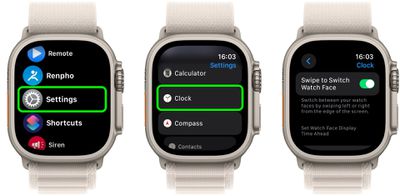
settings

That's all there is to it. If you have more than one watch face assigned to your Apple Watch, you will now be able to swipe quickly and easily between them.


Top Rated Comments

contacos Avatar
38 months ago
Apple settings are so dumb like what does that have to do with "Clock"? They really need to nuke their whole settings panel on any iDevice really and start from scratch. It's like they are trying to squeeze today's features into settings from iOS 2 and it just does not work and does not make any sense anymore.

Score: 18 Votes (Like | Disagree)
38 months ago
I also changed it back as soon as 10.2 was available, but I do not understand why some settings (like this one) are only available from the watch itself and not from the Watch App on my iPhone. I had searched there before giving up and going through all Settings on the watch.

Some other settings are only available from the Watch App on iPhone, so I find it unintuitive when to use which Settings.
Score: 11 Votes (Like | Disagree)
38 months ago
So nice that feature returned!
Score: 11 Votes (Like | Disagree)
headlessmike Avatar
38 months ago
I prefer to keep this disabled as I used to accidentally switch faces more often than intentionally. But I'm happy for y'all that missed the old behavior.
Score: 10 Votes (Like | Disagree)
38 months ago
As far as I remember, it did not work exactly the same way before.
In WatchOS 9, when you swiped, you got the new face showing the time. Seems so logic
In WatchOS 10.2, when you swipe, you first get the standard (10:09) time displayed for 1 second and then the actual time. Pretty ugly glitch effect.

How is it they were not able to reestablish what existed before when setting is set to "Swipe" ? Is it because they went a quick and dirty way, just reusing the long press code and simply segueing automatically to the new face. But the result is not nice looking.
Score: 9 Votes (Like | Disagree)
pdaholic Avatar
38 months ago
I spent 20 min looking for this setting after my watch updated this morning. Wasn’t expecting it there. Thanks!
Score: 9 Votes (Like | Disagree)

Popular Stories

iOS 28 AI

Apple Taking New Approach to Developing iOS 28 and macOS 28

Sunday November 8, 2026 7:42 am PST by
Apple has made a change to its development process for iOS 28, macOS 28, and corresponding software updates, according to Bloomberg's Mark Gurman. In his Power On newsletter today, he said Apple separates development of each year's new operating systems into three major stages. Typically, he said each stage consists of four weeks of coding followed by a four-week "convergence" period where...
duo aquarium

More Fun iPhone Duo Apps: 30 New Picks to Try

Friday November 6, 2026 3:27 pm PST by
When the iPhone Duo launched, we shared a list of some of the fun apps developers created for the new form factor. Two weeks out, developers are continuing to come up with fresh ideas, so we thought we'd share some of our favorites. Games Marbles Unhinged ($2.99) - Marbles Unhinged is a marble maze designed for the Duo. When you fold it, the floor turns into a ramp. If you stand the top...
apple pro tell logo

Apple Launching Five New Products Today

Thursday November 5, 2026 12:59 am PST by
Apple is launching five new products on Friday, November 6, following pre-orders that opened last week, including its first touchscreen MacBook Pro models. The following new products will be available from today: iPad mini with OLED display and A20 Pro chip iMac with M6 chip 14-inch MacBook Pro with M6 chip 14-inch MacBook Pro with OLED touchscreen 16-inch MacBook Pro with OLED...
Latest Stories
This Could Be Your Last Chance to Pre-Order the HomeView at a Discount
1 minute ago
Some HomePod Mini 2 Buyers Returning Units Over Mac Speaker Issues
15 minutes ago
MacBook Pro With PROLED XDR Display: Details You Might Have Missed
27 minutes ago
Satechi Offers MacRumors Readers 30% Off Select Accessories in Early Black Friday Sale
49 minutes ago
Leaker Envisions a Shorter iPhone With a New iOS Layout
1 hour ago
Apple to Give You More Control Over When Your Mac Passwords Lock
2 hours ago
Siri Is Getting a Better Memory
3 hours ago
iPhone 18e Could Feature Bigger Display and Battery
3 hours ago
Apple's Siri Boss May Leave - Here's Who Could Take Over
3 hours ago
Apple Launching Two More New Products This Friday
4 hours ago
Apple Store Subscription Sign-Up Controversy Exposed
12 hours ago
Siri AI Rumored to Become 'More Like an Agent' as Early as Next Year
22 hours ago
Apple Taking New Approach to Developing iOS 28 and macOS 28
1 day ago
Early Apple Black Friday Deals on Apple Watch, MacBook Air, and More
2 days ago
'Backglow' Lets You Customize New MacBook Pro's Glowing Apple Logo
2 days ago
Top Stories: Apple Product Launches, iOS 27.3 Beta, and More
2 days ago
More Fun iPhone Duo Apps: 30 New Picks to Try
3 days ago
Hands-On With Apple's New OLED Touchscreen MacBook Pro
3 days ago
Apple Store With All-New Design Opening Soon in Southern California
3 days ago
Control the Glowing Apple Logo on Your New MacBook Pro
3 days ago
Apple Shares New 'Apple Card: Apply and Use in Minutes' Ad
3 days ago
Apple Says More Than 100,000 Apps Optimized for iPhone Duo, Here's What's Still Missing
3 days ago
Early Black Friday Deals Kickoff With Steep Discounts on Apple Watch Ultras and More
3 days ago
The MacRumors Show: iOS 27.3 Looks Like a Huge Update
3 days ago
Best Buy's Black Friday Event Begins With Sitewide Savings on Apple, TVs, More
3 days ago
Apple Releasing Yet Another Two New Products Next Week
3 days ago
MacBook Air Drops to Lowest Price in Months With Amazon's $250 Discount
3 days ago
Apple Rumored to Drop the iPhone's Action Button Next Year
3 days ago
Apple's Extended Return Policy Now in Effect for 2026 Holiday Season
3 days ago
Apple Music Classical Updated With New Icon and Refreshed Design
3 days ago










































