How to Change Your Default Card for Apple Pay Purchases on Your Mac - MacRumorsOpen MenuShow RoundupsShow Forums menuVisit ForumsOpen Sidebar
Skip to Content

How to Change Your Default Card for Apple Pay Purchases on Your Mac

by

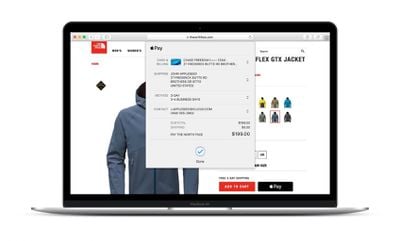
Apple Pay is a convenient way to pay for things with your iPhone or Apple Watch when you're out and about, but it's also an easy and secure way to pay when buying merchandise online with your Mac, wherever you see the ‌Apple Pay‌ symbol when checking out.

Mac Apple Pay
Your Mac will use the default card in your Wallet that's set up to work with ‌‌Apple Pay‌‌. If you have multiple cards in your Wallet, you can easily change the default card your Mac uses by following the steps below.

Bear in mind, whichever card you choose as the default will become your preferred card for Mac App Store, Apple Music, and Apple services. Here's how it's done.

  1. Launch System Preferences from your Mac's Dock, from the Applications folder, or from the Apple menu bar ( -> System Preferences...).
  2. Click Wallet & Apple Pay.system preferences
  3. Select your preferred card from the Default Card pop-up menu at the bottom of the preference pane.
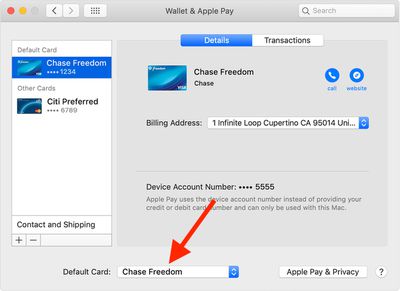
That's all there is to it. Note that you can also change the default card that ‌Apple Pay‌ uses when you pay for something with your iPhone and with your Apple Watch.
Related Roundup: Apple Pay

Popular Stories

American Express Gold Apple Pay Feature

American Express Announces New Apple Pay Feature

Tuesday June 30, 2026 10:27 am PDT by
American Express today announced that you can now redeem Membership Rewards points when checking out with Apple Pay on the web and in apps on the iPhone and iPad. When checking out with Apple Pay on iOS 18 or iPadOS 18 or later, tap on your eligible American Express card (Platinum, Gold, Green, and others) and select the Membership Rewards points option. You can use points to cover all or...
iPhone 18 Pro and Pro Max Feature

'Apple Upgrade' Program Reportedly Launching Next Week

Tuesday July 21, 2026 8:30 am PDT by
Apple and Klarna are partnering on a new "Apple Upgrade" leasing program set to launch in the U.S. on Tuesday, July 28, according to Bloomberg's Mark Gurman. The program will allow you to finance most iPhone, iPad, Mac, and Apple Watch models, with a 24-month term for iPhones and Apple Watches and a 36-month term for iPads and Macs. Customers will be able to pay off the device early during...
iPhone 18 Pro Deep Red Feature

iPhone 18 Pro Launching in Two Months With These 12 New Features

Friday July 17, 2026 10:39 am PDT by
It is now mid-July, and that means the iPhone 18 Pro and iPhone 18 Pro Max are now just two months away. The devices are expected to look similar to the iPhone 17 Pro and iPhone 17 Pro Max, but there will still be many year-over-year changes, with rumored features including a smaller Dynamic Island, 5G via satellite, and more. Apple is expected to unveil the iPhone 18 Pro, iPhone 18 Pro Max, ...