iOS 14: How to Check Headphone Audio Level in Real Time - MacRumorsOpen MenuShow RoundupsShow Forums menuVisit ForumsOpen Sidebar
Skip to Content

iOS 14: How to Check Headphone Audio Level in Real Time

by

Last year in iOS 13, Apple introduced new hearing features in the Health app that are designed to help users avoid being exposed to high levels of sound when wearing headphones for an extended period of time. In iOS 14, Apple is advancing its hearing features by adding the ability to measure the volume level of what you're listening to in real time.
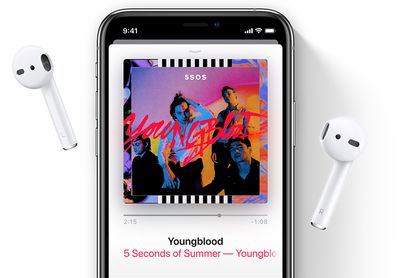
airpodsapplemusic
With the new feature, Apple is putting more emphasis on the health dangers of being exposed to high volume audio. Listening to something at 80 decibels (dB) for more than 40 hours in a one-week period increases your risk of hearing loss. Raise it 10 dB to 90, and damage can begin after only four hours a week. Turn it up over 100 dB, and listening for just a few minutes a week can cause damage.

With the new headphone measuring feature, you can check that what you're listening to is being played at an acceptable level for your ears. It's easy to set up and use once you know where it is. The following steps show you how it's done on an ‌iPhone‌ or ‌iPad‌ running iOS 14.

How to Set Up the Headphone Level Checker in iOS 14

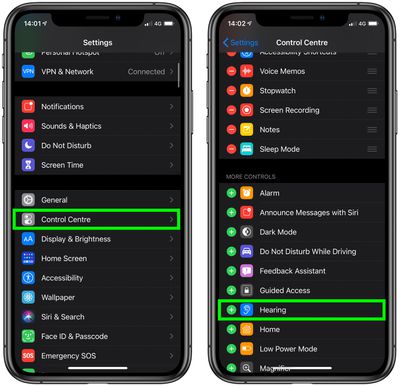
  1. Launch the Settings app on your ‌iPhone‌ or ‌‌iPad‌‌.

  2. Tap Control Center.
  3. Scroll down and tap the green plus (+) button next to Hearing.
    settings

How to Use the Headphone Level Checker in iOS 14

The next time you're listening to something on your iOS device over connected headphones, follow these steps.

  1. Launch Control Center: On an ‌‌iPad‌‌ with a Home button, double-tap the Home button; on ‌iPhone‌ 8 or earlier, swipe up from the bottom of the screen; and on a 2018 iPad Pro or ‌iPhone‌ X and later, swipe down from the upper right of the screen.
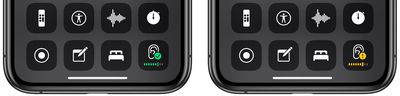
  2. Look at the Hearing button in Control Center. If it has a green tick, you're listening at a healthy volume level. If what you're listening to exceeds the 80-decibel level, the measurement icon will display a yellow exclamation mark, warning you that the volume is too high.
    control center

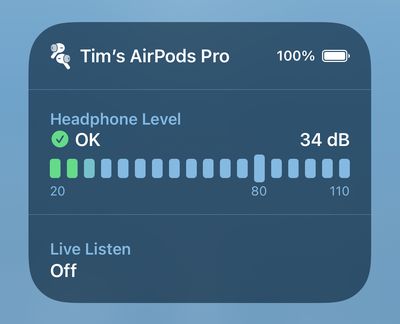
  3. For a more detailed picture of the current decibel level, tap the Hearing button.
    headphone level

The real-time headphone level feature works well with most headphones, but bear in mind that Apple says the measurement is more accurate with AirPods and other Apple-certified headsets.


Tag: Hearing
Related Forum: iOS 14

Top Rated Comments

einsteinbqat Avatar
76 months ago

"Control centre" lol iOS 14 already has typos
I don't think that you realise that Brits, Canucks, Aussies, Kiwis, etc., write centre with the R before the E. The R at the end, that's the American way. And we write, neighboUr, flavoUr, coloUr, odoUr, doughnut, etc. USA aren't the centre of everything. 😉
Score: 33 Votes (Like | Disagree)
Apple_Robert Avatar
76 months ago

!!!! In general, slide the slider to the left or turn the knob counter clockwise to turn the volume down. As a civilization we are now so stupid we can't tell when we have something turned up too loud?
A song sound level may sound reasonable to a listener. That doesn’t necessarily mean the sound is medically safe at that moment, much less long term. Many people get used to loud noises. That doesn’t mean they should continue listening to loud noises

I think you are trivializing an important feature and topic.
Score: 14 Votes (Like | Disagree)
Apple_Robert Avatar
76 months ago
Another good article, MacRumors. A handy feature indeed.

In my opinion, Apple should set it up where the user is notified with an across the screen display if the decibels are too loud. Too easy to forget to swipe up and check control center for a lot of people.
Score: 8 Votes (Like | Disagree)
76 months ago

But the USA population is bigger than all those countries COMBINED!!
Reminds me of the phrase "quality over quantity". :p

(Joking, BTW).
Score: 7 Votes (Like | Disagree)
NickName99 Avatar
76 months ago

!!!! In general, slide the slider to the left or turn the knob counter clockwise to turn the volume down. As a civilization we are now so stupid we can't tell when we have something turned up too loud?
Most guys over 50 I know have significant loss of hearing, from failing to protect their hearing over the years. I try to take better care of my ears, I don’t want to end up another old guy always shouting for people to speak up or repeat themselves. It’s funny how so many of these little macho ideas end up making us weaker in the long run.
Score: 6 Votes (Like | Disagree)
Pakaku Avatar
76 months ago
Semi-related, but the fact that the lowest two volume notches still sound way too loud whenever I use headphones has always astounded me, and I really wish Apple would give us better management over that in iOS and OSX. I always find myself resorting to apps like Audio Hijack in order to limit it.
Score: 6 Votes (Like | Disagree)

Popular Stories

Apple Card iPhone 16 Pro Feature

Apple Card Promo to Offer Free AirPods Pro 3

Friday May 15, 2026 8:59 am PDT by
Starting as early as next week, customers who sign up for an Apple Card at Apple's retail stores in the U.S. will receive $249 cash back when they purchase AirPods Pro 3, according to Bloomberg's Mark Gurman. The promotion has yet to be officially announced by Apple, so exact terms and conditions are not available at this time. AirPods Pro 3 are priced at $249 in the U.S., so customers who...
Apple WWDC25 iOS 26 CarPlay Light mode 250609

Six Popular iPhone Apps Now Available on CarPlay

Thursday May 14, 2026 9:10 am PDT by
Apple's CarPlay system for accessing iPhone apps on a vehicle's dashboard screen has received six popular apps in recent weeks: ChatGPT, Perplexity, Grok, Google Meet, WhatsApp, and the indie artist streaming platform Audiomack. Make sure you have the latest version of each app and they will automatically appear on CarPlay. ChatGPT Starting with iOS 26.4, CarPlay supports voice-based...
ipad mini 7 blue

OLED iPad Mini: Release Date, Pricing, and What to Expect

Thursday May 14, 2026 5:08 am PDT by
According to the latest rumors, Apple is close to launching its next-generation iPad mini. So what should we expect from the successor to the iPad mini 7 that Apple released over a year ago? Read on to find out. Processor and Performance Apple is working on a next-generation version of the iPad mini (codename J510/J511) that features the A19 Pro chip, according to information found in code...