When you pair AirPods Max headphones to your iPhone, iPad, Apple Watch, or Mac, the pairing information is synced across all the devices linked to your iCloud account. That means if you've already paired your AirPods Max to one of your devices, then you won't need to go through the process again when it comes to connecting them to your Apple TV.

However, even if your AirPods Max are linked to your iCloud account, it may not be immediately obvious how to select your AirPods Max on your Apple TV. Like AirPods, AirPods Max have an auto-switching feature that works with iPhones and iPads, but the function doesn't extend to Apple TV, so you have to select them manually. This article shows you how.
Note that to successfully connect, AirPods Max require your Apple TV to be running tvOS 14.3 or later.
How to Connect AirPods Max to Apple TV
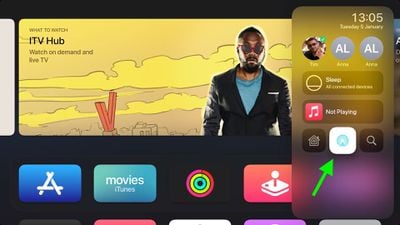
- Press and hold the "TV" button on your Siri Remote to open Control Center.
- Select the AirPlay icon (the middle icon in the bottom row).

- Wait for your AirPods Max to appear at the top of the list, under "Headphones."
- Select your AirPods Max to connect them.

Note that, as of writing, the Spatial Audio feature doesn't work with Apple TV, so you won't get the immersive audio experience from AirPods Max like you can on iPhone and iPad. Hopefully Apple will bring the feature to Apple TV in a future update.
How to Connect AirPods to Apple TV From Playing Media
If you're watching something in the TV app or in certain other media apps on Apple TV, you can swipe down on the glass touch surface of the Siri Remote to reveal a menu with subtitle and sound options.

If the menu appears, simply navigate to the Audio section, and then select AirPods Max in the AirPlay device options.
If a menu doesn't appear when you swipe down during playback, the app you're using probably doesn't have it, so you'll have to select AirPods Max from the main Control Center, as explained first in this article.

Apple Music and some other apps have an AirPlay button in their interface – you can recognize the icon by the concentric circles emanation from a pyramid. Select this, and you'll be able to choose AirPods Max from the menu that appears.