

iOS: Crossfade Between Songs in Apple Music - MacRumorsOpen MenuShow RoundupsShow Forums menuVisit ForumsOpen Sidebar
Skip to Content

iOS: Crossfade Between Songs in Apple Music

by

In iOS 18 and later, Apple Music has several features that should make using the Music app and the ‌‌Apple Music‌‌ streaming service in general a more enjoyable and immersive experience.

apple music crossfade
One ‌Apple Music‌ feature in particular that rival music streaming services have had for some time is the ability to crossfade tracks, and now you can do exactly that in ‌Apple Music‌, so that the audio smoothly transitions between songs and the music never stops.

To enable crossfade for ‌Apple Music‌ on iPhone and iPad, simply do the following:

  1. Open the Settings app on your device.
  2. Scroll down and tap Apps.
  3. Locate the Music app and tap on it.
  4. Scroll down to the "Audio" section and tap Song Transitions.
  5. Select Crossfade so that the option is checked.
  6. Now you can adjust the slider below to choose the number of seconds in which the crossfade is active across consecutive songs (from 1 up to 12 seconds).
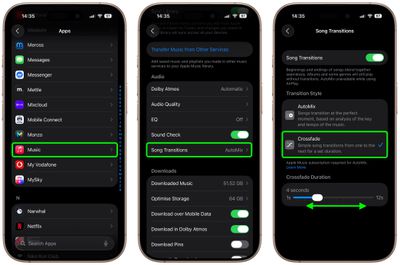
settings

Now go into the Music app and try playing an album, personalized radio station, or playlist, and you should hear the smooth transition between tracks immediately. Note that in iOS 26, the alternative AutoMix feature uses AI to seamlessly blend consecutive songs, like a DJ, to create continuous, uninterrupted playback.


Popular Stories

wigmore hall

Apple Music Classical Announces New Partnership With London's Wigmore Hall

Wednesday June 3, 2026 4:59 am PDT by
Wigmore Hall Live today relaunches as a digital-only platform in partnership with Apple Music Classical, with all recording royalties passed directly to artists, Gramophone reports. Wigmore Hall is a prestigious 550-seat concert hall on Wigmore Street in London's Marylebone, widely regarded as one of the world's foremost venues for chamber music, early music, and vocal recitals. Opened in...
macOS 27 on MacBook Pro

Apple Says macOS 27 Won't Be Compatible With These Macs

Wednesday June 3, 2026 8:29 am PDT by
During WWDC 2025, Apple revealed that macOS 26 Tahoe would be the final major macOS version for Intel-based Macs. macOS 27 will be compatible with Apple silicon Macs only, meaning that you will need a Mac with an M-series chip or a MacBook Neo with an A18 Pro chip in order to install the software update. Apple will unveil macOS 27 during its WWDC 2026 keynote this Monday, June 8, and the...
MacBook Neo on Yellow Feature

MacBook Neo is So Popular That Apple Reportedly Doubled Production

Wednesday June 3, 2026 9:24 am PDT by
On an earnings call in late April, Apple's CEO Tim Cook said that customer response to the MacBook Neo was "off the charts," and the popularity of the laptop has reportedly led the company to significantly boost production. Apple supply chain analyst Ming-Chi Kuo this week said he believes that MacBook Neo shipments to Apple were doubled from an initial target of 5 million units to 10...















