How to Create a Custom iMessage Profile in iOS 13 - MacRumorsOpen MenuShow RoundupsShow Forums menuVisit ForumsOpen Sidebar
Skip to Content

How to Create a Custom iMessage Profile in iOS 13

by

In iOS 13, Apple allows you to create a standardized iMessage profile that includes your name and photo – or an Animoji/Memoji – which accompanies the messages you send to friends so that they know who you are.

The idea behind the new feature is that contacts in the Messages become more easily identifiable, similar to the way WhatsApp and Facebook Messenger contacts have recognizable profile pictures.

If you choose to use a Memoji as your profile pic, you'll be happy to learn that iOS 13 also provides options for customizing it, including pre-selected poses and background colors.

How to Add a Custom Message Photo Profile in iOS 13

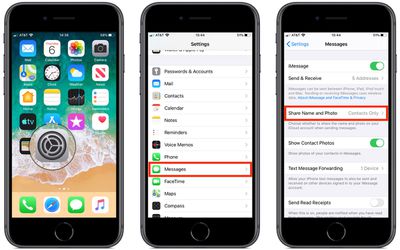
  1. Launch the Settings app on your iPhone or iPad.
  2. Tap Messages.
  3. Tap Share Name and Photo.
    how to create a custome imessage profile in ios 13

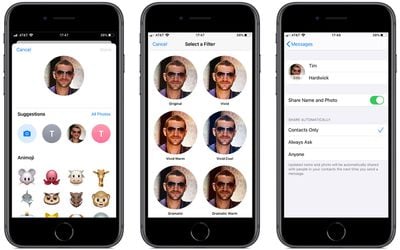
  4. To use a photo in your new profile, tap the Camera button and take a picture of yourself. Alternatively, tap All Photos to choose an existing picture from your photo albums.
  5. Once you've selected a picture, you'll be given the option to move and scale it in the circular frame. Click Choose once you're done.
  6. You'll then be asked to select a filter to apply to the photo. Alternatively, tap Original to skip this step.
  7. Tap Done.
    how to create a custom imessage profile in ios 13

  8. Tap the empty fields alongside your profile picture to enter your first and second name.
  9. Make sure the Share Name and Photo switch is toggled to the On position.
  10. Choose from one of the automatic contact sharing options – Contacts Only, Always Ask, or Anyone.
How to Add a Message Animoji/Memoji Profile in iOS 13

  1. Launch the Settings app on your iPhone or ‌iPad‌.
  2. Tap Messages.
  3. Tap Share Name and Photo.
    how to create a custome imessage profile in ios 13

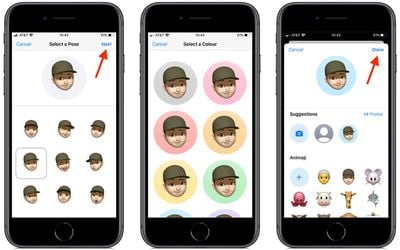
  4. Select an Animoji from the default list. If you've created a Memoji, it will also appear in the list for you to choose.
  5. In the next screen, select a pre-defined Pose.
    how to create a custom memoji imessage profile in ios 13

  6. Move and scale the image in the circular profile frame, then tap Choose.
  7. Select a background color.
  8. Tap Done.
  9. Tap the empty fields alongside your profile picture to enter your first and second name.
  10. Make sure the Share Name and Photo switch is toggled to the On position.
  11. Choose from one of the automatic contact sharing options: Contacts Only, Always Ask, or Anyone.
In iOS 13, you can also turn your Memoji into stickers, which can be used across numerous apps like Messages and Mail. Memoji stickers and the Memoji editor are also supported by all devices with an A9 chip or later – not just those with TrueDepth cameras.

Related Forum: iOS 13

Top Rated Comments

dontwalkhand Avatar
97 months ago
Sounds like Apple really wants to replace Facebook messenger and what’s app. I’m ok with this, but they need an iMessage app for Android users too as I can’t always tell my friends to get an iPhone and they actually listen.
Score: 12 Votes (Like | Disagree)
97 months ago
Do iMessage profiles do anything about the problem of multiple conversations to the same person using different contact details (email/phone number)?
This is my biggest pet peeve about iMessage. Sure the memojis and stuff are fun, but what about improving the actual function of iMessage? Threads based on contact info, not number, would be ideal. I have family all around the world and they swap SIM cards frequently while traveling back and forth. I have all of their numbers programmed into their contact info. Why does iMessage start a new thread with each number instead of continuing from where we left off before they swapped SIM cards? Come on Apple.
Score: 6 Votes (Like | Disagree)
sterlingindigo Avatar
97 months ago
It would be nice if these ios13 how to’s were posted once iOS 13 becomes available to those who aren’t developers or posted to a separate developers board or at least a disclaimer for the general public that iOS 13 isn’t available yet.
Score: 5 Votes (Like | Disagree)
thewhitehart Avatar
97 months ago
What happens if you have someone’s name and photo in your address book already? Does their custom profile override your settings?
Score: 4 Votes (Like | Disagree)
97 months ago
They should optimize the search function on iMessage rather than doing new memojis. For example if someone used the word car once a week and you’re searching for that specific word you only get the result for the last time mentioned. Worse, if you search for a person you didn’t talk long time ago the person won’t show up if you search the name. You need to scroll through all your conversations down.


All in all there is a lot of work to do on iMessage.
Score: 3 Votes (Like | Disagree)
97 months ago
MacRumors content image
You can see Facebook dominates world with Messanger and WhatsApp. iMessage do not appear in report. Not sure it is omnited or irrelevant.
https://www.similarweb.com/blog/worldwide-messaging-apps
And in some regions you have data for chatting in WhatsApp for free, like in Africa.
It clearly shows how people care about privacy.
It seems as though iMessage was omitted because unlike the messengers in the report, iMessage cannot be installed on any other platform but Apple’s own. But iMessage has a huge user base. I know a lot of people who uses iMessage as their primary messenger, they just use what’s app to communicate with people overseas, group chats that involves people who use android phones or to send large files. I myself fit into that category, if it wasn’t for those reasons I’d never use WhatsApp.
Score: 3 Votes (Like | Disagree)

Popular Stories

ios 26 5 rcs

iOS 27.3 May Expand RCS Support to Australia's Telstra in December

Tuesday October 20, 2026 9:04 am PDT by
In a support document that it has since deleted, Australian carrier Telstra said RCS support would be available starting with an iOS update coming in December. If this timeframe remains accurate, then iPhone users with Telstra will likely be able to use RCS in the Messages app starting with iOS 27.3. RCS has many benefits over the traditional SMS standard for text messaging with Android users, ...
apple pro tell logo

Apple Launching Five New Products Today

Thursday November 5, 2026 12:59 am PST by
Apple is launching five new products on Friday, November 6, following pre-orders that opened last week, including its first touchscreen MacBook Pro models. The following new products will be available from today: iPad mini with OLED display and A20 Pro chip iMac with M6 chip 14-inch MacBook Pro with M6 chip 14-inch MacBook Pro with OLED touchscreen 16-inch MacBook Pro with OLED...
duo aquarium

More Fun iPhone Duo Apps: 30 New Picks to Try

Friday November 6, 2026 3:27 pm PST by
When the iPhone Duo launched, we shared a list of some of the fun apps developers created for the new form factor. Two weeks out, developers are continuing to come up with fresh ideas, so we thought we'd share some of our favorites. Games Marbles Unhinged ($2.99) - Marbles Unhinged is a marble maze designed for the Duo. When you fold it, the floor turns into a ramp. If you stand the top...
Latest Stories
Siri AI Rumored to Become 'More Like an Agent' as Early as Next Year
1 hour ago
Apple Taking New Approach to Developing iOS 28 and macOS 28
3 hours ago
Early Apple Black Friday Deals on Apple Watch, MacBook Air, and More
22 hours ago
'Backglow' Lets You Customize New MacBook Pro's Glowing Apple Logo
22 hours ago
Top Stories: Apple Product Launches, iOS 27.3 Beta, and More
1 day ago
More Fun iPhone Duo Apps: 30 New Picks to Try
2 days ago
Hands-On With Apple's New OLED Touchscreen MacBook Pro
2 days ago
Apple Store With All-New Design Opening Soon in Southern California
2 days ago
Control the Glowing Apple Logo on Your New MacBook Pro
2 days ago
Apple Shares New 'Apple Card: Apply and Use in Minutes' Ad
2 days ago
Apple Says More Than 100,000 Apps Optimized for iPhone Duo, Here's What's Still Missing
2 days ago
Early Black Friday Deals Kickoff With Steep Discounts on Apple Watch Ultras and More
2 days ago
The MacRumors Show: iOS 27.3 Looks Like a Huge Update
2 days ago
Best Buy's Black Friday Event Begins With Sitewide Savings on Apple, TVs, More
2 days ago
Apple Releasing Yet Another Two New Products Next Week
2 days ago
MacBook Air Drops to Lowest Price in Months With Amazon's $250 Discount
2 days ago
Apple Rumored to Drop the iPhone's Action Button Next Year
2 days ago
Apple's Extended Return Policy Now in Effect for 2026 Holiday Season
2 days ago
Apple Music Classical Updated With New Icon and Refreshed Design
2 days ago
OLED iPad Mini, M6 iMac, and New MacBook Pros Available From Today
2 days ago
Apple Surveys iPhone Duo Buyers About Crease and Camera
3 days ago
Apple's First Touchscreen Mac is Now Arriving to Customers
3 days ago
Claude Gets Personal Finance Feature With Bank Account Linking
3 days ago
Apple Arcade Adds Crossy Road Rush and NBA 2K27
3 days ago
Apple's New HomeView Smart Home Hub: Here's How Much RAM It Has
3 days ago
iPad Mini vs. iPad Air Buyer's Guide: Now Just $50 Apart
3 days ago
First iOS 27.3 and macOS Golden Gate 27.3 Public Betas Now Available
3 days ago
Apple Announces a New Mac Sales Record
3 days ago
Paid $200 for Logic Pro? Apple Says You Won't Get This New Feature
3 days ago
Instagram's Edits Video Editor is Now Available on Mac
3 days ago