

How to Disable Today View and Search on Your iPhone Lock Screen - MacRumorsOpen MenuShow RoundupsShow Forums menuVisit ForumsOpen Sidebar
Skip to Content

How to Disable Today View and Search on Your iPhone Lock Screen

by

In iOS, Apple's Today View and Spotlight Search functions can be accessed via the iPhone Lock Screen. This article explains why you might want to disable access to them from the Lock Screen, and how to go about doing so.
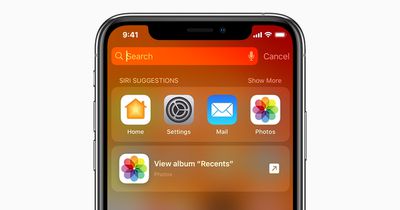
iphone search
In early versions of Apple's mobile operating system, all an iPhone's Lock Screen provided users with access to was the time, date, any notifications, and the camera and flashlight functions. To access anything else, you had to unlock the iPhone. It was straightforward and secure.

These days, iOS allows for optional access to several additional features from the Lock Screen, including (but not limited to) the Today View and Spotlight Search.

Accessed with a left-to-right swipe, the Today View is where you can add widgets and other things you might want to see at a glance without unlocking your iPhone. Swiping down from the middle of the Lock Screen brings up the search input field and Siri suggestions, which are the digital assistant's best guesses as to what apps you might want to use at a given time.

While these are worthwhile, handy features to have available from the Lock Screen, it does mean that anyone can view and use them when your iPhone is locked, and potentially learn things about your device's contents. If that sounds like a step too far from a security perspective, you can easily disable access to these functions on your iPhone. Here's how it's done.

  1. Unlock your iPhone and open the Settings app.
  2. Scroll down and tap Face ID & Passcode (or Touch ID & Passcode).
  3. Enter your passcode at the prompt.
  4. Scroll down, and under "Allow Access When Locked," toggle off the switch next to Today View and Search.
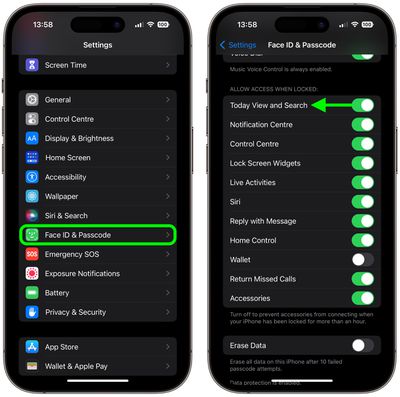
disable today view lock screen

These functions will be disabled with immediate effect, and will no longer be available from the Lock Screen, giving you that added level of security.


Popular Stories

macOS 27 on MacBook Pro

Apple Says macOS 27 Won't Be Compatible With These Macs

Wednesday June 3, 2026 8:29 am PDT by
During WWDC 2025, Apple revealed that macOS 26 Tahoe would be the final major macOS version for Intel-based Macs. macOS 27 will be compatible with Apple silicon Macs only, meaning that you will need a Mac with an M-series chip or a MacBook Neo with an A18 Pro chip in order to install the software update. Apple will unveil macOS 27 during its WWDC 2026 keynote this Monday, June 8, and the...
MacBook Neo on Yellow Feature

MacBook Neo is So Popular That Apple Reportedly Doubled Production

Wednesday June 3, 2026 9:24 am PDT by
On an earnings call in late April, Apple's CEO Tim Cook said that customer response to the MacBook Neo was "off the charts," and the popularity of the laptop has reportedly led the company to significantly boost production. Apple supply chain analyst Ming-Chi Kuo this week said he believes that MacBook Neo shipments to Apple were doubled from an initial target of 5 million units to 10...
iphone 18 pro blue%402x

iPhone 18 Pro: Dark Cherry, Light Blue, and Dark Gray Chassis Leaked [Update]

Thursday June 4, 2026 5:18 am PDT by
Update: Since publication, new information has come to light suggesting the images have been AI-manipulated and are not in fact iPhone 18 Pro chassis parts. The original article follows. The color options Apple is reportedly planning for the upcoming iPhone 18 Pro and ‌iPhone 18 Pro‌ Max have appeared online today in the form of images of chassis parts of unknown authenticity....















