

If you've installed iOS 14 or iPadOS 14 through Apple's developer program or the public beta after it's been released, you may decide you want to downgrade because of issues. Keep reading to learn how it's done.
Compared to betas of previous years, iOS 14 and iPadOS 14 are relatively stable. That said, Apple's beta versions of its major software updates can be notoriously buggy, especially the early releases.
You may find apps not working properly, poor battery life, device crashes, and features that don't do what they're supposed to. Fortunately, you can restore your iPhone or iPad to the previous version of iOS.
If you made an archived backup before you installed the beta, you can remove the iOS 14 beta and restore the backup. If you didn’t make a backup, you can still downgrade, but you won't be able to restore your device to its original state before you upgraded.
Also, if you've installed watchOS 7 on your Apple Watch, it's important to note that you won't be able to use it with your iPhone once you've gone back to iOS 13. Downgrading an Apple Watch to a previous version of watchOS can't be done manually either – if you want to remove watchOS 7, you'll have to send your watch in to Apple.
How to Downgrade from iOS 14 or iPadOS 14
- Launch Finder on your Mac.
- Connect your iPhone or iPad to your Mac using a Lightning cable.
- Put your device into recovery mode. The method of doing this depends on your device, so check the list below these steps to find your model. Apple also provides more information on Recovery mode in this support article.

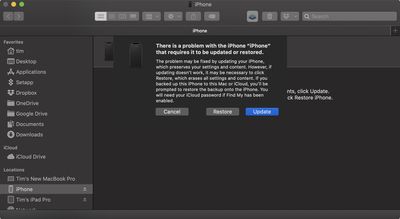
- A dialog will pop up asking if you want to restore your device. Click Restore to wipe your device and install the latest public release of iOS or iPadOS.
- Wait while the restore process completes.
How to Enter Recovery Mode on Your iOS Device
- iPad models with Face ID: Press and quickly release the Volume Up button. Press and quickly release the Volume Down button. Press and hold the Top button until your device begins to restart. Continue holding the Top button until your device goes into recovery mode.
- iPhone 8 or later: Press and quickly release the Volume Up button. Press and quickly release the Volume Down button. Then, press and hold the Side button until you see the recovery mode screen.
- iPhone 7, iPhone 7 Plus, and iPod touch (7th generation): Press and hold the Top (or Side) and Volume Down buttons at the same time. Keep holding them until you see the recovery mode screen.
- iPad with Home button, iPhone 6s or earlier, and iPod touch (6th generation) or earlier: Press and hold both the Home and the Top (or Side) buttons at the same time. Keep holding them until you see the recovery mode screen.
One you've followed the above steps, you can restore a backup of your device from iOS 13 or iPadOS 13 using your Mac or iCloud.




















Top Rated Comments
For me, it added another 24gb between System and Other.