

How to Fake a Dropped Call on Your iPhone When You No Longer Want to Chat - MacRumorsOpen MenuShow RoundupsShow Forums menuVisit ForumsOpen Sidebar
Skip to Content

How to Fake a Dropped Call on Your iPhone When You No Longer Want to Chat

by

If you've ever wanted to end a call on your iPhone without seeming rude, this handy little trick is for you. Keep reading to learn how to fake a dropped call.
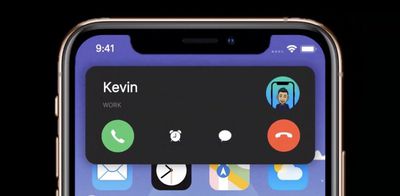
ios 14 phone calls
Whenever you hang up a call on iPhone, the person on the other end sees a message on their phone saying "Call Ended." This is usually treated as a clear indication that you ended the call on purpose, since if the call had dropped due to bad reception, the message would have read "Call Failed," which sounds a lot less incriminating.

So what if you want to end a call without it looking like you abruptly and rudely hung up? The answer is to turn on Airplane mode. That's because when Airplane mode is enabled during a call, the call immediately ends and the person on the other end sees "Call Failed," as if the conversation ended through no fault of your own. Granted, it's sneaky, but it works.

The easiest way to turn on Airplane Mode is via Control Center. To open Control Center, swipe down diagonally from the top-right corner of the screen (if your iPhone has a Home button, swipe up from the bottom of the screen). Then, tap the button that looks like an airplane so that it turns orange and the green cellular button next to it grays out. The cellular provider name in the top-left corner will also be replaced by a plane symbol.
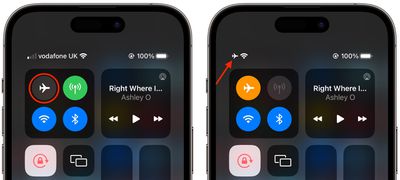
control center
This should immediately end the call, and all that the person on the other end will see is that the call "failed." If you still appear to be on the call, chances are you have Wi-Fi calling enabled, in which case simply tap the blue Wi-Fi button in Control Center to end Wi-Fi calling.


Popular Stories

iPhone 18 Pro and Pro Max Feature

'Apple Upgrade' Program Reportedly Launching Next Week

Tuesday July 21, 2026 8:30 am PDT by
Apple and Klarna are partnering on a new "Apple Upgrade" leasing program set to launch in the U.S. on Tuesday, July 28, according to Bloomberg's Mark Gurman. The program will allow you to finance most iPhone, iPad, Mac, and Apple Watch models, with a 24-month term for iPhones and Apple Watches and a 36-month term for iPads and Macs. Customers will be able to pay off the device early during...
iPhone 18 Pro Deep Red Feature

iPhone 18 Pro Launching in Two Months With These 12 New Features

Friday July 17, 2026 10:39 am PDT by
It is now mid-July, and that means the iPhone 18 Pro and iPhone 18 Pro Max are now just two months away. The devices are expected to look similar to the iPhone 17 Pro and iPhone 17 Pro Max, but there will still be many year-over-year changes, with rumored features including a smaller Dynamic Island, 5G via satellite, and more. Apple is expected to unveil the iPhone 18 Pro, iPhone 18 Pro Max, ...
iPhone 18 Pro Deep Red Feature

iPhone 18 Pro Launching in Two Months With These 12 New Features

Tuesday July 21, 2026 6:22 am PDT by
It is now mid-July, and that means the iPhone 18 Pro and iPhone 18 Pro Max are now just two months away. The devices are expected to look similar to the iPhone 17 Pro and iPhone 17 Pro Max, but there will still be many year-over-year changes, with rumored features including a smaller Dynamic Island, 5G via satellite, and more. Apple is expected to unveil the iPhone 18 Pro, iPhone 18 Pro Max, ...













