How to Filter Messages Between Known and Unknown Senders in iOS 14 - MacRumorsOpen MenuShow RoundupsShow Forums menuVisit ForumsOpen Sidebar
Skip to Content

How to Filter Messages Between Known and Unknown Senders in iOS 14

by

messagesiconIn iOS 14, Apple has added several new features to its native Messages app, including the an improved interface for filtering incoming messages.

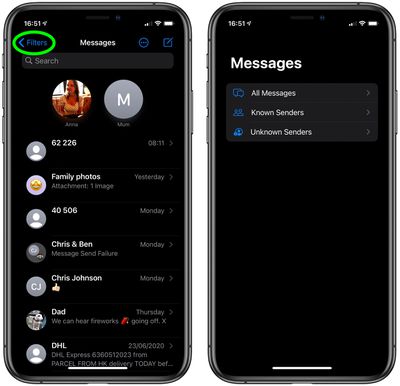
Message filtering sorts messages from people who are not in your contacts into a separate list, which makes it easier to view messages from friends, family, or colleagues in their own special Known Senders list.

All other messages, from OTP codes and courier texts to potential spam, go in their own Unknown Senders list.

Message filtering is off by default, but you can turn it on at any time to activate the two message views in the Messages app. The following steps show you how.

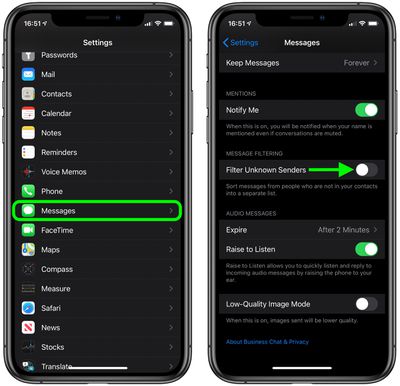
  1. Launch the Settings app on your iPhone or iPad.
  2. Scroll down and tap Messages.
  3. Scroll down to Message Filtering and tap the toggle next to Filter Unknown Senders to move it to the green ON position.
    messages

  4. Now exit out of the Settings app and launch the Messages app.
  5. If you're viewing the normal Messages list, tap Filters in the top-left corner of the screen.
    messages

Under All Messages, you should now see the two filtered options, Known Senders and Unknown Senders. Just tap the options to see the associated messages list.


Related Forum: iOS 14

Popular Stories

ios 27 messages

Apple Intelligence Introduces Contextual Call and Messages Features

Monday June 8, 2026 12:49 pm PDT by
Apple today announced a set of new communication-focused Apple Intelligence features, including contextual suggestions in Messages and a Call Context tool that surfaces relevant information from Mail when a user phones a business. The new Messages features offer one-tap suggestions based on the content of a conversation. If a contact asks for photos, Messages can surface a suggestion to...
ios 27 messages

14 Ways Apple Is Improving Messages in iOS 27

Wednesday June 10, 2026 4:01 am PDT by
Apple at this year's WWDC emphasized that its approach to iOS 27 development was to add fewer newer features and instead make existing features better. Examples of that approach can be seen across the operating system, but it is arguably most obvious in the changes coming to Messages. That's not to say there's nothing original coming to Messages in iOS 27. For instance, one new Apple...
iCloud iPhone 17 Pro

iPhone Users Who Pay for iCloud Storage Get Two New Perks on iOS 27

Thursday July 2, 2026 6:10 am PDT by
If you pay for certain iCloud+ storage plans beyond the 5GB that Apple offers for free, you will receive two more perks on iOS 27 at no additional cost. A summary of the two new iCloud+ perks on iOS 27:Increased daily usage limits for some new Apple Intelligence features, including image generation in the revamped Image Playground app. HomeKit Secure Video cameras receive generated video...