How to Find Your Apple TV Siri Remote Using Your iPhone - MacRumorsOpen MenuShow RoundupsShow Forums menuVisit ForumsOpen Sidebar
Skip to Content

How to Find Your Apple TV Siri Remote Using Your iPhone

by

In iOS 17 and tvOS 17 and later, Apple includes a feature that lets Apple TV users locate a misplaced Siri Remote using their iPhone. Keep reading to learn how it's done.
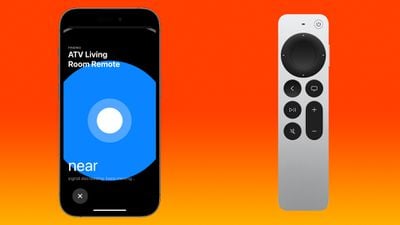
find siri remote iphone
Prior to the launch of the latest ‌Apple TV‌ 4K, there were rumors that Apple would build ‌Find My‌ functionality into the ‌Siri‌ Remote. That didn't happen. Instead, Apple introduced a new iPhone option that does essentially the same thing.

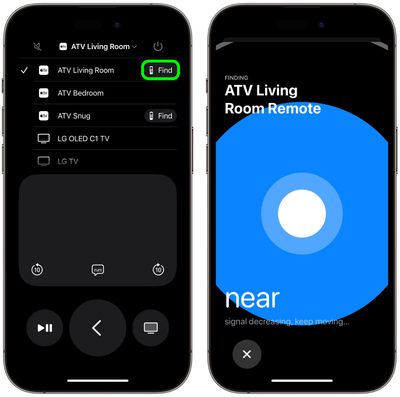
If a ‌Siri‌ Remote becomes lost, the ‌Apple TV‌ remote control available in the Control Center on an ‌iPhone‌ can be used to locate the missing remote. When enabled, users will see a Find My-like interface on their iPhone that guides them toward the remote, with an onscreen circle that changes in size to guide movement in the right direction.

Note that Find My for the ‌Siri‌ Remote is available on the second and third-generation ‌Siri‌ Remotes, and the feature is limited to the ‌Apple TV‌ 4K models released in 2021 and 2022 with updated firmware.

Find Your Siri Remote With Your iPhone

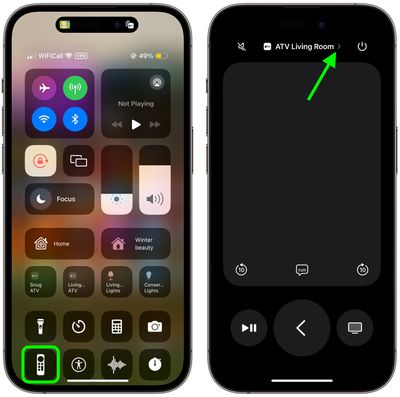
  1. Bring up the Control Center from your iPhone by swiping down from the upper right corner of the screen (on an ‌iPhone‌ with a Home button, swipe up from the bottom of the screen).
  2. Tap the Apple TV Remote button (if it's not there, you can manually add it to Control Center).
  3. Tap the chevron next to the name of the connected Siri Remote.
    control center

  4. Tap the Find button next to the misplaced Siri Remote.
  5. Use the onscreen Find My-like interface to locate the remote. The size of the circle increases to guide movement in the correct direction. When your iPhone is right next to the remote, the screen shows a solid white orb.
  6. Tap the X button to close the location interface.
    remote

In our experience, the proximity accuracy of the feature is equivalent to locating an AirTag with Find My, so it's really helpful for locating your Siri Remote even if it's just hidden between the sofa cushions.


Related Roundup: Apple TV
Buyer's Guide: Apple TV (Don't Buy)

Top Rated Comments

37 months ago
Here's another solution for all:

MacRumors content image
Score: 6 Votes (Like | Disagree)
George Dawes Avatar
37 months ago
Now this IS useful !

Well worth updating just for this tbh
Score: 6 Votes (Like | Disagree)
Muero Avatar
37 months ago

I was considering buying the newer version for this feature alone given how often my child misplaces our remote.
instead of replacing the remote, have you considered replacing the child?
Score: 5 Votes (Like | Disagree)
37 months ago
Have tested this on our older lightning remote.. works great.

So what is this black magic? How the hell does this work?
Score: 4 Votes (Like | Disagree)
37 months ago
Just tried it. It's so inaccurate it's practically useless. I asked someone to hide my remote and I couldn't find it using this feature.
Score: 4 Votes (Like | Disagree)
37 months ago
The Internet is going to explode. In my experience from various sources, this was the #1 requested feature.
Score: 4 Votes (Like | Disagree)

Popular Stories

General visionOS watchOS and tvOS Betas Feature Redux

Apple Releases Second watchOS 26.6, tvOS 26.6 and visionOS 26.6 Betas

Monday June 15, 2026 10:06 am PDT by
Apple today provided developers with the second betas of upcoming watchOS 26.6, tvOS 26.6, and visionOS 26.6 betas for testing purposes. The software comes three weeks after Apple seeded the first betas. The software updates are available through the Settings app on each device, and because these are developer betas, a free developer account is required. There's no word on what's in the...
f 5d631a2d7714517b0b0137e38aadf744d175cb3e

Apple Releases First iOS 27, iPadOS 27, and macOS 27 Betas to Developers

Monday June 8, 2026 11:40 am PDT by
Following the WWDC 2026 keynote event, Apple has seeded the first betas of iOS 27, iPadOS 27, macOS 27, watchOS 27, tvOS 27, and visionOS 27 to developers for testing purposes. Registered developers can opt in to betas and download the software through the Settings app on each device. The software includes many of the new features that were shown off earlier today, though some of what...
Apple TV 2025 Thumb 2 Sans Text

Apple Announces tvOS 27 With These New Features

Monday June 8, 2026 2:00 pm PDT by
Apple barely touched on tvOS 27 during its WWDC 2026 keynote today, but the update exists, and it adds some new features to the Apple TV. In a slide that was shown very briefly during the keynote, Apple revealed some of tvOS 27's new features and enhancements: A redesigned Podcasts app Smoother app launches and animations Faster AirPlay connectivity with other Apple devices Smart ...