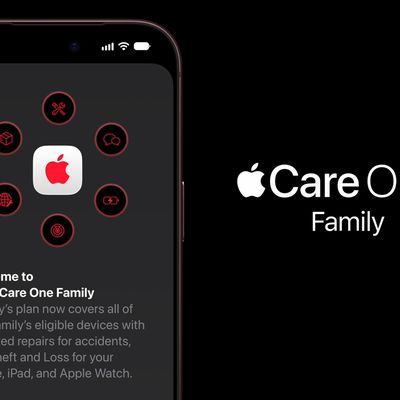
This article explains how to get up-to-date warranty information for Apple devices including iPhone, iPad, Mac, Apple Watch, Apple TV, AirPods, and Apple HomePod.
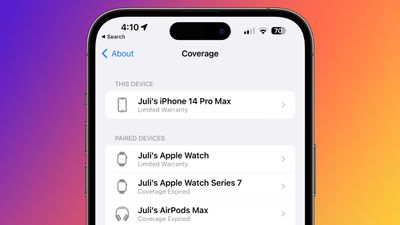
When you buy an Apple device, it comes with a limited warranty to cover manufacturing defects and hardware failures. You can also optionally extend your device's warranty by buying additional AppleCare coverage for a limited time after purchase.
AppleCare Coverage on iPhone and iPad
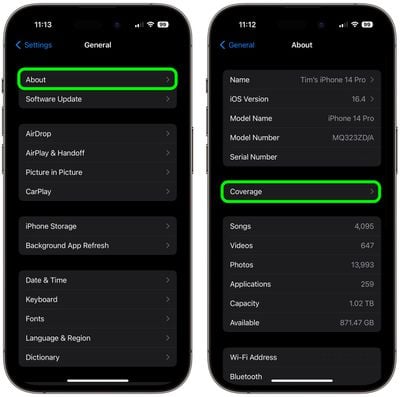
Whichever warranty you have for your iPhone or iPad, you can easily check its coverage status, as well as any Apple products that have been paired with it, right on your device. The following steps show you how it's done on an iPhone or iPad running iOS 16.4/iPadOS 16.4 or later.
- Launch the Settings app on your iPhone or iPad.
- Scroll down and tap General.
- Tap About.
- Tap Coverage.

- To check coverage for the device you're using, tap its entry under "This Device." To check the coverage of any devices you've paired to it, tap entries under "Paired Devices."
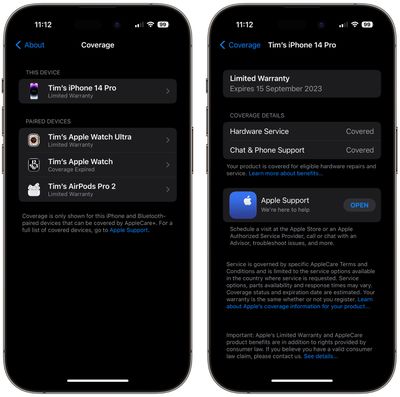
When you tap on an entry, you'll be able to check the expiration date of any remaining warranty, including coverage details such as Hardware Service and Chat & Phone Support. You will also see a handy download link to the Apple Support app, where you can contact Apple for further support and advice about your coverage.
AppleCare Coverage on Mac
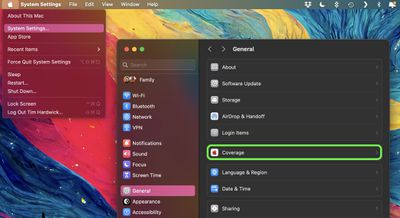
In macOS Sonoma 14.1 and later, you can check the Apple warranty status for your Mac, and any AirPods and/or Beats headphones that you own and have paired to the Mac.
- Click the Apple symbol () in the menu bar and select System Settings....
- Select General in the side column
- Select Coverage.
- Click the option under "This Device" to see your Mac warranty information, or click the options under "More Devices" for selected Bluetooth-paired devices.
AppleCare Coverage on Other Apple Devices
You can check the warranty information of other devices logged into your Apple ID by visiting the Apple My Support page using a web browser. Simply sign in using your Apple credentials and select the device you want more information on. From here, you can also opt to extend AppleCare coverage for any eligible devices.