

How to Float Notes Over Application Windows in macOS - MacRumorsOpen MenuShow RoundupsShow Forums menuVisit ForumsOpen Sidebar
Skip to Content

How to Float Notes Over Application Windows in macOS

by

In the Notes app in macOS, it's possible to float individual notes over other windows so that they stay visible regardless of which application is active.

float notes macos
This makes for a convenient way to reference an existing note while writing an essay or report, for example. It also comes in useful if you want to take notes when researching something online. Keep reading to learn how it's done.

How to Float a Note in macOS

  1. Launch the Notes app, located in your Mac's Applications folder.

  2. Click the Create a Note button, or click an existing note in the list on the left-hand panel.

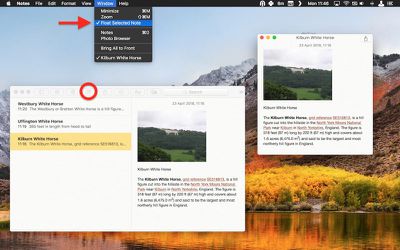
  3. In the Notes menu bar, select Window -> Float Selected Note.
float a note macos notes
The note will be automatically given its own window, which will remain above other open application windows. To turn off the floating behavior but retain the note's separate window, simply click inside the note's window and again select Window -> Float Selected Note to untick the option in the menu bar.

You can have as many note windows open as you want – just double-click each note in your Notes list and they'll pop up separately on the screen. If you've selected several in the list by holding down the Command key, simply double-click one to open them all at once. You can then position them on the screen and control which ones float using the same menu bar option outlined above.

If you close Apple Notes, the number and position of your open note windows will be remembered the next time you launch the app, as well as which ones you've opted to float on top of other open windows. Just remember that your floating notes can't share the same screen as another app that's in fullscreen mode.


Tag: Notes

Top Rated Comments

penguintheft Avatar
105 months ago
This article is missing a step. After selecting "Float Selected Note," the note will not automatically stay on top of all other active windows, unless you click on "Window" again, and then select "Float on Top."
Score: 4 Votes (Like | Disagree)
105 months ago
Floating notes was a feature available even in Windows 98!
Hehe yeah, and Stickies (floating notes) was part of Classic macOS, back in the mid 90s :p actually I didn’t know we have the feature in Notes..
Score: 4 Votes (Like | Disagree)
105 months ago
A double click on the note in the menu also makes it pop out of the main window.
Score: 4 Votes (Like | Disagree)
105 months ago
Very useful tip in this article - thanks!
Score: 3 Votes (Like | Disagree)
timmyh Avatar
105 months ago
I used to use a fantastic little app called Afloat for system-wide floating windows, but it stopped working around the time of El Capitan.


For anyone with the patience, I found this neat guide to getting Afloat working again in macOS (although I can't vouch for it): http://www.perfectlyrandom.org/2016/10/23/always-on-top-in-macos-sierra/

Attachment Image
Score: 3 Votes (Like | Disagree)
105 months ago
Stickies is still around. I use it, but maybe now I will switch to Notes
Whatever floats your note!
Score: 2 Votes (Like | Disagree)

Popular Stories

Apple Card iPhone 16 Pro Feature

Apple Card Promo to Offer Free AirPods Pro 3

Friday May 15, 2026 8:59 am PDT by
Starting as early as next week, customers who sign up for an Apple Card at Apple's retail stores in the U.S. will receive $249 cash back when they purchase AirPods Pro 3, according to Bloomberg's Mark Gurman. The promotion has yet to be officially announced by Apple, so exact terms and conditions are not available at this time. AirPods Pro 3 are priced at $249 in the U.S., so customers who...
Apple WWDC25 iOS 26 CarPlay Light mode 250609

Six Popular iPhone Apps Now Available on CarPlay

Thursday May 14, 2026 9:10 am PDT by
Apple's CarPlay system for accessing iPhone apps on a vehicle's dashboard screen has received six popular apps in recent weeks: ChatGPT, Perplexity, Grok, Google Meet, WhatsApp, and the indie artist streaming platform Audiomack. Make sure you have the latest version of each app and they will automatically appear on CarPlay. ChatGPT Starting with iOS 26.4, CarPlay supports voice-based...
ipad mini 7 blue

OLED iPad Mini: Release Date, Pricing, and What to Expect

Thursday May 14, 2026 5:08 am PDT by
According to the latest rumors, Apple is close to launching its next-generation iPad mini. So what should we expect from the successor to the iPad mini 7 that Apple released over a year ago? Read on to find out. Processor and Performance Apple is working on a next-generation version of the iPad mini (codename J510/J511) that features the A19 Pro chip, according to information found in code...













