Generate Images in iPhone's Messages App Using DALL·E - MacRumorsOpen MenuShow RoundupsShow Forums menuVisit ForumsOpen Sidebar
Skip to Content

Generate Images in iPhone's Messages App Using DALL·E

by

With iOS 18.2, Apple introduced ChatGPT integration with Apple Intelligence to expand the range of AI capabilities accessible to users on supported iPhone models. One skill in particular that you may not be aware of is the ability to generate images in the Messages app, ready for sharing. ChatGPT leverages DALL·E to generate the images, and the results are almost invariably better than Apple's Image Playground. Keep reading to learn how it's done.
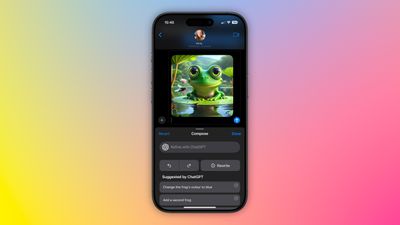
chatgpt image messages

Set Up ChatGPT on Your iPhone

If you have Apple Intelligence enabled on an iPhone 15 Pro or iPhone 16, setting up ChatGPT integration requires just a few steps, and you can begin without even having a ChatGPT account. You can always start with the basic setup and upgrade to a connected account later if needed, although in our tests there isn't too much difference between them when used within the context of daily iPhone usage.

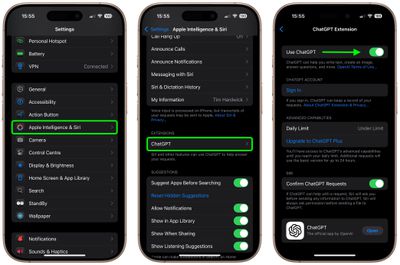
  1. Open Settings.
  2. Tap Apple Intelligence & Siri.
  3. Under "Extensions," tap ChatGPT.
  4. Toggle on the switch next to Use ChatGPT.
settings

If you have a ChatGPT account (free or paid), you can optionally Sign In from this last screen using your account credentials.

Generate Images in Messages

When ChatGPT integration is enabled, whenever you invoke Siri, the voice assistant analyzes your request to see if it's something that needs to be answered by ChatGPT. However, you can specify that you want to use ChatGPT simply by starting a Siri query with "ChatGPT."

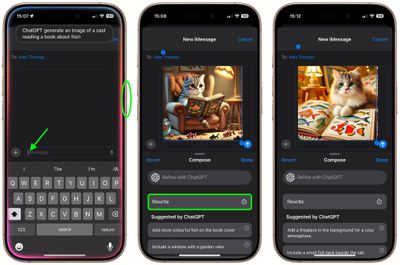
So the next time you're in a Messages conversation and want to express something with an image, tap inside the input field, hold down the Side button on your device to rouse Siri, then say something like, "ChatGPT, generate an image of a cat reading a book about fish." Give it a few seconds to think, and ChatGPT will drop the image into the text field, ready for it to be shared in the conversation.
messages
If you're happy with the output, just tap the Send button to send it on its way. If the image doesn't turn out quite how you hoped, you have a few options. You can tap Rewrite, and ChatGPT will re-generate from scratch a new image based on your prompt.

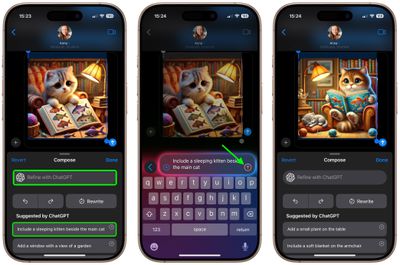
Alternatively, you can tap one of the provided suggestions from ChatGPT to add specific details to the image, or you can tap Refine with ChatGPT and type your own description for more exact detail requests. Simply hit the colored arrow button to send the prompt to ChatGPT, and it will work its magic.
messages
As you can see, the combination of Siri and ChatGPT easily enhances the voice assistant's capabilities compared to what most iPhone users will be used to. The integration works well even for complex queries involving problem solving, writing assistance, detailed explanations, and step-by-step instructions. For everything you can do with ChatGPT in iOS 18.2 and later, be sure to check out our dedicated guide.

Top Rated Comments

turbineseaplane Avatar
23 months ago
What does one even do with this output?

Is this just sort of a fun bauble?
Score: 17 Votes (Like | Disagree)
Dwalls90 Avatar
23 months ago
It's wild to me that Image Playground still can't do this
Score: 7 Votes (Like | Disagree)
23 months ago
So Apple could better have used their programmers for solving bugs in iOS 18 than writing code for image playgrounds which aren’t as good as with ChatGPT and dall.e?

What a world we live in 🤷🏻‍♂️
Score: 6 Votes (Like | Disagree)
23 months ago
Why is generative AI only able to render chubby faced cats? I haven’t seen one that was able to generate a photo of a more narrow faced cat.

Score: 6 Votes (Like | Disagree)
Gix1k Avatar
23 months ago
Serious question....people actually use this feature? There's no situation in my life where I need a pic of a cat reading a book or a frog in a space suit.
Score: 5 Votes (Like | Disagree)
sw1tcher Avatar
23 months ago
I hope this isn't the sort of innovation Tim Cook talked about ('https://forums.macrumors.com/threads/apple-ceo-tim-cook-theres-a-lot-of-innovation-left-for-future-iphone-development.2448438/') during yesterday's earnings call.
Score: 5 Votes (Like | Disagree)

Popular Stories

General macOS Mail Feature

ChatGPT Can Now Access Your iCloud Mail and Calendar

Tuesday October 27, 2026 12:51 pm PDT by
OpenAI today said it added iCloud Mail and Calendar plugins to ChatGPT. With the iCloud Calendar integration, ChatGPT can read, schedule, and update events that show up on your iPhone's Calendar app or any third-party app that uses iCloud Calendar. The Mail integration lets ChatGPT search and read iCloud Mail, manage messages and drafts, send email, and look up iCloud contacts. iCloud...
ios 26 5 rcs

iOS 27.3 May Expand RCS Support to Australia's Telstra in December

Tuesday October 20, 2026 9:04 am PDT by
In a support document that it has since deleted, Australian carrier Telstra said RCS support would be available starting with an iOS update coming in December. If this timeframe remains accurate, then iPhone users with Telstra will likely be able to use RCS in the Messages app starting with iOS 27.3. RCS has many benefits over the traditional SMS standard for text messaging with Android users, ...
Latest Stories
Apple Store Subscription Sign-Up Controversy Exposed
3 hours ago
Siri AI Rumored to Become 'More Like an Agent' as Early as Next Year
13 hours ago
Apple Taking New Approach to Developing iOS 28 and macOS 28
14 hours ago
Early Apple Black Friday Deals on Apple Watch, MacBook Air, and More
1 day ago
'Backglow' Lets You Customize New MacBook Pro's Glowing Apple Logo
1 day ago
Top Stories: Apple Product Launches, iOS 27.3 Beta, and More
2 days ago
More Fun iPhone Duo Apps: 30 New Picks to Try
2 days ago
Hands-On With Apple's New OLED Touchscreen MacBook Pro
2 days ago
Apple Store With All-New Design Opening Soon in Southern California
2 days ago
Control the Glowing Apple Logo on Your New MacBook Pro
2 days ago
Apple Shares New 'Apple Card: Apply and Use in Minutes' Ad
3 days ago
Apple Says More Than 100,000 Apps Optimized for iPhone Duo, Here's What's Still Missing
3 days ago
Early Black Friday Deals Kickoff With Steep Discounts on Apple Watch Ultras and More
3 days ago
The MacRumors Show: iOS 27.3 Looks Like a Huge Update
3 days ago
Best Buy's Black Friday Event Begins With Sitewide Savings on Apple, TVs, More
3 days ago
Apple Releasing Yet Another Two New Products Next Week
3 days ago
MacBook Air Drops to Lowest Price in Months With Amazon's $250 Discount
3 days ago
Apple Rumored to Drop the iPhone's Action Button Next Year
3 days ago
Apple's Extended Return Policy Now in Effect for 2026 Holiday Season
3 days ago
Apple Music Classical Updated With New Icon and Refreshed Design
3 days ago
OLED iPad Mini, M6 iMac, and New MacBook Pros Available From Today
3 days ago
Apple Surveys iPhone Duo Buyers About Crease and Camera
3 days ago
Apple's First Touchscreen Mac is Now Arriving to Customers
3 days ago
Claude Gets Personal Finance Feature With Bank Account Linking
3 days ago
Apple Arcade Adds Crossy Road Rush and NBA 2K27
3 days ago
Apple's New HomeView Smart Home Hub: Here's How Much RAM It Has
3 days ago
iPad Mini vs. iPad Air Buyer's Guide: Now Just $50 Apart
3 days ago
First iOS 27.3 and macOS Golden Gate 27.3 Public Betas Now Available
3 days ago
Apple Announces a New Mac Sales Record
4 days ago
Paid $200 for Logic Pro? Apple Says You Won't Get This New Feature
4 days ago








































