

Apple Watch Ultra models recently gained new low-power settings that can extend battery life up to 60 hours on a single charge, or what Apple calls "multi-day adventure battery life." This article explains how it works and how to set it up.
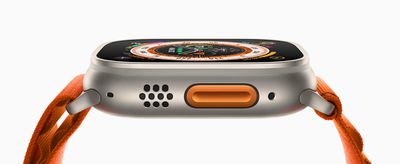
When Apple introduced the Apple Watch Ultra in September, one of the touted features was that it boasts the best battery life of any Apple Watch, capable of reaching up to 36 hours during normal use. Given that successive Apple Watch Series models have only ever officially offered up to 18 hours ("all-day") battery life in normal use, it was pretty big news.
While watchOS 9 brought a new Low Power Mode to Apple Watch Series 4 and later models that also offers up to 36 hours of battery, Apple promised to bring additional low-power settings to Apple Watch Ultra in the fall that would extend battery life even further and make it capable of reaching up to 60 hours.
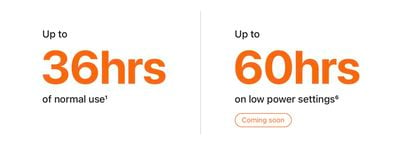
Since then, Apple has released watchOS 9.1 and the company has followed through on its promise, allowing Ultra owners to eke even more life out of their timepiece. The steps below explain how to enable it, but before you can make use of the new feature, you'll need to make sure your Apple Watch Ultra is updated to watchOS 9.1 or later.
In the Watch app on your iPhone, go to General -> Software Update. If you're not already up to date, wait for the update to appear, then tap Download and Install. Make sure your Apple Watch has at least 50% charge and is connected to its charger while the update process completes.
Get 60-Hour Battery Life on Apple Watch Ultra
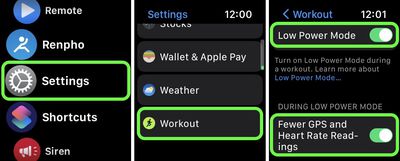
To achieve the extended battery life, Ultra models must first have workout settings enabled for fewer heart rate and GPS readings. Here's how to enable them. (Note that these settings are also available on Apple Watch Series 8 and second-generation Apple Watch SE, but Apple has not stated that they will extend battery life on these models beyond the 36 hours offered by the system-wide Low Power Mode.)
- Launch the Settings app on your Apple Watch Ultra.
- Scroll to the bottom and tap Workout.
- Toggle on the switch next to Low Power Mode.
- Below "During Low Power Mode," toggle on the switch next to Fewer GPS and Heart Rate Readings.
Apple says that with the above settings enabled, Low Power Mode preserves battery life only during walking, running, and hiking workouts, by reducing the frequency of GPS and heart rate readings (heart rate readings are reduced to once per minute, while GPS readings are reduced to once every two minutes) and turning off alerts, splits, and segments. In other words, this means that to get the full 60 hours of battery life, you'll need to enable Low Power Mode outside of workouts as well.
When set up in this manner, Ultra users can expect to get "up to" 60 hours of battery life from their smartwatch. This number is calculated based on 15 hours of workout, over 600 time checks, 35 minutes of app use, 3 minutes of talk, and 15 hours of sleep tracking, over the course of 60 hours, according to Apple.



















Top Rated Comments