How to Get Your iPhone Ready for iOS 13 - MacRumorsOpen MenuShow RoundupsShow Forums menuVisit ForumsOpen Sidebar
Skip to Content

How to Get Your iPhone Ready for iOS 13

by

Apple officially releases iOS 13 in just over an hour, and a host of new iPhone features are coming with it, including a system-wide Dark Mode, a Find My app, a revamped Photos app, updated privacy features, and street-level Maps, not to mention hundreds of smaller new changes and tweaks.
test iOS 13
This article covers some of the things you can do to prepare your iPhone for Apple's latest mobile operating system, including storage maintenance tips, backup advice, and a few other useful tidbits to consider before upgrading. First though, you'll need to make sure your iPhone is compatible with iOS 13.

iOS 13 Compatibility Check

If you own an iPhone 6s or later, your device will run the latest operating system. Still unsure? Here's Apple's official compatibility list for iOS 13.

  • iPhone 11
  • iPhone 11 Pro
  • iPhone 11 Pro Max
  • iPhone XS
  • iPhone XS Max
  • iPhone XR
  • iPhone X
  • iPhone 8
  • iPhone 8 Plus
  • iPhone 7
  • iPhone 7 Plus
  • iPhone 6s
  • iPhone 6s Plus
  • iPhone SE
  • iPod touch (7th generation)

Reclaim Device Storage Space

With the release of iOS 13, Apple is improving the way apps in the App Store are packaged together, and it says users can expect app downloads that are up to 50 percent smaller, resulting in less storage space taken up by apps. However, before you can benefit, you'll first want to make sure your device has adequate space to download and install the new operating system.

With that in mind, it's worth looking at what apps you currently have installed on your devices and whether you really need them. Swipe through your home screen and check inside your folders to root out any long-forgotten apps that are taking up precious storage space.
settings
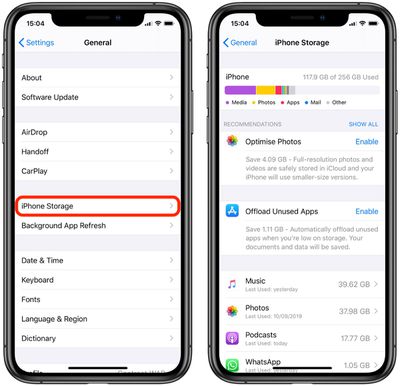
You can delete apps by holding a finger on them and tapping the X that appears at the corner of their icon. Alternatively, go to Settings -> General -> iPhone Storage, tap any apps you don't use, and select Delete App. Be ruthless – you can always re-install removed apps at a later date if you change your mind.

Check on the size of any social media or messaging apps you have installed, such as Facebook and WhatsApp. These apps can often balloon in size after long periods of activity because of chat history, media caching and the like, so you might want to delete and reinstall them to start afresh.

Also, be sure to heed any personal recommendations on the iPhone Storage screen, like keeping high-resolution photos in iCloud and smaller-size versions on your device, or letting iOS automatically offload any apps you don't use often.

Create an Archived iTunes Backup

It's best practice to have an iTunes backup of your device stored on your computer in case something goes awry, or the worst happens and installation of iOS 13 fails. If you need to downgrade shortly after installing a new iOS update, making an archived iTunes backup beforehand is necessary.

An archived iTunes backup saves the current state of your iOS device and prevents it from being accidentally overwritten by subsequent backups. Here's how to do it on a Mac. (Note that if you're a Windows user, the iTunes procedure varies slightly and you will need to rename your iTunes backup folder or move it to another location to prevent it from being overwritten).
encryptedbackup

  1. Connect your iPhone to a Mac with the latest version of iTunes installed (click iTunes -> Check For Updates from the menu bar to make sure) and click on the device's icon in iTunes' interface.
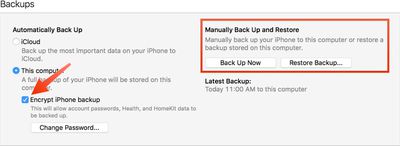
  2. Under backups, select This computer, choose Encrypt iPhone backup and then set a password. An encrypted backup retains all your account passwords as well as your Health and HomeKit data, whereas a non-encrypted backup doesn't.
  3. Click Back Up Now and wait for the backup process to finish. It should take between 5 to 25 minutes to complete depending on how much data is stored on your device.

Archive the Backup
Screen Shot 1 5

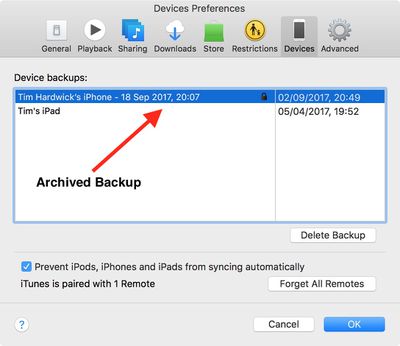
  1. To archive the backup, select Preferences from the iTunes menu and click on the Devices tab. Right-click the new backup and choose the Archive option.
  2. After the archival process is complete, a backup is labeled with the date and the time that it was archived.

Archived backups can be viewed at any time in iTunes' Preferences section. You can also delete an archived backup from here – simply select the backup in question and click the Delete Backup button.

Installing iOS 13

When iOS 13 becomes available (likely around 10 AM PST/1 PM EST on the official release day, based on past releases) it will be delivered to your device either via iTunes when you plug it into your computer, or as an over-the-air update. Make sure your device is fully charged before you start the process over Wi-Fi, as it may take some time to complete.


Related Forum: iOS 13

Top Rated Comments

GadgetBen Avatar
93 months ago

Any thoughts/wisdom/opinions about installing iOS 13 vs. waiting for 13.1? I keep reading about bugs in 13.

Wait for 13.1 I’m on it now and it’s far better. So much so I’m going to update my Pro when it arrives tomorrow to the Beta.
Score: 8 Votes (Like | Disagree)
az431 Avatar
93 months ago

Any thoughts/wisdom/opinions about installing iOS 13 vs. waiting for 13.1? I keep reading about bugs in 13.
Every piece of software ever developed has bugs

The fact that even a dozen people rant about a bug on MR does not mean the bug is widespread (or that it is even a bug)

I've had zero issues with 13.0 or 13.1 aside from mail not always refreshing the unread email account
Score: 5 Votes (Like | Disagree)
93 months ago
Any thoughts/wisdom/opinions about installing iOS 13 vs. waiting for 13.1? I keep reading about bugs in 13.
Score: 4 Votes (Like | Disagree)
bbrks Avatar
93 months ago

Any thoughts/wisdom/opinions about installing iOS 13 vs. waiting for 13.1? I keep reading about bugs in 13.
I see no reason why wouldnt you install IOS 13 and check how it works. IOS 13.1 final will come within next couple of weeks anyway. So.......
Score: 3 Votes (Like | Disagree)
Ronlap Avatar
93 months ago
Better to wait for iOS 13.1 at the end of the month since iOS 13 contains a vulnerability that could allow anyone to bypass the lockscreen protection on your iPhone and access sensitive information.

Jose Rodriguez ('https://twitter.com/VBarraquito'), a Spanish security researcher, contacted The Hacker News and revealed that he discovered a lockscreen bypass bug in iOS 13 that allowed him to access the full list of Contacts on his iPhone—and every piece of information saved on them.
Score: 3 Votes (Like | Disagree)
93 months ago

Any thoughts/wisdom/opinions about installing iOS 13 vs. waiting for 13.1? I keep reading about bugs in 13.
I researched and concluded i’ll wait for iOS 13.1; taking advantage of this atypical around the corner semi-major update (sept 30th)

iOS 13 does have several bugs.
Score: 3 Votes (Like | Disagree)

Popular Stories

apple pro tell logo

Apple Launching Five New Products Today

Thursday November 5, 2026 12:59 am PST by
Apple is launching five new products on Friday, November 6, following pre-orders that opened last week, including its first touchscreen MacBook Pro models. The following new products will be available from today: iPad mini with OLED display and A20 Pro chip iMac with M6 chip 14-inch MacBook Pro with M6 chip 14-inch MacBook Pro with OLED touchscreen 16-inch MacBook Pro with OLED...
duo aquarium

More Fun iPhone Duo Apps: 30 New Picks to Try

Friday November 6, 2026 3:27 pm PST by
When the iPhone Duo launched, we shared a list of some of the fun apps developers created for the new form factor. Two weeks out, developers are continuing to come up with fresh ideas, so we thought we'd share some of our favorites. Games Marbles Unhinged ($2.99) - Marbles Unhinged is a marble maze designed for the Duo. When you fold it, the floor turns into a ramp. If you stand the top...
silver iphone 18 pro

Apple Rumored to Drop the iPhone's Action Button Next Year

Friday November 6, 2026 6:07 am PST by
Apple plans to merge the iPhone's Action button with the Camera Control starting next year, according to the leaker known as "Instant Digital." In a new post on Weibo, the leaker claimed that a single press of the combined button would open the camera, while a long press would trigger the function assigned to the Action button. They explicitly clarified that the dedicated Action button would ...
Latest Stories
Early Apple Black Friday Deals on Apple Watch, MacBook Air, and More
15 hours ago
'Backglow' Lets You Customize New MacBook Pro's Glowing Apple Logo
15 hours ago
Top Stories: Apple Product Launches, iOS 27.3 Beta, and More
22 hours ago
More Fun iPhone Duo Apps: 30 New Picks to Try
2 days ago
Hands-On With Apple's New OLED Touchscreen MacBook Pro
2 days ago
Apple Store With All-New Design Opening Soon in Southern California
2 days ago
Control the Glowing Apple Logo on Your New MacBook Pro
2 days ago
Apple Shares New 'Apple Card: Apply and Use in Minutes' Ad
2 days ago
Apple Says More Than 100,000 Apps Optimized for iPhone Duo, Here's What's Still Missing
2 days ago
Early Black Friday Deals Kickoff With Steep Discounts on Apple Watch Ultras and More
2 days ago
The MacRumors Show: iOS 27.3 Looks Like a Huge Update
2 days ago
Best Buy's Black Friday Event Begins With Sitewide Savings on Apple, TVs, More
2 days ago
Apple Releasing Yet Another Two New Products Next Week
2 days ago
MacBook Air Drops to Lowest Price in Months With Amazon's $250 Discount
2 days ago
Apple Rumored to Drop the iPhone's Action Button Next Year
2 days ago
Apple's Extended Return Policy Now in Effect for 2026 Holiday Season
2 days ago
Apple Music Classical Updated With New Icon and Refreshed Design
2 days ago
OLED iPad Mini, M6 iMac, and New MacBook Pros Available From Today
2 days ago
Apple Surveys iPhone Duo Buyers About Crease and Camera
2 days ago
Apple's First Touchscreen Mac is Now Arriving to Customers
3 days ago
Claude Gets Personal Finance Feature With Bank Account Linking
3 days ago
Apple Arcade Adds Crossy Road Rush and NBA 2K27
3 days ago
Apple's New HomeView Smart Home Hub: Here's How Much RAM It Has
3 days ago
iPad Mini vs. iPad Air Buyer's Guide: Now Just $50 Apart
3 days ago
First iOS 27.3 and macOS Golden Gate 27.3 Public Betas Now Available
3 days ago
Apple Announces a New Mac Sales Record
3 days ago
Paid $200 for Logic Pro? Apple Says You Won't Get This New Feature
3 days ago
Instagram's Edits Video Editor is Now Available on Mac
3 days ago
Prevent Siri and Search From Accessing Specific iPhone Apps
3 days ago
Best Early Black Friday Deals on iPhone 18 Pro and iPhone Duo
3 days ago









































