

How to Use Your iPhone's Hidden Camera Level Tool - MacRumorsOpen MenuShow RoundupsShow Forums menuVisit ForumsOpen Sidebar
Skip to Content

How to Use Your iPhone's Hidden Camera Level Tool

by

Apple's native Camera app has plenty of tools for helping you get the right shot, but some are more hidden than others. The camera level is the perfect example of a really handy tool that many users don't even know exists, mainly because it's part of a feature that's turned off by default.

If you tend to take pictures of things when standing directly over your subject, like a meal on a table or an ornament on the ground, then you'll want to use the camera level, as it helps you capture a balanced shot without having to use a tripod arm or mount. It's also useful for taking a shot of something directly above you, like an object on the ceiling or in the sky.


Here's how to enable and use it on iOS 11 and later.

How to Enable the Camera Level on iPhone and iPad

The camera level tool used to be part of the Grid overlay, but Apple has separated out the function in recent versions of iOS, and it now has its own switch.

  1. Open the Settings app on your iOS device.

  2. Scroll down the list and tap Camera.

  3. In the "Composition" section, toggle on the switch next to Level.
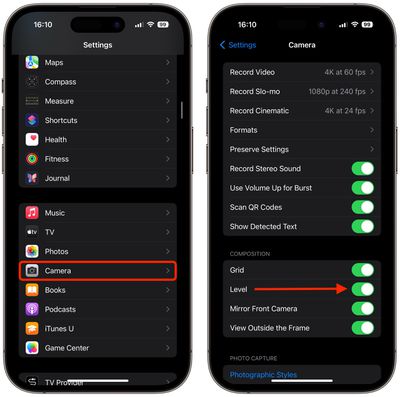
settings

How to Use the Camera Level on iPhone and iPad

  1. Open the Camera app on your iOS device.

  2. Set the capture mode to Photo, Portrait, Square, or Time Lapse, using the sliding menu above the shutter button.

  3. Point the camera straight down above your subject (or straight up if the subject/scene you want to capture is above you).

  4. Line up the floating crosshair with the fixed crosshair in the center of the screen by adjusting the angle of your phone's camera. The crosshairs will both glow yellow when in perfect alignment.

  5. Tap the shutter button to capture the shot.
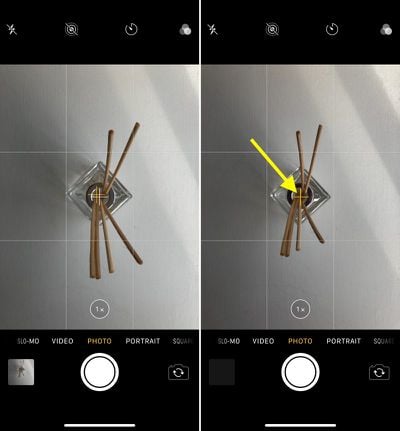
camera lens tool how to

The aligned crosshairs turn yellow (right), indicating the lens is parallel with the ground.

The level tool also comes in handy when scanning documents on a desk with your phone's camera, but iOS now offers a dedicated scanning feature in the Notes app, so you'll probably want to use that instead.


Top Rated Comments

Someirishguy Avatar
108 months ago
Does not work for me
It’s only when you’re pointing the camera straight down
Score: 7 Votes (Like | Disagree)
108 months ago
It’s only when you’re pointing the camera straight down
Well, that's..... useful for taking downward pictures... Would have loved the level to be available in regular shots so I can level the camera to keep the horizon level in my landscape shots.
Score: 6 Votes (Like | Disagree)
108 months ago
This really highlights how poorly designed some of the Apple apps are that you have to leave the app and dig into a submenu of the completely seperate settings app to toggle features like this.

It’s mad that you also have to go to this page to change the camera recording quality.
Score: 4 Votes (Like | Disagree)
tomtendo Avatar
108 months ago
Does not work for me
Score: 4 Votes (Like | Disagree)
mtneer Avatar
108 months ago
Thank you for pointing this out.
Score: 4 Votes (Like | Disagree)
efktd Avatar
108 months ago
Not with my iPhone 7 either

Edit: I posted before reading others’ comments, it does work, but it doesn’t make much sense if it will only work facing down. How often do people actually take photos in that manner?
More than you think...

Attachment Image
Score: 3 Votes (Like | Disagree)

Popular Stories

Apple Card iPhone 16 Pro Feature

Apple Card Promo to Offer Free AirPods Pro 3

Friday May 15, 2026 8:59 am PDT by
Starting as early as next week, customers who sign up for an Apple Card at Apple's retail stores in the U.S. will receive $249 cash back when they purchase AirPods Pro 3, according to Bloomberg's Mark Gurman. The promotion has yet to be officially announced by Apple, so exact terms and conditions are not available at this time. AirPods Pro 3 are priced at $249 in the U.S., so customers who...
Apple WWDC25 iOS 26 CarPlay Light mode 250609

Six Popular iPhone Apps Now Available on CarPlay

Thursday May 14, 2026 9:10 am PDT by
Apple's CarPlay system for accessing iPhone apps on a vehicle's dashboard screen has received six popular apps in recent weeks: ChatGPT, Perplexity, Grok, Google Meet, WhatsApp, and the indie artist streaming platform Audiomack. Make sure you have the latest version of each app and they will automatically appear on CarPlay. ChatGPT Starting with iOS 26.4, CarPlay supports voice-based...
ipad mini 7 blue

OLED iPad Mini: Release Date, Pricing, and What to Expect

Thursday May 14, 2026 5:08 am PDT by
According to the latest rumors, Apple is close to launching its next-generation iPad mini. So what should we expect from the successor to the iPad mini 7 that Apple released over a year ago? Read on to find out. Processor and Performance Apple is working on a next-generation version of the iPad mini (codename J510/J511) that features the A19 Pro chip, according to information found in code...













