How to Hide Your 'Last Seen' Status in WhatsApp - MacRumorsOpen MenuShow RoundupsShow Forums menuVisit ForumsOpen Sidebar
Skip to Content

How to Hide Your 'Last Seen' Status in WhatsApp

by

For a long time now, WhatsApp has included a feature that shows when a user was last online or last active on the messaging platform, which can be either helpful or a hindrance, depending on your personal or business situation.

Whatsapp Feature
As regular WhatsApp users will know, the "Last Seen" status of a contact sits atop the conversation thread, informing you when that contact last opened the app and was active on the platform. But if you don't want people to know when you were last active, WhatsApp includes a setting to hide your Last Seen status or limit its visibility to certain users.

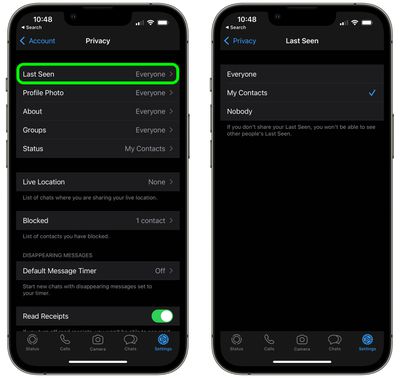
You can set it so that your Last Seen status can be seen by everyone, no-one, or only your contacts. Just bear in mind that if your Last Seen is hidden from another person, you won't be able to see their Last Seen either. Here's how it works.

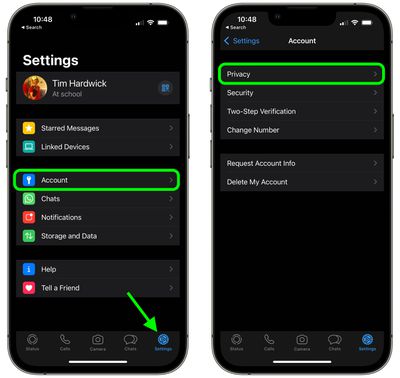
  1. Open the WhatsApp app on your iPhone.
  2. Tap the Settings icon in the bottom-right.

  3. Tap Account.
  4. Tap Privacy.
    whatsapp

  5. Tap Last Seen.
  6. Tap to select Everyone, My Contacts, or Nobody.
    whatsapp

WhatsApp is currently working on giving users the option to adjust the visibility of their Last Seen status on a contact-by-contact basis, according to a September 2021 report, although the option has yet to be rolled out as of writing.

At the end of 2021, WhatsApp also made a privacy change to prevent people on its messaging platform from viewing the Last Seen status of users whom they have never chatted with, however people and businesses a user knows or has previously messaged are not affected by the change.


Popular Stories

Whatsapp Feature

These Older iPhones Will Need an Update to Keep Running WhatsApp

Thursday June 11, 2026 3:36 am PDT by
Some older iPhone models will need a software update to keep running WhatsApp from the end of November 2026, after Meta confirmed it is raising the app's minimum system requirements. From November 30, WhatsApp will require iOS 15.5 or later, up from the current requirement of iOS 15.1. The models affected are the iPhone 6s, iPhone 6s Plus, iPhone SE (1st generation), iPhone 7, and iPhone...
Whatsapp Feature

WhatsApp Working on View-Once Text Messages for iPhone

Wednesday June 17, 2026 1:48 am PDT by
WhatsApp is working on a way to let users send text messages that can only be viewed once, similar to the feature already available for photos, videos, and voice notes. According to WABetaInfo, after typing a message in the chat bar, users will be able to select a new "Send as view once" option by long-pressing the Send button. When the message is sent, the recipient will be able to open the ...
Whatsapp Feature

WhatsApp Now Lets You Reserve a Username

Monday June 29, 2026 4:01 pm PDT by
Popular messaging app WhatsApp is now allowing users to reserve usernames ahead of plans to launch username-based messaging. Right now, WhatsApp uses a person's phone number as an identifier, but usernames will allow people to interact without having to exchange personal information. Username reservations are rolling out starting this week, and not all users will have access to the...