

How to Enhance Siri Requests in iOS By Adding Your Personal Contact Details - MacRumorsOpen MenuShow RoundupsShow Forums menuVisit ForumsOpen Sidebar
Skip to Content

How to Enhance Siri Requests in iOS By Adding Your Personal Contact Details

by

If you add your personal contact information to your iPhone or iPad, it allows Siri to carry out more complex queries and offer better suggestions, such as giving you directions home or reminding you about your scheduled meeting when you arrive at the office.
siri iphone x
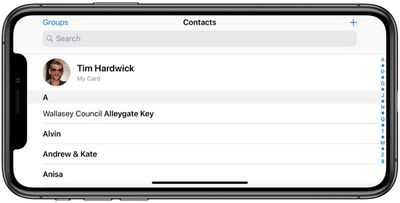
For best results, you need to make sure your self-identifying contact card – called My Card in the Contacts app – includes sufficient information about you. Your iPhone or ‌iPad‌ should use your Apple ID to create your contact card, but you may need to provide additional details like your name and address to complete it.
editing my card in contacts for better siri suggestions
To do so, open the Contacts app on your device and tap My Card at the top of your contacts list, then tap Edit and enter your information – you can insert additional fields as desired using the plus buttons. If you don't see My Card, tap the Add button and enter your info, then return to your device's Home screen and follow the steps below.

  1. Launch the Settings app on your iPhone or ‌iPad‌.
  2. Scroll down and tap Contacts.
  3. Tap My Info.
    editing my card in contacts for better siri suggestions 1

  4. Select your name in the contacts list that appears.
  5. Next, tap Siri & Search.
  6. Make sure the toggle next to Siri & Suggestions is in the green ON position.
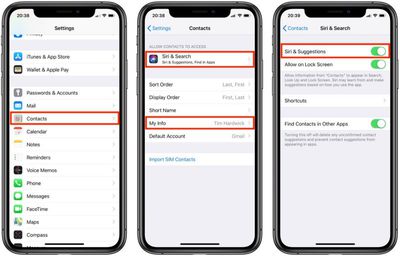
If you like, you can enable these personalized ‌Siri‌ Suggestions on your iPhone's lock screen – just make sure the toggle next to Allow on Lock Screen is also in the green ON position.

You can also enhance ‌Siri‌'s responses by establishing relationships between your familial contacts. Click here to learn how.

Popular Stories

iphone 16 teal

Siri Lawsuit: Apple Agrees to Pay Owners of These iPhone Models

Thursday May 7, 2026 6:30 am PDT by
Apple has agreed to pay $250 million to settle a U.S. class action lawsuit over delayed Siri features, and eligible iPhone users could receive up to a $95 payout. Below, we have answered some key questions regarding the lawsuit. Why Was Apple Sued? In June 2024, Apple previewed new Siri capabilities powered by Apple Intelligence, including understanding of a user's personal context,...
Finder Siri Feature

iOS 27 Getting Major Siri Redesign With Chat Interface and Dedicated App

Tuesday May 12, 2026 1:38 pm PDT by
Apple is introducing an overhauled version of Siri in iOS 27, evolving the personal assistant into a more capable chatbot and AI agent able to compete with ChatGPT, Claude, and Gemini. With Siri's transition, Apple will be making multiple Siri-related design changes in iOS 27, according to a new report from Bloomberg. Siri will largely live in the Dynamic Island in iOS 27, but there will also be...
OpenAI vs Apple Feature

OpenAI Considering Legal Action Against Apple Over 'Strained' Siri Partnership

Thursday May 14, 2026 10:52 am PDT by
OpenAI is preparing to potentially take legal action against Apple due to a "strained" relationship with the iPhone maker, according to Bloomberg's Mark Gurman. The two companies reached a partnership in 2024 that saw ChatGPT integrated into features like Siri and Image Playground across iOS, iPadOS, and macOS. iPhone users can also subscribe to ChatGPT directly via the Settings app, with...












