How to Fix a Damaged macOS Installer - MacRumorsOpen MenuShow RoundupsShow Forums menuVisit ForumsOpen Sidebar
Skip to Content

How to Fix a Damaged macOS Installer

by

Creating a macOS installer on a bootable USB drive provides a convenient way of installing a fresh copy of macOS on multiple Macs, and also allows you to perform a clean installation quickly and easily.
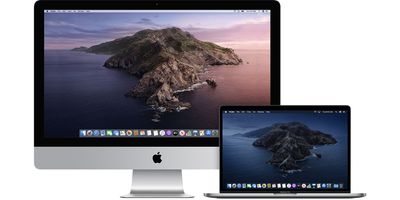
Catalina
If you tried to run your installer recently and unexpectedly received an error that it is damaged and can't be used, then don't worry – keep reading for a simple and straightforward way to fix it.

Why is my macOS Installer Damaged?

If you tried to use a macOS installer in the last few days or weeks, you may have been met with an error message saying something like "This copy of the Install macOS Mojave.app application is damaged, and can’t be used to install macOS."
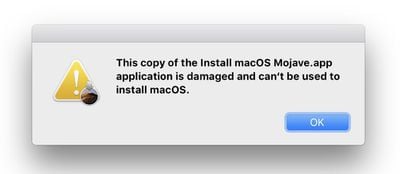
installer
As Apple explains in a newly published support document, the likely reason for the "damaged" error message is an expired certificate. Happily though, the fix is very simple.

How to Fix a Damaged macOS Installer

To fix the damaged installer, you should just download the installer again. Doing so will also ensure that you have all of the macOS updates that have been released since you made the original installer, meaning you won't have to update macOS immediately after the initial installation is complete.

You can find the latest official download links below for the last six versions of Apple's Mac operating system, all of which contain a new certificate that has not expired:

To learn how to perform a clean installation of macOS using the bootable USB drive method, click one of the following links: macOS Catalina, macOS Mojave, macOS Sierra.


Top Rated Comments

gank41 Avatar
92 months ago

That message does not mean you can't download it.

It only means that the installer won't run on that system version.
You will see that message after the download is complete (because the system automatically tries to launch the installer)
And, you have the downloaded installer, in your Applications folder. I would save the installer app to an external drive, and use one of the methods to create a fresh bootable installer from that app.
Finally, delete the downloaded installer from your boot drive.
Actually, I get that message BEFORE it tries to download it. I'm well aware that you can still download the file and create USB Installers and whatnot.. Gotta have the file downloaded first, though. And I'm not able to get that far.
Score: 4 Votes (Like | Disagree)
chrfr Avatar
91 months ago

I am sure that I already had been looking and can't seem to find and it's puzzles me..
It could be on any drive attached to your computer.
Score: 3 Votes (Like | Disagree)
gank41 Avatar
92 months ago

Right this had baffled me and a colleague for a few days. The issue im having, now I understand the cause of the error, is that the links send you to the App Store and it just announces that it cant connect to the store. It will if I go to an app thats there. Any clues folks
The only way I was able to get the App Store installers was by going through a Virtual Machine of 10.14 and downloading them from there, and then copying them over.
Score: 2 Votes (Like | Disagree)
92 months ago

The createinstallmedia command will fail with the new Sierra installer. Some code is munged somewhere. As a workaround, do an actual installation to your flash drive, then just copy the new installer to that drive's Applications folder. At least you can boot and get Sierra installed to an otherwise unbootable drive (or reinstalled over an earlier installation nondestructively).
Thank you. I too have a workaround. Make a bootable DVD installer instead.

To do this copy and paste these into terminal to make the bootable iso file (assuming you have the Sierra installer in your Applications folder):

hdiutil attach /Applications/Install\ macOS\ Sierra.app/Contents/SharedSupport/InstallESD.dmg -noverify -nobrowse -mountpoint /Volumes/install_app

hdiutil create -o /tmp/Sierra.cdr -size 7.85g -layout SPUD -fs HFS+J

hdiutil attach /tmp/Sierra.cdr.dmg -noverify -nobrowse -mountpoint /Volumes/install_build

asr restore -source /Volumes/install_app/BaseSystem.dmg -target /Volumes/install_build -noprompt -noverify -erase

rm /Volumes/OS\ X\ Base\ System/System/Installation/Packages

cp -rp /Volumes/install_app/Packages /Volumes/OS\ X\ Base\ System/System/Installation/

cp -rp /Volumes/install_app/BaseSystem.chunklist /Volumes/OS\ X\ Base\ System/BaseSystem.chunklist

cp -rp /Volumes/install_app/BaseSystem.dmg /Volumes/OS\ X\ Base\ System/BaseSystem.dmg

hdiutil detach /Volumes/install_app

hdiutil detach /Volumes/OS\ X\ Base\ System/

hdiutil convert /tmp/Sierra.cdr.dmg -format UDTO -o /tmp/Sierra.iso

mv /tmp/Sierra.iso.cdr ~/Desktop/Sierra.iso

A bootable iso file called Sierra.iso will then appear on your desktop and you can use this to burn it to a dual layer dvd:

sudo drutil burn /Users/YOURNAME/Desktop/Sierra.iso

where you replace "YOURNAME" with the username for the account you are logged into at the time.

and then boot to startup manager with option key to select the dvd.

Just be aware though that a bootable dvd takes a lot longer to boot up than a bootable usb.
Score: 2 Votes (Like | Disagree)
92 months ago

Another weird problem I'm having is the error: ''..... is not a valid mount point'' in terminal. It only happens when I want to make a Sierra bootable installer, all the others work fine. Changing the name of the USB drive does not solve the issue and I've checked the path and it's correct. Does anyone else has this issue with the new 10.12 Sierra installer?
Indeed. I was so curious about your post that I downloaded Sierra and attempted to make the bootable usb to see if this bug is reproducible.

I got the same result.

The reproducibility of the bug makes it very suitable to apple for a bug report.

I have submitted the bug report to apple.
Score: 2 Votes (Like | Disagree)
92 months ago
So is this new certificate also going to expire at some point in the future?
Score: 2 Votes (Like | Disagree)

Popular Stories

duo aquarium

More Fun iPhone Duo Apps: 30 New Picks to Try

Friday November 6, 2026 3:27 pm PST by
When the iPhone Duo launched, we shared a list of some of the fun apps developers created for the new form factor. Two weeks out, developers are continuing to come up with fresh ideas, so we thought we'd share some of our favorites. Games Marbles Unhinged ($2.99) - Marbles Unhinged is a marble maze designed for the Duo. When you fold it, the floor turns into a ramp. If you stand the top...
iOS 28 AI

Apple Taking New Approach to Developing iOS 28 and macOS 28

Sunday November 8, 2026 7:42 am PST by
Apple has made a change to its development process for iOS 28, macOS 28, and corresponding software updates, according to Bloomberg's Mark Gurman. In his Power On newsletter today, he said Apple separates development of each year's new operating systems into three major stages. Typically, he said each stage consists of four weeks of coding followed by a four-week "convergence" period where...
apple pro tell logo

Apple Launching Five New Products Today

Thursday November 5, 2026 12:59 am PST by
Apple is launching five new products on Friday, November 6, following pre-orders that opened last week, including its first touchscreen MacBook Pro models. The following new products will be available from today: iPad mini with OLED display and A20 Pro chip iMac with M6 chip 14-inch MacBook Pro with M6 chip 14-inch MacBook Pro with OLED touchscreen 16-inch MacBook Pro with OLED...
Latest Stories
Apple Store Subscription Sign-Up Controversy Exposed
9 hours ago
Siri AI Rumored to Become 'More Like an Agent' as Early as Next Year
19 hours ago
Apple Taking New Approach to Developing iOS 28 and macOS 28
21 hours ago
Early Apple Black Friday Deals on Apple Watch, MacBook Air, and More
2 days ago
'Backglow' Lets You Customize New MacBook Pro's Glowing Apple Logo
2 days ago
Top Stories: Apple Product Launches, iOS 27.3 Beta, and More
2 days ago
More Fun iPhone Duo Apps: 30 New Picks to Try
3 days ago
Hands-On With Apple's New OLED Touchscreen MacBook Pro
3 days ago
Apple Store With All-New Design Opening Soon in Southern California
3 days ago
Control the Glowing Apple Logo on Your New MacBook Pro
3 days ago
Apple Shares New 'Apple Card: Apply and Use in Minutes' Ad
3 days ago
Apple Says More Than 100,000 Apps Optimized for iPhone Duo, Here's What's Still Missing
3 days ago
Early Black Friday Deals Kickoff With Steep Discounts on Apple Watch Ultras and More
3 days ago
The MacRumors Show: iOS 27.3 Looks Like a Huge Update
3 days ago
Best Buy's Black Friday Event Begins With Sitewide Savings on Apple, TVs, More
3 days ago
Apple Releasing Yet Another Two New Products Next Week
3 days ago
MacBook Air Drops to Lowest Price in Months With Amazon's $250 Discount
3 days ago
Apple Rumored to Drop the iPhone's Action Button Next Year
3 days ago
Apple's Extended Return Policy Now in Effect for 2026 Holiday Season
3 days ago
Apple Music Classical Updated With New Icon and Refreshed Design
3 days ago
OLED iPad Mini, M6 iMac, and New MacBook Pros Available From Today
3 days ago
Apple Surveys iPhone Duo Buyers About Crease and Camera
4 days ago
Apple's First Touchscreen Mac is Now Arriving to Customers
4 days ago
Claude Gets Personal Finance Feature With Bank Account Linking
4 days ago
Apple Arcade Adds Crossy Road Rush and NBA 2K27
4 days ago
Apple's New HomeView Smart Home Hub: Here's How Much RAM It Has
4 days ago
iPad Mini vs. iPad Air Buyer's Guide: Now Just $50 Apart
4 days ago
First iOS 27.3 and macOS Golden Gate 27.3 Public Betas Now Available
4 days ago
Apple Announces a New Mac Sales Record
4 days ago
Paid $200 for Logic Pro? Apple Says You Won't Get This New Feature
4 days ago









































