How to Use iPhone Mirroring in macOS Sequoia - MacRumorsOpen MenuShow RoundupsShow Forums menuVisit ForumsOpen Sidebar
Skip to Content

How to Use iPhone Mirroring in macOS Sequoia

by

In macOS Sequoia, Apple introduced iPhone Mirroring, a new Continuity feature that bridges the gap between your Mac and iPhone. It allows you to view and control your iPhone directly from your Mac's screen, creating a seamless integration between the two devices.
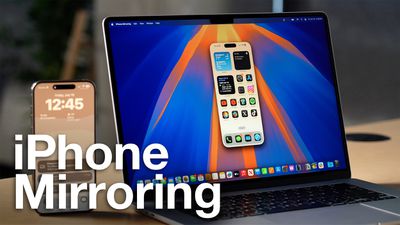
iPhone Mirroring Thumb 2
iPhone Mirroring opens up a world of possibilities for multitasking and productivity. Imagine responding to iPhone notifications, sending text messages, or even navigating through iOS apps, all without taking your hands off your Mac's keyboard.

Your ‌iPhone‌ can remain tucked away in a pocket or a bag while you control it from your Mac, so no one can access it or see what you're doing with it. Just note that you do need to have your ‌iPhone‌ close enough to your Mac for there to be a Bluetooth connection.

With ‌iPhone‌ Mirroring turned on, incoming ‌iPhone‌ notifications show up right alongside your Mac notifications in the Notification Center at the upper right hand corner of the Mac's display. ‌iPhone‌ notifications are indicated with a small ‌iPhone‌ icon, but they otherwise look like native Mac notifications. You can even click on a notification and open up the app on your ‌iPhone‌, interacting with it directly from the Mac.

The feature is particularly useful for tasks that require extensive typing, such as composing long emails or editing documents on your iPhone. Check that your devices support iPhone Mirroring by referring to the following section, then read on to learn how to set up the feature.

iPhone Mirroring Requirements

To use iPhone Mirroring, you need a Mac that runs macOS Sequoia and that has an Apple silicon chip (M1 or later) or a T2 security chip. Macs with T2 security chips are Intel-based and include the following machines:

  • 2018 and later MacBook Pro
  • 2020 iMac
  • iMac Pro
  • 2018 Mac mini
  • 2019 Mac Pro

These Macs have Apple silicon chips:

  • 2020 and later Mac mini
  • 2020 and later MacBook Air
  • 2021 and later iMac
  • 2021 and later MacBook Pro (14 and 16 inch)
  • 2020 13-inch MacBook Pro
  • 2022 and later Mac Studio
  • 2023 Mac Pro

Any iPhone that runs iOS 18 works with iPhone Mirroring.

  • All iPhone 16 models
  • All iPhone 15 models
  • All iPhone 14 models
  • All iPhone 13 models
  • All iPhone 12 models
  • All iPhone 11 models
  • iPhone XS and XS Max
  • iPhone XR
  • iPhone SE (2nd and 3rd gen)

Your iPhone and Mac need to be signed into the same Apple ID, and two-factor authentication must be enabled for the iPhone Mirroring feature to work. You will also need to make sure that Bluetooth and Wi-Fi are enabled, and that the two devices are near each other.

Get Started With iPhone Mirroring
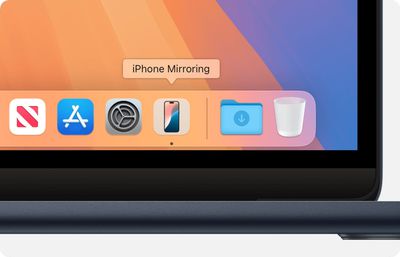
macos sequoia macbook air iphone mirroring app icon in dock

  1. From your Mac's Dock, click on the iPhone Mirroring app.
  2. Click Continue at the pop-up informational screen.
  3. If your Mac asks you to unlock your iPhone, use your iPhone to enter your iPhone passcode.
  4. Click Get Started.
  5. At the prompt, allow incoming ‌iPhone‌ notifications to show up alongside your Mac notifications in the Notification Center.
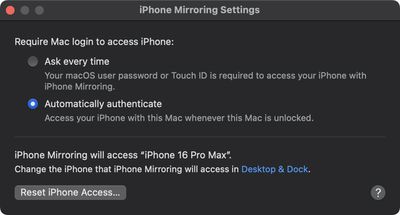
  6. If your Mac asks whether to require Mac login to access your iPhone, choose Ask Every Time or Authenticate Automatically. You can change this later in iPhone Mirroring ➝ Settings..., accessible in the menu bar when the app is open.
    settings

Note that an iPhone needs to be locked while an iPhone Mirroring session is in progress, so you can't use your iPhone while it's being mirrored to your Mac. If your iPhone is not locked and you attempt to initiate iPhone Mirroring from your Mac, you will get a warning that the iPhone is in use.
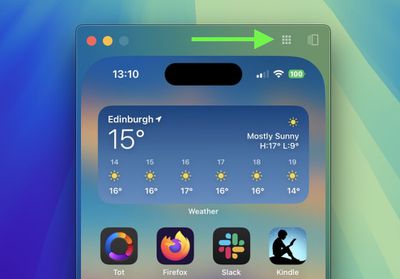
mirroring
You can interact with your iPhone using your Mac's keyboard and trackpad or mouse. Click and drag to scroll, single-click to tap, and use keyboard shortcuts like Command + H for the Home Screen. To adjust the mirroring window, hover your cursor above the iPhone screen. This reveals controls for accessing the Home Screen and App Switcher. You can also resize the mirroring window using Command and the +/- keys.
mirroring
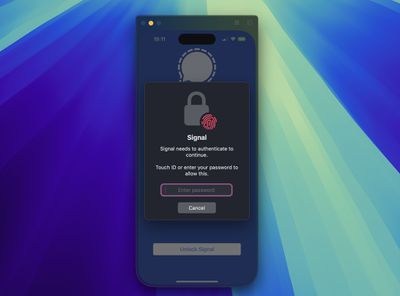
If you're mirroring your iPhone to your desktop and attempt to open an app that requires authentication, you don't need to pick up your iPhone or resign yourself to an inaccessible app – you can just use Touch ID on your Mac.
settings
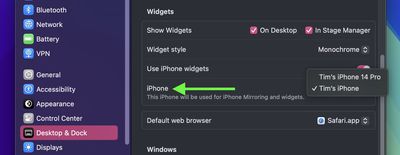
Lastly, if you own more than one iPhone, in System Settings ➝ Desktop & Dock, under "Widgets," there's an option that lets you choose which iPhone to mirror on your desktop.

iPhone Mirroring Limitations

iPhone Mirroring won't function if your Mac is currently using AirPlay to stream music or video to another device, or if Sidecar is activated with an iPad. Additionally, you cannot enable Continuity Camera, so if you're using your iPhone as a webcam for your Mac, iPhone Mirroring won't be available at the same time.

When trying to watch movies and TV shows from certain apps like Hulu and Netflix, you may encounter a blank black screen with the iPhone Mirroring app, likely due to DRM restrictions. You also won't be able to access the Control Center or Notification Center while using iPhone Mirroring, nor can you manage the Lock Screen.

Coming Soon
finder
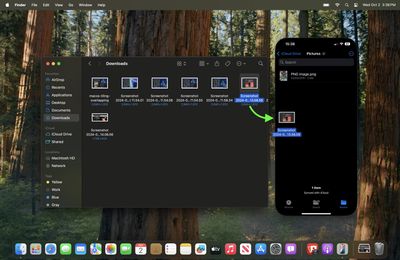
In Apple's forthcoming macOS Sequoia 15.1 update, expected to arrive in late October, Apple is enabling file transfers for iPhone Mirroring, which means you will be able to transfer files, photos, and videos from your Mac to your ‌iPhone‌ and vice versa using drag and drop gestures.

Related Forum: macOS Sequoia

Popular Stories

iOS 28 AI

Apple Taking New Approach to Developing iOS 28 and macOS 28

Sunday November 8, 2026 7:42 am PST by
Apple has made a change to its development process for iOS 28, macOS 28, and corresponding software updates, according to Bloomberg's Mark Gurman. In his Power On newsletter today, he said Apple separates development of each year's new operating systems into three major stages. Typically, he said each stage consists of four weeks of coding followed by a four-week "convergence" period where...

duo aquarium

More Fun iPhone Duo Apps: 30 New Picks to Try

Friday November 6, 2026 3:27 pm PST by
When the iPhone Duo launched, we shared a list of some of the fun apps developers created for the new form factor. Two weeks out, developers are continuing to come up with fresh ideas, so we thought we'd share some of our favorites. Games Marbles Unhinged ($2.99) - Marbles Unhinged is a marble maze designed for the Duo. When you fold it, the floor turns into a ramp. If you stand the top...


apple pro tell logo

Apple Launching Five New Products Today

Thursday November 5, 2026 12:59 am PST by
Apple is launching five new products on Friday, November 6, following pre-orders that opened last week, including its first touchscreen MacBook Pro models. The following new products will be available from today: iPad mini with OLED display and A20 Pro chip iMac with M6 chip 14-inch MacBook Pro with M6 chip 14-inch MacBook Pro with OLED touchscreen 16-inch MacBook Pro with OLED...
Latest Stories
Some HomePod Mini 2 Buyers Returning Units Over Mac Speaker Issues
4 minutes ago
MacBook Pro With PROLED XDR Display: Details You Might Have Missed
15 minutes ago
Satechi Offers MacRumors Readers 30% Off Select Accessories in Early Black Friday Sale
37 minutes ago
Leaker Envisions a Shorter iPhone With a New iOS Layout
1 hour ago
Apple to Give You More Control Over When Your Mac Passwords Lock
2 hours ago
Siri Is Getting a Better Memory
2 hours ago
iPhone 18e Could Feature Bigger Display and Battery
3 hours ago
Apple's Siri Boss May Leave - Here's Who Could Take Over
3 hours ago
Apple Launching Two More New Products This Friday
3 hours ago
Apple Store Subscription Sign-Up Controversy Exposed
12 hours ago
Siri AI Rumored to Become 'More Like an Agent' as Early as Next Year
22 hours ago
Apple Taking New Approach to Developing iOS 28 and macOS 28
1 day ago
Early Apple Black Friday Deals on Apple Watch, MacBook Air, and More
2 days ago
'Backglow' Lets You Customize New MacBook Pro's Glowing Apple Logo
2 days ago
Top Stories: Apple Product Launches, iOS 27.3 Beta, and More
2 days ago
More Fun iPhone Duo Apps: 30 New Picks to Try
3 days ago
Hands-On With Apple's New OLED Touchscreen MacBook Pro
3 days ago
Apple Store With All-New Design Opening Soon in Southern California
3 days ago
Control the Glowing Apple Logo on Your New MacBook Pro
3 days ago
Apple Shares New 'Apple Card: Apply and Use in Minutes' Ad
3 days ago
Apple Says More Than 100,000 Apps Optimized for iPhone Duo, Here's What's Still Missing
3 days ago
Early Black Friday Deals Kickoff With Steep Discounts on Apple Watch Ultras and More
3 days ago
The MacRumors Show: iOS 27.3 Looks Like a Huge Update
3 days ago
Best Buy's Black Friday Event Begins With Sitewide Savings on Apple, TVs, More
3 days ago
Apple Releasing Yet Another Two New Products Next Week
3 days ago
MacBook Air Drops to Lowest Price in Months With Amazon's $250 Discount
3 days ago
Apple Rumored to Drop the iPhone's Action Button Next Year
3 days ago
Apple's Extended Return Policy Now in Effect for 2026 Holiday Season
3 days ago
Apple Music Classical Updated With New Icon and Refreshed Design
3 days ago
OLED iPad Mini, M6 iMac, and New MacBook Pros Available From Today
3 days ago