How to Use iMessage Contact Key Verification on iPhone - MacRumorsOpen MenuShow RoundupsShow Forums menuVisit ForumsOpen Sidebar
Skip to Content

How to Use iMessage Contact Key Verification on iPhone

by

In iOS 17.2 and later, Apple includes a Contact Key Verification feature that aims to enhance your messaging security on an iPhone. This article explains why you might want to use the feature and includes practical steps to enable it on your device.
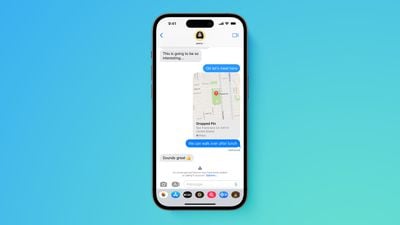
Apple advanced security iMessage Contact Key Verification screen Feature

Why Use Contact Key Verification?

Contact Key Verification was designed by Apple to ensure that iMessage conversations are more secure and that the person you are communicating with is genuinely who they claim to be. This method of verification is especially useful for ensuring the integrity of communications in situations where confidentiality is crucial.

In such scenarios, Contact Key Verification introduces the following benefits:

  • Enhanced Security: Provides an extra layer of protection against sophisticated cyber threats, ensuring you're only messaging those you intend to.
  • Automatic Verification Alerts: Offers automatic alerts and the ability to compare unique codes in real-time to verify identities in the Messages app.
  • Public Verification Code: Allows you to share a Public Verification Code on social media or save others' codes, enhancing trust in your communications.

Enable Contact Key Verification

Before attempting to use Contact Key Verification, make sure your devices are using iOS 17.2, iPadOS 17.2, watchOS 9.2, and macOS 14.2, or later, and are passcode or password protected.

You will also need to be signed into iCloud and iMessage with the same Apple ID and you have two-factor authentication turned on for your ‌Apple ID‌. Lastly, anyone you are trying to verify will need to be in your contacts.

  1. Open the Settings app on your iPhone.
  2. Tap on your ‌Apple ID‌ located near the top.
  3. Scroll down to locate and select the Contact Key Verification option.
  4. Toggle the switch next to Verification in iMessage to activate Contact Key Verification.
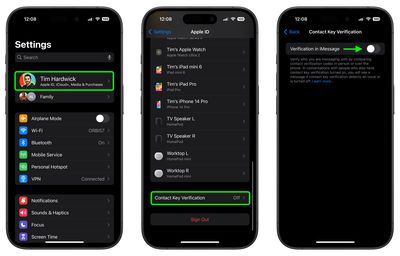
settings

After following these steps, you'll encounter a splash screen that explains more about the feature. You might also need to update other devices linked to your ‌Apple ID‌. If you have a device that can't be updated, you need to sign out of iMessage on that device before you can turn on this feature.

Verifying Your Own Identity for Others

  1. In Settings, go to your ‌Apple ID‌ and select Contact Key Verification. Here, you'll find an option to Show Public Verification Code.
  2. Tap Copy Verification Code to copy your unique code.
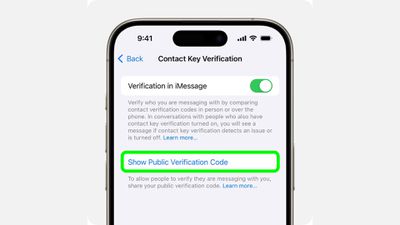
settings

You can now share this code directly with individuals or share it publicly online. This allows others to verify that they are indeed communicating with you, and not someone else masquerading as you.

Verifying the Identity of Others

  1. Open a conversation in Messages, tap the person's name at the top, and then select Verify Contact near the bottom of the menu.
  2. Both you and the other person will see a six-digit code generated on your devices. Compare these codes to ensure they match.
  3. If the codes match, select Mark as Verified, then tap Update. This will associate the verification code with the person's contact card, and a checkmark will appear next to their name in Messages.
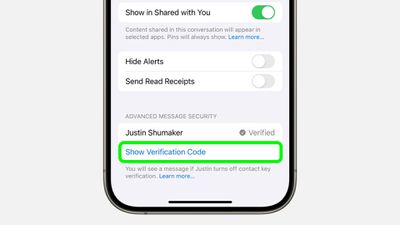
messages

If you have iMessage Contact Key Verification turned on but your contact doesn't, you'll see their name and "Verification Off." To use iMessage Contact Key Verification, ask them to turn it on. If you've already verified the contact, you'll see a checkmark by the contact's name. You'll also see a checkmark by their name at the top of the Messages thread.

Additional Steps for Public Verification Codes

For a higher level of security, you and your contacts can generate a verification code in Messages, then save each other's Public Verification Codes in Contacts. This is useful when you want to verify each other simultaneously, or if the Public Verification Code you received doesn't match the one your contact shares with you.

  1. At the top of the iMessage conversation, select their name. You can also select a contact from the Contacts app.
  2. Select Info, then select Edit.
  3. In the "verification code" field, type or paste the Public Verification Code that your contact shared. If you don't see the "verification code" field, you might have to select the Add (+) button, select More Fields, then select "verification code."

If their Public Verification Code matches and is verified by iMessage Contact Key Verification, a checkmark will show in their Contact Card and next to their name in iMessage conversations.

If their Public Verification Code doesn't match the code stored on Apple servers or isn't verified, a checkmark won't show. Before you continue messaging, you might want to check that you entered the code correctly or make sure that you're messaging the right person.

If You Receive a Contact Key Verification Alert

If you receive an alert from iMessage Contact Key Verification, this indicates a need to confirm the identity of the person you're communicating with. This could be due to several reasons, such as a change in their device or security settings.

To address the alert, pause your conversation to securely verify the contact, either through a direct comparison of verification codes or another trusted method. It's crucial to take these alerts seriously, as they are designed to protect the integrity of your communications. For detailed instructions and responses to specific alert types, refer to Apple's Support page.

Popular Stories

ios 26 5 rcs

iOS 27.3 May Expand RCS Support to Australia's Telstra in December

Tuesday October 20, 2026 9:04 am PDT by
In a support document that it has since deleted, Australian carrier Telstra said RCS support would be available starting with an iOS update coming in December. If this timeframe remains accurate, then iPhone users with Telstra will likely be able to use RCS in the Messages app starting with iOS 27.3. RCS has many benefits over the traditional SMS standard for text messaging with Android users, ...

apple pro tell logo

Apple Launching Five New Products Today

Thursday November 5, 2026 12:59 am PST by
Apple is launching five new products on Friday, November 6, following pre-orders that opened last week, including its first touchscreen MacBook Pro models. The following new products will be available from today: iPad mini with OLED display and A20 Pro chip iMac with M6 chip 14-inch MacBook Pro with M6 chip 14-inch MacBook Pro with OLED touchscreen 16-inch MacBook Pro with OLED...
duo aquarium

More Fun iPhone Duo Apps: 30 New Picks to Try

Friday November 6, 2026 3:27 pm PST by
When the iPhone Duo launched, we shared a list of some of the fun apps developers created for the new form factor. Two weeks out, developers are continuing to come up with fresh ideas, so we thought we'd share some of our favorites. Games Marbles Unhinged ($2.99) - Marbles Unhinged is a marble maze designed for the Duo. When you fold it, the floor turns into a ramp. If you stand the top...
Latest Stories
Early Apple Black Friday Deals on Apple Watch, MacBook Air, and More
17 hours ago
'Backglow' Lets You Customize New MacBook Pro's Glowing Apple Logo
17 hours ago
Top Stories: Apple Product Launches, iOS 27.3 Beta, and More
1 day ago
More Fun iPhone Duo Apps: 30 New Picks to Try
2 days ago
Hands-On With Apple's New OLED Touchscreen MacBook Pro
2 days ago
Apple Store With All-New Design Opening Soon in Southern California
2 days ago
Control the Glowing Apple Logo on Your New MacBook Pro
2 days ago
Apple Shares New 'Apple Card: Apply and Use in Minutes' Ad
2 days ago
Apple Says More Than 100,000 Apps Optimized for iPhone Duo, Here's What's Still Missing
2 days ago
Early Black Friday Deals Kickoff With Steep Discounts on Apple Watch Ultras and More
2 days ago
The MacRumors Show: iOS 27.3 Looks Like a Huge Update
2 days ago
Best Buy's Black Friday Event Begins With Sitewide Savings on Apple, TVs, More
2 days ago
Apple Releasing Yet Another Two New Products Next Week
2 days ago
MacBook Air Drops to Lowest Price in Months With Amazon's $250 Discount
2 days ago
Apple Rumored to Drop the iPhone's Action Button Next Year
2 days ago
Apple's Extended Return Policy Now in Effect for 2026 Holiday Season
2 days ago
Apple Music Classical Updated With New Icon and Refreshed Design
2 days ago
OLED iPad Mini, M6 iMac, and New MacBook Pros Available From Today
2 days ago
Apple Surveys iPhone Duo Buyers About Crease and Camera
3 days ago
Apple's First Touchscreen Mac is Now Arriving to Customers
3 days ago
Claude Gets Personal Finance Feature With Bank Account Linking
3 days ago
Apple Arcade Adds Crossy Road Rush and NBA 2K27
3 days ago
Apple's New HomeView Smart Home Hub: Here's How Much RAM It Has
3 days ago
iPad Mini vs. iPad Air Buyer's Guide: Now Just $50 Apart
3 days ago
First iOS 27.3 and macOS Golden Gate 27.3 Public Betas Now Available
3 days ago
Apple Announces a New Mac Sales Record
3 days ago
Paid $200 for Logic Pro? Apple Says You Won't Get This New Feature
3 days ago
Instagram's Edits Video Editor is Now Available on Mac
3 days ago
Prevent Siri and Search From Accessing Specific iPhone Apps
3 days ago
Best Early Black Friday Deals on iPhone 18 Pro and iPhone Duo
3 days ago









































