How to Install the iPadOS Public Beta - MacRumorsOpen MenuShow RoundupsShow Forums menuVisit ForumsOpen Sidebar
Skip to Content

How to Install the iPadOS Public Beta

by

Apple released a public beta of iPadOS for compatible iPad models, enabling users who aren't signed up for the Apple Developer Program to test the software update ahead of its official release in the fall.

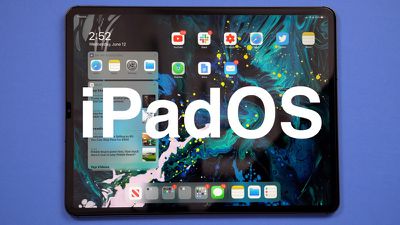
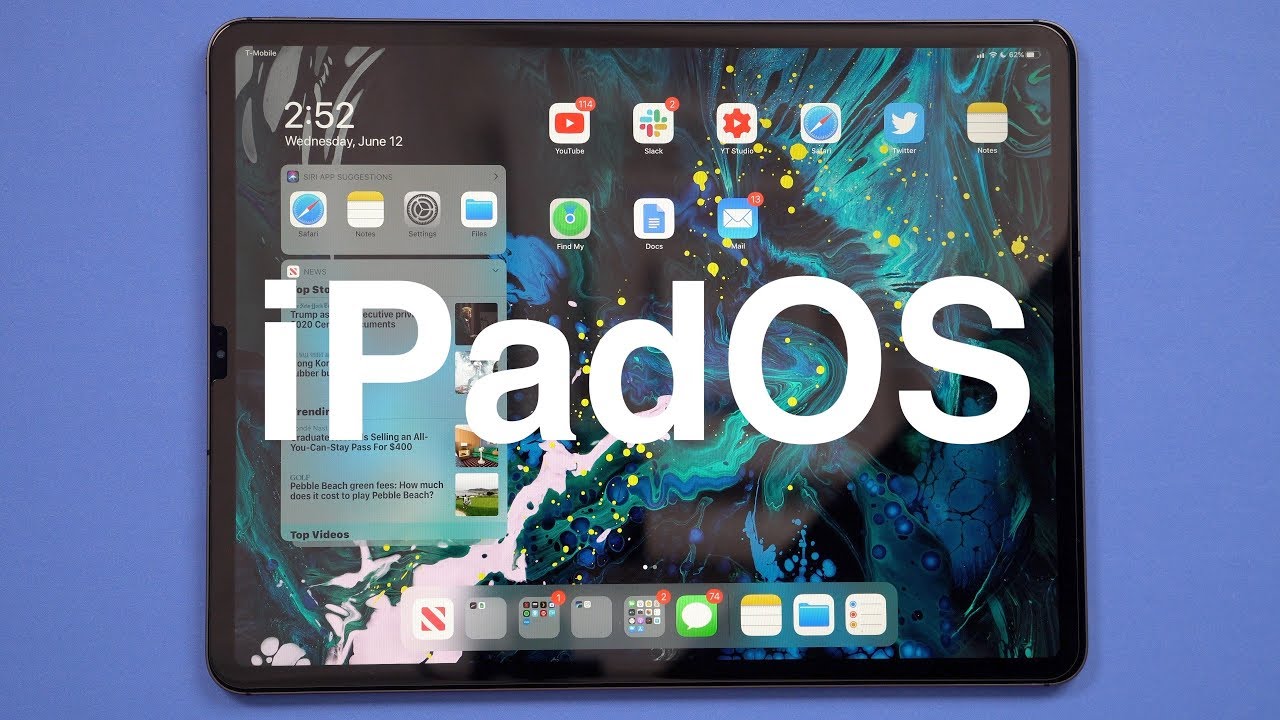
iPadOS is a rebranded version of iOS 13 specially made for iPads, with extra features designed to take advantage of larger tablet displays. It includes an updated Home screen, improved multitasking functionality, new Apple Pencil functionality, support for external drives, folder sharing in Files, text editing improvements, and all of the other new changes in iOS 13.
ipados 1
With that said, bear in mind that iPadOS is pre-release software, so installing the public beta on a secondary device is highly recommended. The stability of beta software cannot be guaranteed, as it often contains bugs and issues that have yet to be ironed out, so installing it on your day-to-day device isn't advised.

Is iPadOS Compatible With My iPad?

Apple's list of compatible devices confirms that iPadOS is compatible with all of these ‌iPad‌ models:

  • 12.9-inch iPad Pro 3rd generation
  • 12.9-inch ‌iPad Pro‌ 2nd generation
  • 12.9-inch ‌iPad Pro‌ 1st generation
  • 11-inch ‌iPad Pro‌
  • 10.5-inch ‌iPad Pro‌
  • 9.7-inch ‌iPad Pro‌
  • ‌iPad‌ 6th generation (2018 model)
  • ‌iPad‌ 5th generation
  • iPad Air 3 (2019 model)
  • ‌iPad Air‌ 2
  • iPad mini 5 (2019 model)
  • ‌iPad mini‌ 4

Installing the Public Beta shouldn't take longer than half an hour, but first you should create a backup of your device's contents and settings by following the step-by-step instructions below.

How to Create a Backup of Your iPad in iTunes

  1. Connect your ‌iPad‌ to a Mac or PC using a Lightning to USB cable or a USB-C to USB cable, depending on the model.

  2. Open iTunes.
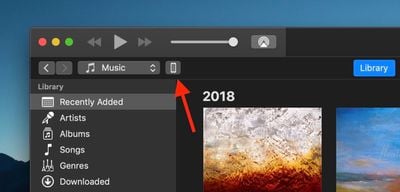
  3. Click the device icon in the top-left menu and select your ‌iPad‌.
    how to install the iPadOS Public Beta 1
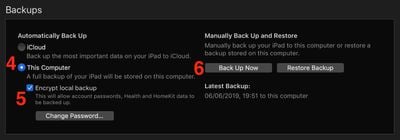
  4. Under Backups, click This computer.
  5. Tick the Encrypt local backup checkbox if you want to securely back up your login credentials and any Health and HomeKit data.
    how to install the iPadOS Public Beta 2
  6. Click Back Up Now.
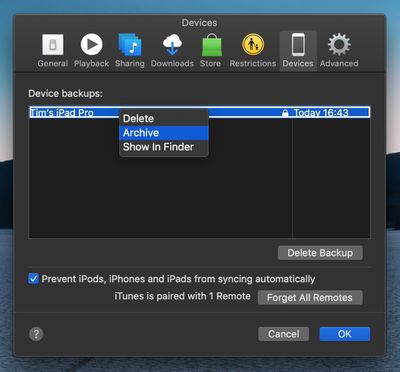
  7. Click iTunes -> Preferences… in the macOS menu bar.
  8. Click the Devices tab.
    how to install the ipados public beta 3
  9. Right-click (or Ctrl-click) the new backup, and select Archive from the contextual dropdown menu.
How to Enroll in the Apple Beta Software Program

Now that you've backed up your device, you're ready to download the iPadOS Public Beta. To do so, you must enroll your ‌iPad‌ in the free Apple Beta Software Program.

  1. Open Safari on your ‌iPad‌ and navigate to the Apple Beta Software Program.
  2. Tap the Sign up button, or sign in if you're already a member.
  3. Enter your Apple ID credentials and tap the Sign in button.
  4. Agree to the Apple Beta Software Program terms and conditions if necessary.
    how to install ipados public beta 4
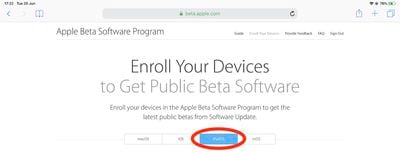
  5. A Guide for Public Betas screen will appear. Select the iPadOS tab, scroll down to the Get Started section and tap enroll your iOS device.
  6. On the Enroll Your Devices screen, with the iPadOS tab selected, scroll down and tap the Download profile button. how to install ipados public beta 5
  7. Tap Allow at the profile prompt.
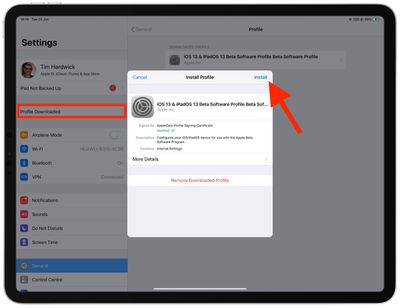
  8. Launch the Settings app on your iOS device and then tap Profile Downloaded below your ‌Apple ID‌ banner.
    how to install the iPadOS Public Beta 7
  9. Tap Install and follow the prompts to install the iOS Beta Software Profile.
  10. Restart your device after installing the profile by tapping the restart popup.
How to Install the iPadOS Public Beta

Once you're enrolled in the Apple Beta Software Program, you can install the iPadOS Public Beta on your iOS device just as you would a regular software update.

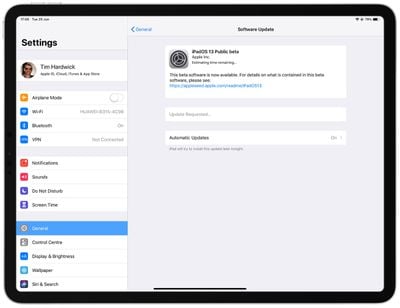
  1. Launch the Settings app on your ‌iPad‌.
  2. Tap General -> Software Update.
    how to install the iPadOS Public Beta 6
  3. Tap Download and Install.
  4. Tap Install Now.

If you come across any issues installing the iPadOS Public Beta, it may help to clear any previous profiles lingering on your device. You can find these in the Settings app under General -> Profile.

Want to discuss the iPadOS beta? Make sure to check out our iOS 13 discussion forum.


Related Forum: iOS 13

Top Rated Comments

96 months ago
So tempting as I cannot wait for the changes but not sure I want to install on a business critical daily driver!
Score: 3 Votes (Like | Disagree)
magicschoolbus Avatar
96 months ago
Beta testers are the real MVPs. I just want to know if a Sandisk extreme ssd will be able to be read from my lightning port...
Score: 2 Votes (Like | Disagree)
Shirasaki Avatar
96 months ago
iPadOS is only for developers right now, not for Beta testing
iOS13 beta you can install, & iPadOS is available to developers right now :)
[doublepost=1562224357][/doublepost]
no. i used to update the apps in iTunes & actually USE iTunes, but i quit like a year ago haha
No, iPadOS is also available for public beta testing now. Just download profile from beta.apple.com.

Score: 1 Votes (Like | Disagree)
BroTim52 Avatar
96 months ago
So tempting as I cannot wait for the changes but not sure I want to install on a business critical daily driver!
[doublepost=1561679547][/doublepost]I just installed and this is an amazing update. I initially on my iPad Pro 2nd generation and then installed on my new iPad Pro 3rd generation and so far it’s working great for the most part. I really haven’t ran across any major issues.

Score: 1 Votes (Like | Disagree)
paulchat55 Avatar
96 months ago
I am on my second try of installing the public beta. First time was last night and it was taking awhile so I turned it off, back on, and had to do a restore today back to ios12, then to beta 12.4, then install my backup. Now I’m trying again and it’s rebooted and been on the Apple logo for a good hour. It’s a 10.5” iPad Pro.
I have the same issue on my 10.5 iPad Pro. tried the install multiple times.
Score: 1 Votes (Like | Disagree)
Gravydog316 Avatar
96 months ago
Tap the blue person account icon (App Store) and scroll down the short list. You will see any apps that need to be updated.
yeah i found it! i like the old way 'cause i'm obsessed with app updates for some reason haha
Score: 1 Votes (Like | Disagree)

Popular Stories

duo aquarium

More Fun iPhone Duo Apps: 30 New Picks to Try

Friday November 6, 2026 3:27 pm PST by
When the iPhone Duo launched, we shared a list of some of the fun apps developers created for the new form factor. Two weeks out, developers are continuing to come up with fresh ideas, so we thought we'd share some of our favorites. Games Marbles Unhinged ($2.99) - Marbles Unhinged is a marble maze designed for the Duo. When you fold it, the floor turns into a ramp. If you stand the top...
apple pro tell logo

Apple Launching Five New Products Today

Thursday November 5, 2026 12:59 am PST by
Apple is launching five new products on Friday, November 6, following pre-orders that opened last week, including its first touchscreen MacBook Pro models. The following new products will be available from today: iPad mini with OLED display and A20 Pro chip iMac with M6 chip 14-inch MacBook Pro with M6 chip 14-inch MacBook Pro with OLED touchscreen 16-inch MacBook Pro with OLED...
iOS 28 AI

Apple Taking New Approach to Developing iOS 28 and macOS 28

Sunday November 8, 2026 7:42 am PST by
Apple has made a change to its development process for iOS 28, macOS 28, and corresponding software updates, according to Bloomberg's Mark Gurman. In his Power On newsletter today, he said Apple separates development of each year's new operating systems into three major stages. Typically, he said each stage consists of four weeks of coding followed by a four-week "convergence" period where...
Latest Stories
Apple Store Subscription Sign-Up Controversy Exposed
7 hours ago
Siri AI Rumored to Become 'More Like an Agent' as Early as Next Year
17 hours ago
Apple Taking New Approach to Developing iOS 28 and macOS 28
19 hours ago
Early Apple Black Friday Deals on Apple Watch, MacBook Air, and More
2 days ago
'Backglow' Lets You Customize New MacBook Pro's Glowing Apple Logo
2 days ago
Top Stories: Apple Product Launches, iOS 27.3 Beta, and More
2 days ago
More Fun iPhone Duo Apps: 30 New Picks to Try
2 days ago
Hands-On With Apple's New OLED Touchscreen MacBook Pro
3 days ago
Apple Store With All-New Design Opening Soon in Southern California
3 days ago
Control the Glowing Apple Logo on Your New MacBook Pro
3 days ago
Apple Shares New 'Apple Card: Apply and Use in Minutes' Ad
3 days ago
Apple Says More Than 100,000 Apps Optimized for iPhone Duo, Here's What's Still Missing
3 days ago
Early Black Friday Deals Kickoff With Steep Discounts on Apple Watch Ultras and More
3 days ago
The MacRumors Show: iOS 27.3 Looks Like a Huge Update
3 days ago
Best Buy's Black Friday Event Begins With Sitewide Savings on Apple, TVs, More
3 days ago
Apple Releasing Yet Another Two New Products Next Week
3 days ago
MacBook Air Drops to Lowest Price in Months With Amazon's $250 Discount
3 days ago
Apple Rumored to Drop the iPhone's Action Button Next Year
3 days ago
Apple's Extended Return Policy Now in Effect for 2026 Holiday Season
3 days ago
Apple Music Classical Updated With New Icon and Refreshed Design
3 days ago
OLED iPad Mini, M6 iMac, and New MacBook Pros Available From Today
3 days ago
Apple Surveys iPhone Duo Buyers About Crease and Camera
3 days ago
Apple's First Touchscreen Mac is Now Arriving to Customers
3 days ago
Claude Gets Personal Finance Feature With Bank Account Linking
3 days ago
Apple Arcade Adds Crossy Road Rush and NBA 2K27
4 days ago
Apple's New HomeView Smart Home Hub: Here's How Much RAM It Has
4 days ago
iPad Mini vs. iPad Air Buyer's Guide: Now Just $50 Apart
4 days ago
First iOS 27.3 and macOS Golden Gate 27.3 Public Betas Now Available
4 days ago
Apple Announces a New Mac Sales Record
4 days ago
Paid $200 for Logic Pro? Apple Says You Won't Get This New Feature
4 days ago