

iOS 16.4: How to Automatically Dim Video When Flashes of Light Are Detected - MacRumorsOpen MenuShow RoundupsShow Forums menuVisit ForumsOpen Sidebar
Skip to Content

iOS 16.4: How to Automatically Dim Video When Flashes of Light Are Detected

by

In iOS 16.4 and iPad 16.4, Apple has added an accessibility option that dims video when flashes of light or strobe effects are detected. Here's how to enable the feature on your device.
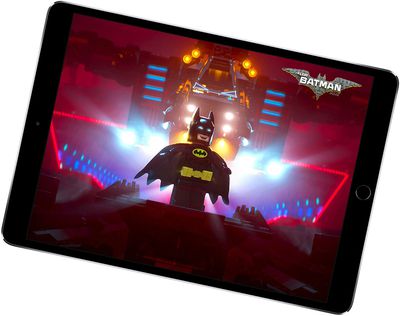
ipaddisplayvideo
When watching video on your iPhone or iPad, there may be times when the content includes rapid flashes of light or stroboscopic effects. In such cases, a key concern is user safety.

Some people with photo-sensitive epilepsy can be affected by strobing light, which may induce seizure. The effect can also produce undesirable sensations amongst the general population, such as disturbed vision.

With this in mind, Apple has added a new option in its accessibility feature set that can automatically reduce the brightness of video if it includes triggering light effects.

The following steps show you how to enable the feature. Note that you must have iOS 16.4 or iPadOS 16.4 installed on your device to see the option. You can check that your device is up-to-date by going to Settings -> General -> Software Update.

  1. Open the Settings app.
  2. Scroll down the menu and tap Accessibility.
  3. Under the "Vision" section, tap Motion.
  4. Toggle the switch next to Dim Flashing Lights to the green ON position.
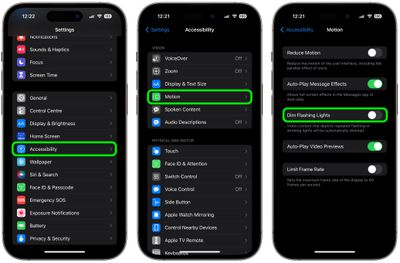
settings

That's all there is to it. Next time you play video and iOS detects the lighting effects, the screen will be automatically dimmed to reduce the possibility of a negative reaction.


Popular Stories

iOS 27 Next to iPhone

Here's When iOS 27 Rolls Out Today in Every Time Zone [Update: It's Out]

Sunday September 13, 2026 3:00 am PDT by
Update 10:04 a.m.: iOS 27 is rolling out now, though it may take a bit for all users to see it, so keep checking! Apple is about to release iOS 27, which will finally deliver more advanced Siri AI capabilities as well as a variety of other refinements, improvements, and new features to iPhones. It's Apple's biggest software update of the year, and Apple announced at Wednesday's iPhone event...
iOS 27 Icon iPhone

iOS 27 Available Now With These 8 New Features

Monday September 14, 2026 9:00 am PDT by
Update — 10 a.m. Pacific Time: Apple has released iOS 27. During its iPhone 18 Pro and iPhone Duo event last week, Apple announced that iOS 27 will be released widely on Monday, September 14. iOS 27 should be available around 10 a.m. Pacific Time / 1 p.m. Eastern Time today via the Settings app, under General → Software Update. Below, we have highlighted eight new features and...
Apple iCloud Plus expansion hero

iCloud+ Now Includes Apple TV, Apple Arcade, and Curated Apple Music Stations in Over 100 Countries

Tuesday September 15, 2026 1:43 am PDT by
Apple today announced a new subscription initiative that turns paid iCloud+ subscriptions into a broader services bundle in more than 100 countries. In select countries, Apple says every paid iCloud+ plan, including the cheapest 50GB tier, now includes Apple TV and Apple Arcade "at no additional cost," while family sharing extends the storage, TV and Arcade access to up to five people....













