

iOS 17: How to Straighten Your Shooting Angle With the New Camera Level Feature - MacRumorsOpen MenuShow RoundupsShow Forums menuVisit ForumsOpen Sidebar
Skip to Content

iOS 17: How to Straighten Your Shooting Angle With the New Camera Level Feature

by

Apple in iOS 17 has introduced a handy new camera feature that helps to straighten up your shooting angle before you even hit the shutter. Running the iOS 17 beta? Then keep reading to learn how to take advantage of the new Level option.

iPhone 14 Pro Rear Camera
For a while now, Apple's Camera app has included a few optional settings that can help you line up your shots. There's a Grid that can be overlaid on the viewfinder to help apply the rule of thirds, and a somewhat-hidden leveling feature for top-down photos that displays a floating crosshair to help you line up your subject properly.

With iOS 17, Apple has further enhanced the camera leveling functionality by separating it out from the Grid mode. By making it an individual option, Apple has also included an additional horizontal level for more traditional straight-on photos.

ios 17 camera level no
Turning the Level option on will pop up a broken horizontal line on the screen when your iPhone senses you're lining up for a straight-on shot and you tilt your device slightly out of horizontal. The line appears white while your phone is out of level and then turns yellow once you achieve a level orientation to indicate success.

ios 17 camera level

How to Enable the Camera Level

The new Level option is off by default if you don't have Grid mode enabled. You can turn it on manually by following these steps.

  1. Open the Settings app on your iPhone.
  2. Scroll down and select Camera.
  3. Under the "Composition" section, toggle on the switch next to Level.
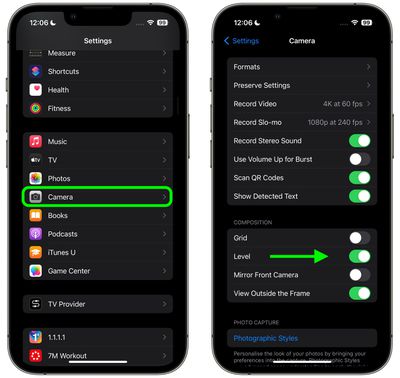
settings

Now open the Camera app and try shooting a subject at a straight angle, and you should see the broken horizontal lines in the center of the viewfinder. Straighten your angle up to connect the lines and make a single yellow line.

The leveling pop-up only appears briefly and only within a narrow range of angles close to horizontal (in either portrait or landscape orientation), so it won't intrusively pop up when you're intentionally trying to take a photo at an angle.

Related Forums: iOS 17, iPadOS 17

Top Rated Comments

Solomani Avatar
39 months ago
I like it, and will likely use the feature once I update to iOS 17. However... according to article, the feature is toggled/enabled in the iPhone Camera Settings section.

IMHO, it could be better if they let us toggle it ON/OFF within the camera app itself.
Score: 4 Votes (Like | Disagree)
39 months ago
Good article. Useful feature of camera app.
Score: 2 Votes (Like | Disagree)
yaxomoxay Avatar
39 months ago

I don't have the level tick box in my camera settings app. am I missing something? 14 pro max latest iOS
Do you have iOS17 beta?
Score: 2 Votes (Like | Disagree)
Solomani Avatar
39 months ago

I'm not sure. Seems to me the vast majority of typical users would not use this if it existed, or even understand the point of it. And lots of people would accidentally turn it on, then start complaining to Support that their camera "has these weird lines all over the picture."

Burying it in Settings probably stops millions of Apple Support and cluttering Apple Store visits from happening.

ETA: I could even see myself accidentally turning it on and being perplexed.
OK that's fair enough.

Although.... to put into perspective, I too personally find several "features" within the camera app as clutter, things I would never use, things that get me thinking "What the hell is this? And why is it there for me to accidentally press toggle ON? Do pro photographers even use this? Or is this something for the Snapchat kids? All I wanna do is shoot right away (spontaneous shot, not a second to waste)...and these things just get in the way."


So yes, I do get your point. One man's "necessary feature" is another man's clutter.

I guess we leave it to Apple to decide (based on their research?) as to which features are absolutely necessary for the majority of users, so that it gets to be available within the camera app itself.
Score: 2 Votes (Like | Disagree)
39 months ago
This will be very useful. I can’t believe that this wasn’t already a thing.
Score: 1 Votes (Like | Disagree)
39 months ago
That's an excellent feature.

MUCH better than dealing with that in post, and potentially suffering a crop as a result.
Score: 1 Votes (Like | Disagree)

Popular Stories

iCloud iPhone 17 Pro

iPhone Users Who Pay for iCloud Storage Get Two New Perks on iOS 27

Thursday July 2, 2026 6:10 am PDT by
If you pay for certain iCloud+ storage plans beyond the 5GB that Apple offers for free, you will receive two more perks on iOS 27 at no additional cost. A summary of the two new iCloud+ perks on iOS 27:Increased daily usage limits for some new Apple Intelligence features, including image generation in the revamped Image Playground app. HomeKit Secure Video cameras receive generated video...
iPhone 4 on Black Feature

Apple Facing One of Its Worst Leaks Since the iPhone 4

Thursday July 2, 2026 9:53 am PDT by
Apple supplier Tata Electronics recently suffered a cyberattack that resulted in thousands of confidential files being published on the dark web, and this reportedly included some photos and documents related to the upcoming iPhone 18 Pro. We have elected not to share any of the leaked photos in this story due to the illegal nature in which they were obtained, but they can easily be found...
American Express Gold Apple Pay Feature

American Express Announces New Apple Pay Feature

Tuesday June 30, 2026 10:27 am PDT by
American Express today announced that you can now redeem Membership Rewards points when checking out with Apple Pay on the web and in apps on the iPhone and iPad. When checking out with Apple Pay on iOS 18 or iPadOS 18 or later, tap on your eligible American Express card (Platinum, Gold, Green, and others) and select the Membership Rewards points option. You can use points to cover all or...













