

iOS 27: Access the New iPhone Recovery Screen - MacRumorsOpen MenuShow RoundupsShow Forums menuVisit ForumsOpen Sidebar
Skip to Content

iOS 27: Access the New iPhone Recovery Screen

by

Since iOS 26, a malfunctioning iPhone has been able to boot itself into Recovery Assistant, with no Mac or PC required. However, you could only get there if your device failed to start up and dropped into recovery on its own.
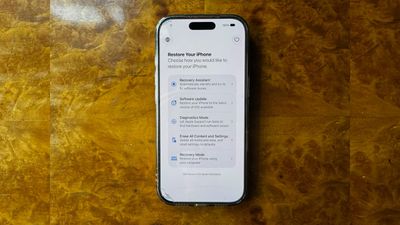
recovery screen%402x scaled
In iOS 27, now available to download, Apple has removed that limitation, and you can now manually boot into a Mac-style recovery screen whenever you like.

The new recovery mode lets you troubleshoot, update, or erase your device without necessarily plugging it into anything. It can connect automatically to a known Wi-Fi network, and it shows your battery percentage in the corner of the screen. Here's how to access it.

How to Boot Into Recovery Mode

Accessing the recovery mode is similar to the equivalent mode on Apple silicon Macs, and it works the same way on iPads running iPadOS 27.

  1. Turn off your iPhone, then wait about a minute to ensure it has fully shut down.
  2. Press and hold the Side button. The Apple logo will appear as it normally does during startup – continue holding the button and you'll see "Continue holding for recovery...".
  3. Release the button when "Loading recovery options..." appears.

Your iPhone will then boot into the new recovery screen instead of loading iOS.
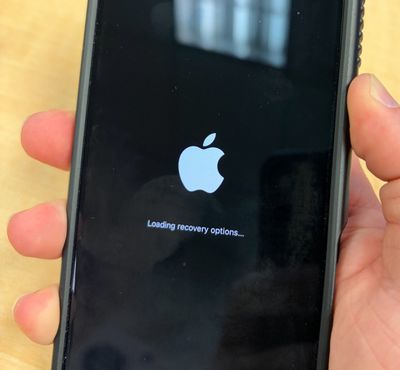
loading recovery options

What the Recovery Options Do

The recovery screen offers five options:

  • Recovery Assistant: Automatically scans for software issues and attempts to fix them without requiring further input.
  • Software Update: Installs the latest version of iOS available for your device, which can help if a failed update has left your iPhone stuck in a boot loop.
  • Diagnostics Mode: Runs diagnostics to check for hardware and software issues, and can recommend repairs if needed.
  • Erase All Content and Settings: Completely wipes your iPhone, just like the equivalent option in the Settings app.
  • Recovery Mode: Puts your iPhone into the traditional recovery mode for restoring it with a Mac or PC, without requiring the usual button-press sequence.

On newer iPhone models, there's also a sixth hidden option. While on the recovery screen, if you press and hold the Side button again, a popup menu will appear showing the option Nearby Device Recovery. This lets you restore your iPhone using another Apple device close by, similar to an existing recovery feature that debuted on iPhone 16 models.

Exiting the Recovery Screen

To leave recovery mode, tap the power button in the top-right corner of the screen and confirm that you want to restart. Alternatively, press and hold the physical Side button and choose Restart or Shut Down.

You shouldn't need the new recovery screen often, but it's worth knowing the button sequence now in case a beta goes wrong or a failed update bricks your iPhone. iOS 27 was released on September 14, 2026.


Related Roundups: iOS 27, iPadOS 27
Related Forum: iOS 27

Top Rated Comments

litmag01 Avatar
9 weeks ago
Move over sliced bread! This is kind of one of those things that should have been available since the Phone launch. Ok at least since they moved to their own chips.

Apple has really done well to work itself into the ARM architecture, and pave the way to a unified style of OS across all devices.
Score: 9 Votes (Like | Disagree)
cogitodexter Avatar
9 weeks ago
I hope the 'erase content and settings' is protected behind biometric authentication - otherwise that's going to be rather useful for thieves.
Score: 6 Votes (Like | Disagree)
pigeonguy Avatar
9 weeks ago

I hope the 'erase content and settings' is protected behind biometric authentication - otherwise that's going to be rather useful for thieves.
It doesn’t disable activation lock, so it doesn’t matter.
Score: 4 Votes (Like | Disagree)
9 weeks ago

It doesn’t disable activation lock, so it doesn’t matter.
Thank you, good point. I too was concerned about this.

Still a rough prank/mean thing to do to someone.

But as they say, physical access is total access.
Score: 3 Votes (Like | Disagree)
9 weeks ago
Good to have this option and ability to use a nearby device to recover will be very useful, if required.
Score: 2 Votes (Like | Disagree)
boswald Avatar
9 weeks ago
This will be great for techs and novices alike. I agree with another poster - this should've been there a long time ago. But as they say, "better late than never!"
Score: 2 Votes (Like | Disagree)

Popular Stories

iOS 27 Next to iPhone

Here's When iOS 27 Rolls Out Today in Every Time Zone [Update: It's Out]

Sunday September 13, 2026 3:00 am PDT by
Update 10:04 a.m.: iOS 27 is rolling out now, though it may take a bit for all users to see it, so keep checking! Apple is about to release iOS 27, which will finally deliver more advanced Siri AI capabilities as well as a variety of other refinements, improvements, and new features to iPhones. It's Apple's biggest software update of the year, and Apple announced at Wednesday's iPhone event...
iOS 27 Icon iPhone

iOS 27 Available Now With These 8 New Features

Monday September 14, 2026 9:00 am PDT by
Update — 10 a.m. Pacific Time: Apple has released iOS 27. During its iPhone 18 Pro and iPhone Duo event last week, Apple announced that iOS 27 will be released widely on Monday, September 14. iOS 27 should be available around 10 a.m. Pacific Time / 1 p.m. Eastern Time today via the Settings app, under General → Software Update. Below, we have highlighted eight new features and...
iPhone Handoff Feature

iOS 27 Introduces New 'iPhone Handoff' Feature

Wednesday September 2, 2026 12:35 pm PDT by
Apple has added a new "iPhone Handoff" feature to iOS 27 that will allow you to switch between two iPhones while using the same phone number on each device. This functionality was briefly mentioned during the WWDC 2026 keynote in June, on a slide that listed hundreds of new features coming in iOS 27 and corresponding software updates, but Apple never shared any further details at the time. ...














