iOS 18: Use New Library and Notes Features in Apple Maps - MacRumorsOpen MenuShow RoundupsShow Forums menuVisit ForumsOpen Sidebar
Skip to Content

iOS 18: Use New Library and Notes Features in Apple Maps

by

Apple Maps in iOS 18 introduces two helpful new features: a centralized Library for saved content and the ability to add personal notes to locations. Here's how to take advantage of these new tools.

Generic iOS 18 Maps Feature

Using the New Library

Apple's iOS 18 update brings significant improvements to the Maps app, and streamlines the process of saving and organizing your favorite locations. Building on the existing Guides feature, the new version introduces a simple "+" button on location listings for quick saving.

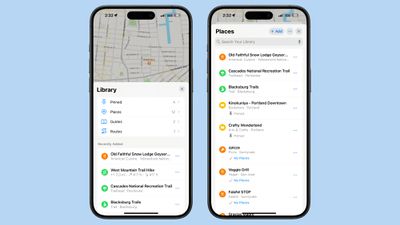
A new Library menu now houses all of your saved places, including those from Guides and Pinned locations. The Library also automatically incorporates previously saved locations, offering a comprehensive view of your favorite spots.
ios 18 maps library
You can individually search through your Pinned, Places, Guides, and Routes collections, and use the three-dot button to sort them by date added, name, or distance, and toggle between list and grid views. The update also enables direct saving of new locations from within the Library itself, via the + Add button.

In summary, the new Library consolidates content that was previously spread across different sections of the app, which makes your saved place information a lot more accessible.

Adding Notes to Locations

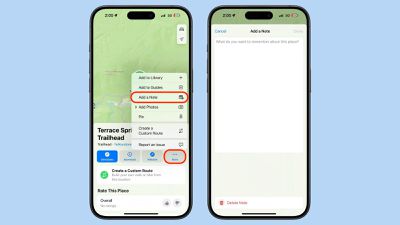
iOS 18 also introduces the ability to add personal notes to any location in Apple Maps. This feature allows you to jot down reminders, impressions, or any other information you want to associate with a specific place. To add a note:

  1. Search for or tap on a location in Maps.
  2. Tap the More button (three dots) in the location's information card.
  3. Tap Add a Note.
  4. Type your note, then tap Done.

maps

Your notes are private and stored only on devices logged into your Apple account. This feature can be particularly useful for remembering details about restaurants, marking meeting spots, or keeping track of places you want to visit.

These new features in iOS 18's Maps app offer enhanced organization and personalization, and there are other additional tools checking out that we've covered elsewhere, including custom routes, hiking trails, and a new Search Here function.


Top Rated Comments

27 months ago
Ever since Maps got the capability of pinning locations, I've wanted the ability to be notified when I'm near a pin or saved location. I always read reviews of restaurants in places away from home but forget about them when I travel there. I'd love to get off a plane and have a reminder with a list of places I should check out. The same capability would be useful for a lot of situations I think.

Score: 8 Votes (Like | Disagree)
jz0309 Avatar
27 months ago
I am still irritated when sometimes, seemingly at random, the map “moves” and North is not at the top anymore, happens in CarPlay and on phone…
Just give me a setting for “North at top” as in any printed map
Score: 3 Votes (Like | Disagree)
27 months ago
Excellent new and useful features for Maps. Something I'll use a lot.
Score: 2 Votes (Like | Disagree)
SnowCrocodile Avatar
27 months ago

it’s been possible to collaborate on ”Guides” (which are essentially collections of bookmarks) for at least 2-3 years: swipe left on a guide and select ”share”. Alas the collaborative aspect has been randomly broken about a year after it was introduced: participants now get a copy of the Guide rather than a shared version. Haven’t tried recently to see if it’s fixed…

Those who suggest using Google Maps are obviously ok with their location being sold to anyone with even a remote interest… not for me, thanks v.m.
So I take if you are not using a cell phone then ?

https://www.zdnet.com/article/us-cell-carriers-selling-access-to-real-time-location-data/

Apple Maps is OK for getting to familiar places. However it left me stranded far too many times.

Just in the last two years:

- asked it for a gas stop before dropping off a rental. When resumed the trip, it routed me to a service drive at the wrong end of the airport. Took me an extra 25 minutes to get through the traffic. Barely made my flight.

- Went to a first meeting with a customer. AM gets me to the opposite side of a major freeway - I could see their office across the road, but had to drive a few miles and turn around to get there.

- Another customer moved their operations to a new building in 2021. Apple Maps still shows old location. They submitted error reports to Apple. I submitted error reports to Apple. Still showing old address as of last year.

- Just this past Sunday - driving back from a getaway weekend upstate, wanted to stop for lunch at a restaurant that we’ve been to a dozen times before. AM could not recognize the name or could not find it several times in a row. Finally I gave up and asked Google Maps, found it right away.

When it does work it’s great and super convenient. And I like the design more. But when I need to go to an unfamiliar location and it’s important to get there on time, I use Google Maps.
Score: 1 Votes (Like | Disagree)
alexandr Avatar
27 months ago

Some of the map data is terrible. There's a couple of roads near me that are completely wrong (in London, UK) and have been there at least 50-70 years. Not sure where the data comes from but it's not on OSM or Google Maps which are both correct.

YMMV. Take more than one map everywhere.
I always do! I also download maps onto my phone in case there's no service where I am. Last trip to Japan I encountered several dead zones, so it's always a good idea.
Score: 1 Votes (Like | Disagree)
cjsuk Avatar
27 months ago

That's good to know, I'm going in 2 weeks, perhaps I'll give  another shot :) But it better not get me lost!! :D
Some of the map data is terrible. There's a couple of roads near me that are completely wrong (in London, UK) and have been there at least 50-70 years. Not sure where the data comes from but it's not on OSM or Google Maps which are both correct.

YMMV. Take more than one map everywhere.
Score: 1 Votes (Like | Disagree)

Popular Stories

duo aquarium

More Fun iPhone Duo Apps: 30 New Picks to Try

Friday November 6, 2026 3:27 pm PST by
When the iPhone Duo launched, we shared a list of some of the fun apps developers created for the new form factor. Two weeks out, developers are continuing to come up with fresh ideas, so we thought we'd share some of our favorites. Games Marbles Unhinged ($2.99) - Marbles Unhinged is a marble maze designed for the Duo. When you fold it, the floor turns into a ramp. If you stand the top...
apple pro tell logo

Apple Launching Five New Products Today

Thursday November 5, 2026 12:59 am PST by
Apple is launching five new products on Friday, November 6, following pre-orders that opened last week, including its first touchscreen MacBook Pro models. The following new products will be available from today: iPad mini with OLED display and A20 Pro chip iMac with M6 chip 14-inch MacBook Pro with M6 chip 14-inch MacBook Pro with OLED touchscreen 16-inch MacBook Pro with OLED...
iOS 28 AI

Apple Taking New Approach to Developing iOS 28 and macOS 28

Sunday November 8, 2026 7:42 am PST by
Apple has made a change to its development process for iOS 28, macOS 28, and corresponding software updates, according to Bloomberg's Mark Gurman. In his Power On newsletter today, he said Apple separates development of each year's new operating systems into three major stages. Typically, he said each stage consists of four weeks of coding followed by a four-week "convergence" period where...


Latest Stories
Apple Store Subscription Sign-Up Controversy Exposed
4 hours ago
Siri AI Rumored to Become 'More Like an Agent' as Early as Next Year
14 hours ago
Apple Taking New Approach to Developing iOS 28 and macOS 28
16 hours ago
Early Apple Black Friday Deals on Apple Watch, MacBook Air, and More
1 day ago
'Backglow' Lets You Customize New MacBook Pro's Glowing Apple Logo
1 day ago
Top Stories: Apple Product Launches, iOS 27.3 Beta, and More
2 days ago
More Fun iPhone Duo Apps: 30 New Picks to Try
2 days ago
Hands-On With Apple's New OLED Touchscreen MacBook Pro
2 days ago
Apple Store With All-New Design Opening Soon in Southern California
2 days ago
Control the Glowing Apple Logo on Your New MacBook Pro
3 days ago
Apple Shares New 'Apple Card: Apply and Use in Minutes' Ad
3 days ago
Apple Says More Than 100,000 Apps Optimized for iPhone Duo, Here's What's Still Missing
3 days ago
Early Black Friday Deals Kickoff With Steep Discounts on Apple Watch Ultras and More
3 days ago
The MacRumors Show: iOS 27.3 Looks Like a Huge Update
3 days ago
Best Buy's Black Friday Event Begins With Sitewide Savings on Apple, TVs, More
3 days ago
Apple Releasing Yet Another Two New Products Next Week
3 days ago
MacBook Air Drops to Lowest Price in Months With Amazon's $250 Discount
3 days ago
Apple Rumored to Drop the iPhone's Action Button Next Year
3 days ago
Apple's Extended Return Policy Now in Effect for 2026 Holiday Season
3 days ago
Apple Music Classical Updated With New Icon and Refreshed Design
3 days ago
OLED iPad Mini, M6 iMac, and New MacBook Pros Available From Today
3 days ago
Apple Surveys iPhone Duo Buyers About Crease and Camera
3 days ago
Apple's First Touchscreen Mac is Now Arriving to Customers
3 days ago
Claude Gets Personal Finance Feature With Bank Account Linking
3 days ago
Apple Arcade Adds Crossy Road Rush and NBA 2K27
3 days ago
Apple's New HomeView Smart Home Hub: Here's How Much RAM It Has
3 days ago
iPad Mini vs. iPad Air Buyer's Guide: Now Just $50 Apart
3 days ago
First iOS 27.3 and macOS Golden Gate 27.3 Public Betas Now Available
4 days ago
Apple Announces a New Mac Sales Record
4 days ago
Paid $200 for Logic Pro? Apple Says You Won't Get This New Feature
4 days ago