

When Apple released iOS 26 in September 2025, it introduced the new Liquid Glass design overhaul, which adopts translucent elements throughout the system interface and in stock apps. iOS 27, available now, builds on Liquid Glass by refining the visual effect to make contents more readable and the interface more consistent, but the overall style remains the same.
On the Home Screen, the search bar, dock, and app folders are translucent. By default, app icons have a layered glass look that gives them dimension, but there's also an option for "Clear" glass-like icons. This setting turns your app icons transparent, and widgets too. So if you want the full glass effect, read on.
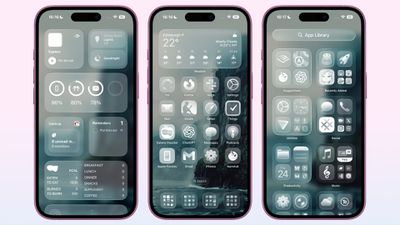
In iOS 18, Apple introduced Dark Mode and Tinted app icons. With iOS 26 and iPadOS 26, Apple added a third visual style – Clear – which removes the color from app icons and widgets, and applies reflective, translucent effects to make them appear see-through.
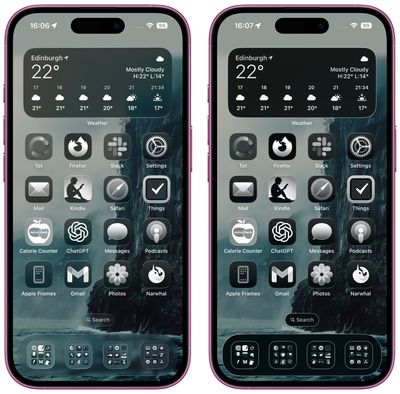
There are two versions of the Clear style. In Light mode, app icons appear semi-transparent, subtly darkening the wallpaper beneath them. Both icons and widgets resemble glass-like panels with layered text and images. In Dark mode, icons retain some transparency but feature a darker background, making them more pronounced while preserving the layered, translucent aesthetic.
Apple also includes an Auto option that dynamically adapts to the Appearance setting of your iPhone.
How to Get Clear App Icons in iOS 26
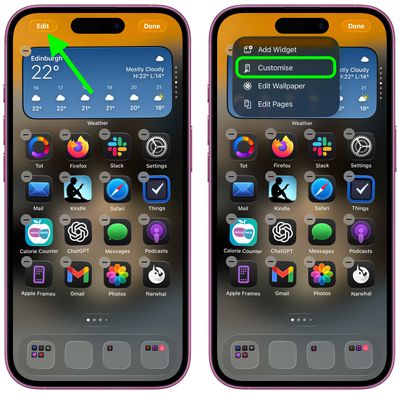
- On your iPhone's Home Screen, long press an empty space until it enters jiggle mode.
- Tap Edit in the top-left corner, then tap Customize in the pop-up menu.

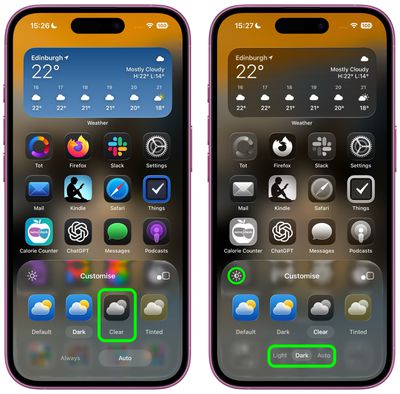
- Select Clear in the panel that appears at the bottom.
- Choose Light, Dark, or Auto mode. If a mode makes icons or app labels hard to see, tap the sun icon in the top-left of the Customize panel to dim the wallpaper.
Accessibility Settings
If legibility is a problem, there are two toggles in Settings ➝ Accessibility ➝ Display & Text Size that impact the look of the Clear style of icons. Try playing with Reduce Transparency and Increase Contrast – just note that toggling on both settings will cause the icons to lose most of their translucency.
Liquid Glass extends to iPadOS 27, macOS 27, watchOS 27, and tvOS 27. iPadOS 27 looks a lot like iOS 27, and macOS 27 has a translucent menu bar and dock background, plus it uses Liquid Glass for buttons, side bars, navigation bars, and the Control Center.



















