

iOS 18: Make Your iPhone Home Screen Icons Dark - MacRumorsOpen MenuShow RoundupsShow Forums menuVisit ForumsOpen Sidebar
Skip to Content

iOS 18: Make Your iPhone Home Screen Icons Dark

by

In iOS 18, iPhone apps have both Light and Dark color options, making it possible to match the color of your icons when you have Dark mode enabled. Keep reading to learn how it works.
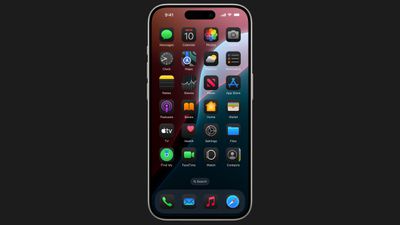
ios 18 dark mode icons
Apple's built-in apps have both Light and Dark color options in iOS 18, and now that the update is available to the public, third-party apps are in the process of providing their own Light and Dark icon alternatives to match your preferred aesthetic, but until then your iPhone will happily generate dark versions of them, too.

The Dark icons are all redesigned with a black background rather than a white or colored background, which makes them blend in better with the ‌Dark Mode‌ setting. In addition, it's possible to turn on Dark icons independently of having ‌Dark Mode‌ enabled, so you can leave Light mode on while using the Dark icon option if you prefer.

To go along with the ‌Dark Mode‌ icons, Apple also introduced a toggle that makes your wallpaper darker. The following steps explain how to switch your icon colors to match Light or Dark mode.

  1. Press and hold a space on the Home Screen or an app page to enter jiggle mode.
  2. Tap Edit in the top-left corner.
  3. Select Customize in the dropdown menu.
  4. Choose Dark, Light, or Automatic in the customization panel. (Automatic will lighten or darken the icons depending on whether Light or Dark mode is enabled.)
  5. Tap anywhere outside the customization panel to close it and exit jiggle mode.
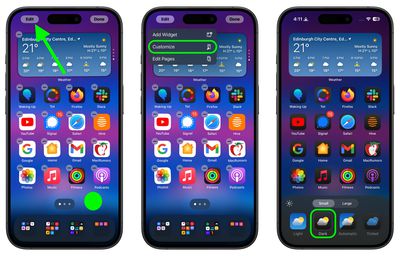
change dark mode icons

Note that the customization panel has other new settings including one to darken your wallpaper (the sun icon), an option to make icons bigger (without labels) or smaller, and a Tint option that will put a tint over all of your icons – you can even match the tint with a color from your wallpaper using the eyedropper icon.


Popular Stories

iCloud iPhone 17 Pro

iPhone Users Who Pay for iCloud Storage Get Two New Perks on iOS 27

Thursday July 2, 2026 6:10 am PDT by
If you pay for certain iCloud+ storage plans beyond the 5GB that Apple offers for free, you will receive two more perks on iOS 27 at no additional cost. A summary of the two new iCloud+ perks on iOS 27:Increased daily usage limits for some new Apple Intelligence features, including image generation in the revamped Image Playground app. HomeKit Secure Video cameras receive generated video...
American Express Gold Apple Pay Feature

American Express Announces New Apple Pay Feature

Tuesday June 30, 2026 10:27 am PDT by
American Express today announced that you can now redeem Membership Rewards points when checking out with Apple Pay on the web and in apps on the iPhone and iPad. When checking out with Apple Pay on iOS 18 or iPadOS 18 or later, tap on your eligible American Express card (Platinum, Gold, Green, and others) and select the Membership Rewards points option. You can use points to cover all or...
series 10 apple watch titanium digital crown

Report: Apple Watch Redesign Coming Next Year With New Band System

Tuesday June 30, 2026 8:45 am PDT by
A "major overhaul" of the Apple Watch's design is due to arrive next year with a new system for connecting bands, according to a known Weibo leaker. In a set of recent posts, the leaker known as "Instant Digital" linked the new claim to older rumors about an "Apple Watch X" model, which was said to introduce a fresh design and break compatibility with the existing watch band system. Citing...













