iOS 26: Screen and Filter Messages From Unknown Senders - MacRumorsOpen MenuShow RoundupsShow Forums menuVisit ForumsOpen Sidebar
Skip to Content

iOS 26: Screen and Filter Messages From Unknown Senders

by

In iOS 26, Apple has introduced enhanced message filtering that gives you more control over unwanted texts, separating spam messages from unknown senders into distinct categories. Here's how to set up and use these new filtering options to keep your Messages app clutter-free.
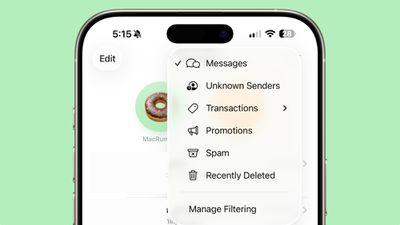
ios 26 messages filtering

Enable Message Filtering Settings

Before you can filter messages from unknown senders in iOS 26, you need to enable the filtering options in your Messages settings.

  1. Open the Messages app on your iPhone.
  2. Tap the filter menu icon (three horizontal lines) in the top-right corner.
  3. Select Manage Filtering. This takes you directly to the Messages section in Settings.
  4. Toggle on Screen Unknown Senders to enable filtering.
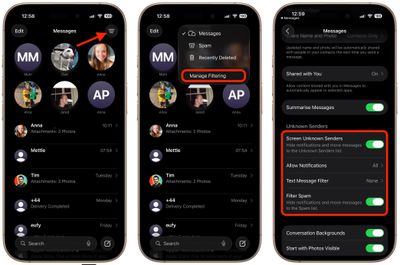
messages

Once activated, "Unknown Senders" will appear as an option in the Messages app's filter menu.

Configure Additional Filtering Options

While you're in the message filtering settings, you'll find several other options worth configuring:

  • Allow Notifications lets you choose whether to receive alerts for certain messages from unknown senders, such as verification codes.
  • Text Message Filter provides additional screening options (this setting may not appear unless you have a third-party app with message filtering extensions installed, depending on your region and carrier).
  • Filter Spam is enabled by default and automatically routes suspected spam to a separate folder.
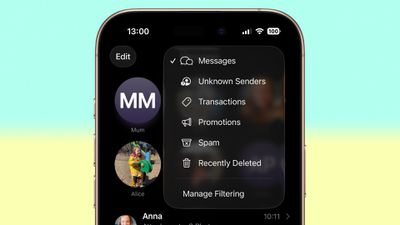
messages filter menu full ios

If the Text Message Filter option appears, selecting it will add "Transactions" and "Promotions" to your filter menu, giving you even more granular control over business-related messages.

Review Messages From Unknown Senders

Once filtering is active, messages from contacts not saved in your address book automatically go to the Unknown Senders section. You'll see a number in brackets next to Unknown Senders in the filter menu indicating new messages, but you won't receive disruptive alerts.

To access these filtered messages, tap the filter menu icon and select Unknown Senders. From here, you can review messages and take action on legitimate senders.
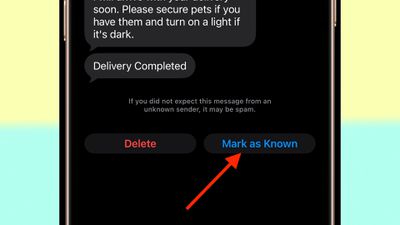
unknown message sender mark as known
Tap any message thread to view its contents. At the bottom of the conversation, you'll see a blue Mark as Known button. Tapping this ensures future messages from that number appear in your main Messages list.

Alternatively, tap the phone number at the top of the conversation to add the sender directly to your Contacts app. Both approaches prevent future messages from this sender being filtered to Unknown Senders.

Recover Spam Messages

By default, messages that iOS 26 classifies as spam are automatically moved to the Spam folder.

To recover a legitimate message that was incorrectly filtered, open the Spam section from the filter menu, tap the message you want to recover, then tap Not Spam. The message will move back to your main Messages list, and future messages from that sender won't be filtered as spam.

If spam filtering isn't working for you as intended, you can turn off the Filter Spam toggle in the Messages app's Settings menu.

Top Rated Comments

15 months ago
Too bad it doesn't work like this with the Apple Watch, defeating the purpose.... My phone hides these like I want but the notifications still fly into my wrist.0

Score: 3 Votes (Like | Disagree)
15 months ago

Too bad it doesn't work like this with the Apple Watch, defeating the purpose.... My phone hides these like I want but the notifications still fly into my wrist.0
Agreed. If I’m wearing my Apple Watch I get spam phone calls and texts but not on the phone. I turned off all messages and calls on watch for now as I rarely use my watch for texts or calls anyway. The check box that says mirror phone doesn’t help either.
Score: 2 Votes (Like | Disagree)
tgwaste Avatar
14 months ago
This entire feature is complete and absolute garbage. I knew Apple wouldn’t do it right.

It’s not hard: give me a way to add strings of text. If it matches I never see it anywhere.

But of course Crapple won’t do that.
Score: 1 Votes (Like | Disagree)
14 months ago

See my post above ('https://forums.macrumors.com/threads/ios-26-screen-and-filter-messages-from-unknown-senders.2467489/post-34178598'), considering the above quote.
Advertising a random app did nothing to address the question I asked.
Score: 1 Votes (Like | Disagree)
15 months ago
Think it will be very useful for me especially taking control of notifications from unknown senders. Will have to try it out after updating.
Score: 1 Votes (Like | Disagree)
15 months ago

Agreed. If I’m wearing my Apple Watch I get spam phone calls and texts but not on the phone. I turned off all messages and calls on watch for now as I rarely use my watch for texts or calls anyway. The check box that says mirror phone doesn’t help either.
One sure way to prevent it. Do not have that feature if possible.

It would be a little difficult though to not use at all because it is not even there.

Other ways yes but not a guarantee to work always or at all.
Score: 1 Votes (Like | Disagree)

Popular Stories

ios 26 5 rcs

iOS 27.3 May Expand RCS Support to Australia's Telstra in December

Tuesday October 20, 2026 9:04 am PDT by
In a support document that it has since deleted, Australian carrier Telstra said RCS support would be available starting with an iOS update coming in December. If this timeframe remains accurate, then iPhone users with Telstra will likely be able to use RCS in the Messages app starting with iOS 27.3. RCS has many benefits over the traditional SMS standard for text messaging with Android users, ...
duo aquarium

More Fun iPhone Duo Apps: 30 New Picks to Try

Friday November 6, 2026 3:27 pm PST by
When the iPhone Duo launched, we shared a list of some of the fun apps developers created for the new form factor. Two weeks out, developers are continuing to come up with fresh ideas, so we thought we'd share some of our favorites. Games Marbles Unhinged ($2.99) - Marbles Unhinged is a marble maze designed for the Duo. When you fold it, the floor turns into a ramp. If you stand the top...
apple pro tell logo

Apple Launching Five New Products Today

Thursday November 5, 2026 12:59 am PST by
Apple is launching five new products on Friday, November 6, following pre-orders that opened last week, including its first touchscreen MacBook Pro models. The following new products will be available from today: iPad mini with OLED display and A20 Pro chip iMac with M6 chip 14-inch MacBook Pro with M6 chip 14-inch MacBook Pro with OLED touchscreen 16-inch MacBook Pro with OLED...
Latest Stories
Apple Store Subscription Sign-Up Controversy Exposed
5 hours ago
Siri AI Rumored to Become 'More Like an Agent' as Early as Next Year
15 hours ago
Apple Taking New Approach to Developing iOS 28 and macOS 28
16 hours ago
Early Apple Black Friday Deals on Apple Watch, MacBook Air, and More
1 day ago
'Backglow' Lets You Customize New MacBook Pro's Glowing Apple Logo
1 day ago
Top Stories: Apple Product Launches, iOS 27.3 Beta, and More
2 days ago
More Fun iPhone Duo Apps: 30 New Picks to Try
2 days ago
Hands-On With Apple's New OLED Touchscreen MacBook Pro
2 days ago
Apple Store With All-New Design Opening Soon in Southern California
2 days ago
Control the Glowing Apple Logo on Your New MacBook Pro
3 days ago
Apple Shares New 'Apple Card: Apply and Use in Minutes' Ad
3 days ago
Apple Says More Than 100,000 Apps Optimized for iPhone Duo, Here's What's Still Missing
3 days ago
Early Black Friday Deals Kickoff With Steep Discounts on Apple Watch Ultras and More
3 days ago
The MacRumors Show: iOS 27.3 Looks Like a Huge Update
3 days ago
Best Buy's Black Friday Event Begins With Sitewide Savings on Apple, TVs, More
3 days ago
Apple Releasing Yet Another Two New Products Next Week
3 days ago
MacBook Air Drops to Lowest Price in Months With Amazon's $250 Discount
3 days ago
Apple Rumored to Drop the iPhone's Action Button Next Year
3 days ago
Apple's Extended Return Policy Now in Effect for 2026 Holiday Season
3 days ago
Apple Music Classical Updated With New Icon and Refreshed Design
3 days ago
OLED iPad Mini, M6 iMac, and New MacBook Pros Available From Today
3 days ago
Apple Surveys iPhone Duo Buyers About Crease and Camera
3 days ago
Apple's First Touchscreen Mac is Now Arriving to Customers
3 days ago
Claude Gets Personal Finance Feature With Bank Account Linking
3 days ago
Apple Arcade Adds Crossy Road Rush and NBA 2K27
3 days ago
Apple's New HomeView Smart Home Hub: Here's How Much RAM It Has
3 days ago
iPad Mini vs. iPad Air Buyer's Guide: Now Just $50 Apart
3 days ago
First iOS 27.3 and macOS Golden Gate 27.3 Public Betas Now Available
4 days ago
Apple Announces a New Mac Sales Record
4 days ago
Paid $200 for Logic Pro? Apple Says You Won't Get This New Feature
4 days ago









































